
mysql

mysql copied to clipboard
 docker-library
when after mysqldump ,mysql is OOM in kubernetes
After I perform a mysqldump operation, the mysql memory has not been released. And mysqld displays the memory used, which is much higher than performance_schema
apiVersion: apps/v1
kind: StatefulSet
metadata:
  labels:
    app: mysql
    version: 8.0.29
  name: mysql
  namespace: st-qa
spec:
  replicas: 1
  selector:
    matchLabels:
      app: mysql
      version: 8.0.29
  serviceName: mysql
  template:
    metadata:
      labels:
        app: mysql
        version: 8.0.29
      name: mysql
    spec:
      containers:
      - env:
        - name: MYSQL_ROOT_PASSWORD
          value: test
        image: mysql:8.0.30
        imagePullPolicy: Always
        livenessProbe:
          failureThreshold: 50
          initialDelaySeconds: 180
          periodSeconds: 10
          successThreshold: 1
          tcpSocket:
            port: mysql
          timeoutSeconds: 5
        name: mysql
        ports:
        - containerPort: 3306
          name: mysql
        readinessProbe:
          failureThreshold: 50
          initialDelaySeconds: 180
          periodSeconds: 10
          successThreshold: 1
          tcpSocket:
            port: mysql
          timeoutSeconds: 5
        resources:
          limits:
            cpu: 4000m
            memory: 9Gi
          requests:
            cpu: 500m
            memory: 1Gi
        volumeMounts:
        - mountPath: /var/lib/mysql
          name: mysql-data-new
        - mountPath: /etc/mysql/
          name: config
      volumes:
      - configMap:
          name: mysql-config
        name: config
  volumeClaimTemplates:
  - metadata:
      labels:
        app: mysql
        version: 8.0.30
      name: mysql-data-new
    spec:
      accessModes:
      - ReadWriteMany
      resources:
        requests:
          storage: 150Gi
      storageClassName: data-nfs
The execution script of mysqldump
for name in `mysql -Bse 'show databases'`;
do
    mysqldump --skip-opt --add-drop-table --add-drop-database --create-options -q -e --set-charset --hex-blob --events -S/tmp/mysql.sock -B $name > $name.sql
done
Prometheus record
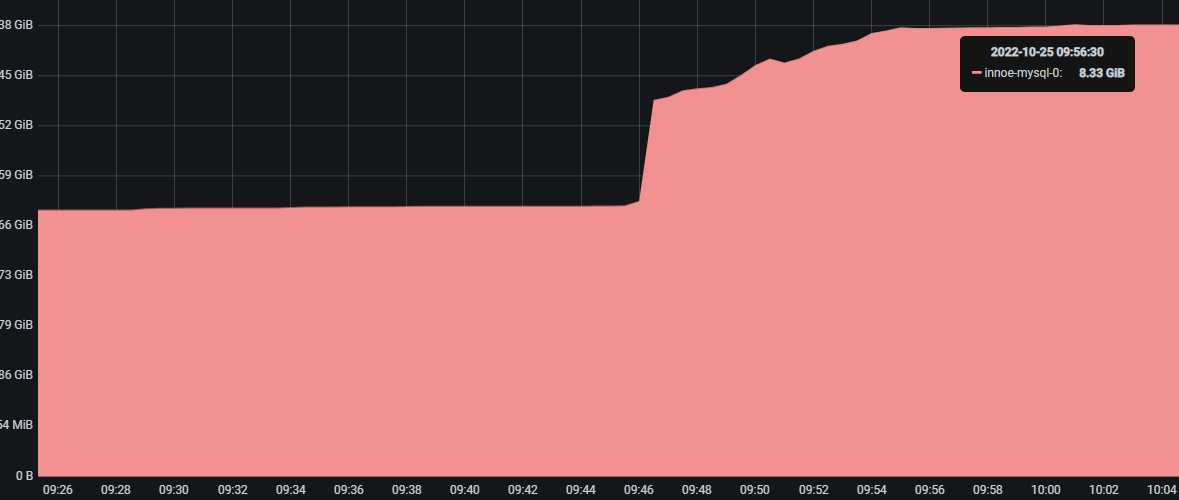
MySQL analysis record
SELECT SUBSTRING_INDEX(event_name,'/',2) AS code_area, FORMAT_BYTES(SUM(current_alloc)) AS current_alloc FROM sys.x$memory_global_by_current_bytes GROUP BY SUBSTRING_INDEX(event_name,'/',2) ORDER BY SUM(current_alloc) DESC;
+---------------------------+---------------+
| code_area                 | current_alloc |
+---------------------------+---------------+
| memory/innodb             | 5.25 GiB      |
| memory/performance_schema | 281.87 MiB    |
| memory/sql                | 262.87 MiB    |
| memory/mysys              | 71.93 MiB     |
| memory/temptable          | 2.00 MiB      |
| memory/mysqld_openssl     | 65.02 KiB     |
| memory/mysqlx             | 3.25 KiB      |
| memory/myisam             |  728 bytes    |
| memory/csv                |  120 bytes    |
| memory/blackhole          |  120 bytes    |
| memory/vio                |   80 bytes    |
+---------------------------+---------------+
mysql.cnf
        [mysqld]
        socket = /tmp/mysql.sock
        pid-file = /tmp/mysql.pid
        user = mysql
        default_authentication_plugin = mysql_native_password
        default_storage_engine = InnoDB
        port = 3306
        character-set-server = utf8mb4
        collation-server = utf8mb4_general_ci
        init_connect = 'SET NAMES utf8mb4'
        lower_case_table_names = 1
        sql_mode = ERROR_FOR_DIVISION_BY_ZERO,NO_AUTO_VALUE_ON_ZERO,NO_ENGINE_SUBSTITUTION
        default-time-zone = '+8:00'
        interactive_timeout = 7200
        wait_timeout = 7200
        key_buffer_size = 64M
        max_allowed_packet = 1024M
        sort_buffer_size = 2M
        max_connect_errors = 999999999
        datadir = /var/lib/mysql
        basedir = /usr
        explicit_defaults_for_timestamp = true
        log_bin = mysql-bin
        binlog_expire_logs_seconds = 1209600
        sync_binlog = 0
        binlog_format = row
        server-id = 10
        relay_log = relay-bin
        replica_net_timeout = 60
        log_replica_updates = 1
        tmp_table_size = 16M
        max_heap_table_size = 16M
        max_prepared_stmt_count = 1048570
        max_connections = 100000
        thread_cache_size = 512
        open_files_limit = 65535
        table_definition_cache = 400
        table_open_cache = 512
        innodb_flush_neighbors = 0
        innodb_log_files_in_group = 3
        innodb_log_file_size = 140M
        innodb_flush_log_at_trx_commit = 1
        innodb_file_per_table = 1
        innodb_buffer_pool_size = 4G
        innodb_buffer_pool_instances = 1
        innodb_read_io_threads = 2
        innodb_write_io_threads = 2
        innodb_io_capacity = 2000
        innodb_change_buffering = none
        innodb_buffer_pool_dump_pct = 40
        innodb_max_undo_log_size = 256M
        log_timestamps = system
        log_error = /var/lib/mysql/mysql-error.log
        slow_query_log = 1
        slow_query_log_file = /var/lib/mysql/slow.log
        long_query_time = 5
        innodb_log_buffer_size = 16M
        max_sort_length = 1M
        join_buffer_size = 1M
        interactive_timeout = 600
        innodb_lru_scan_depth = 800
        innodb_print_all_deadlocks = 1
        innodb_strict_mode = 0
        binlog_transaction_compression = 1
        secure_file_priv = /var/lib/mysql

Yeah I'm not sure, you might try checking upstream forums that would have more insight into the underlying mysql processes to help with troubleshooting. We just package MySQL in a containerized environment so if it reproduces in a non-container deployment then we wouldn't be of much help
