SHADERed
 SHADERed copied to clipboard
 dfranx
Preview issue
I am Ubuntu user setting project preview window clear colour alpha set to zero for each project I must change to 1 Application does not exit properly

Thank you very much @azhar-mahadi for reporting this issue--the mention of "alpha" helped me workaround/solve the same/similar issue I encountered: no image being rendered for the preview.
System configuration
I'm running SHADERed on a laptop with elementary OS 5.1.7 (Ubuntu 18.04 based) and Pantheon with integrated graphics:
OpenGL Renderer		: Mesa DRI Intel(R) HD Graphics 4400 (HSW GT2)
X11 Vendor		: The X.Org Foundation
Version		: 1.20.8

Vendor		: Intel Open Source Technology Center
Version		: 3.0 Mesa 20.0.8
More X11 details
-Extensions-
Composite
DAMAGE
DOUBLE-BUFFER
DPMS
DRI2
DRI3
GLX
Generic Event Extension
MIT-SCREEN-SAVER
MIT-SHM
Present
RANDR
RECORD
RENDER
SECURITY
SHAPE
SYNC
X-Resource
XC-MISC
XFIXES
XFree86-DGA
XFree86-VidModeExtension
XINERAMA
XInputExtension
XKEYBOARD
XTEST
XVideo
(I'm actually using some libraries from Ubuntu Focal in order to get the pre-built binaries to run which could in theory have an impact.)
Symptoms
-
When the application is first launched the "Preview" area only shows a black rectangle--which is very confusing when nothing seems to change the content! :) e.g.:
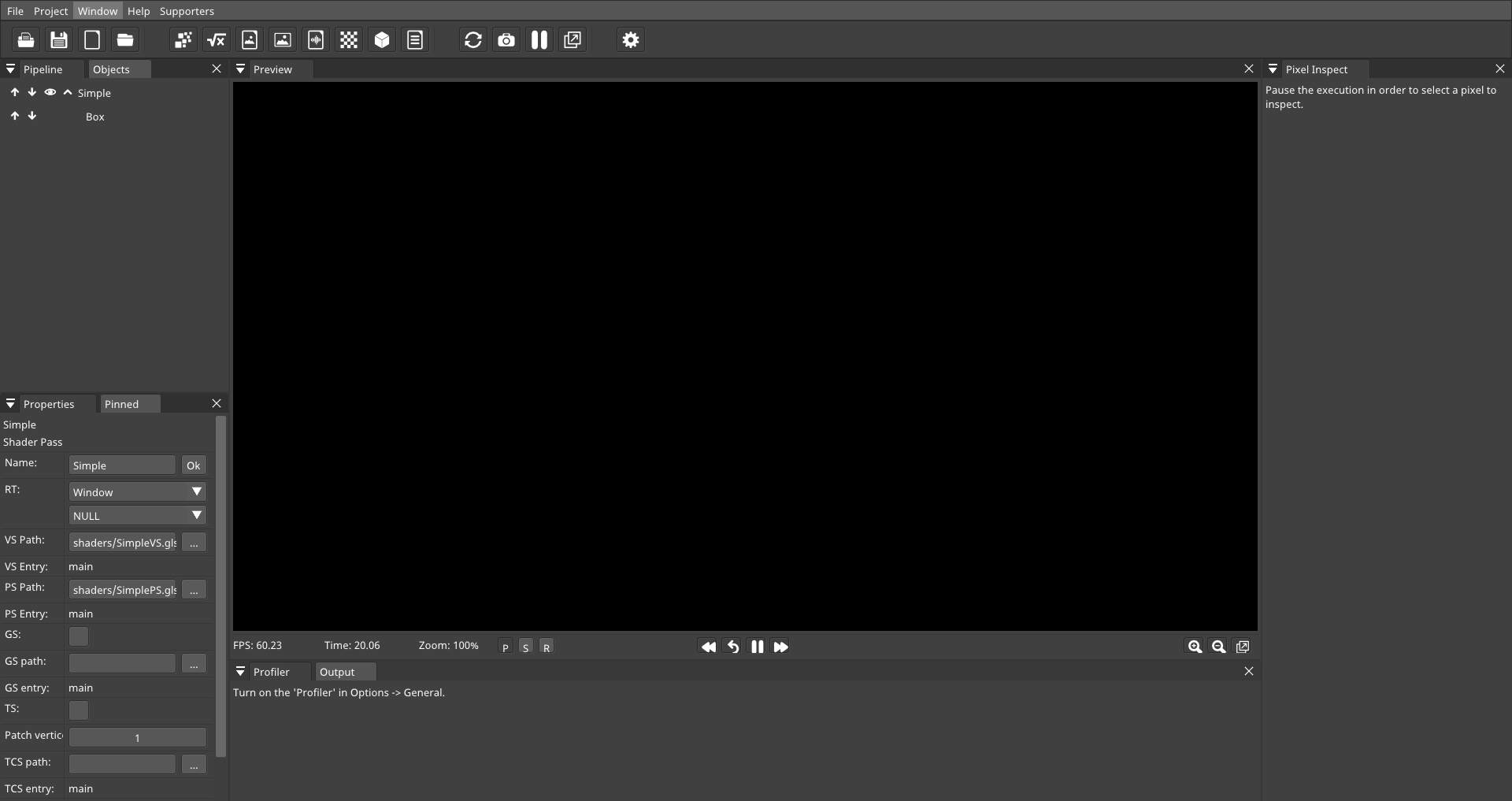
Loading any example project does not change the preview.
At one point I discovered that if you pause the shader & choose a window region to analyze then suddenly the selected area displays the result of the shader in that region!
-
After I found this issue (#235) describing alpha-related problems, I noted that (after some experimentation) by default the "Project" options section had the checkbox "Window alpha channel" unchecked:
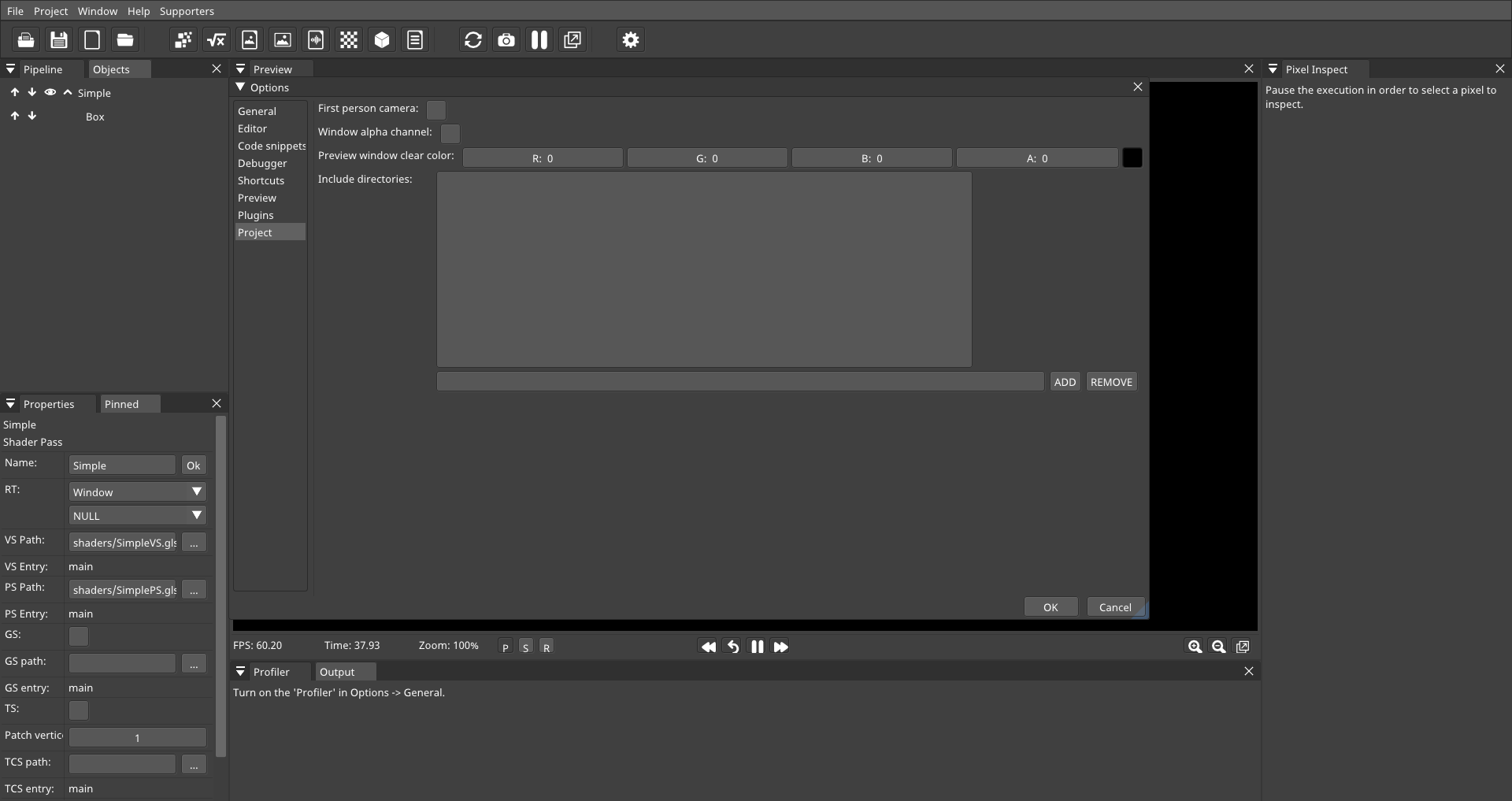
-
When I enabled "Window alpha channel" the preview area immediately changed from black to the grey fill color:
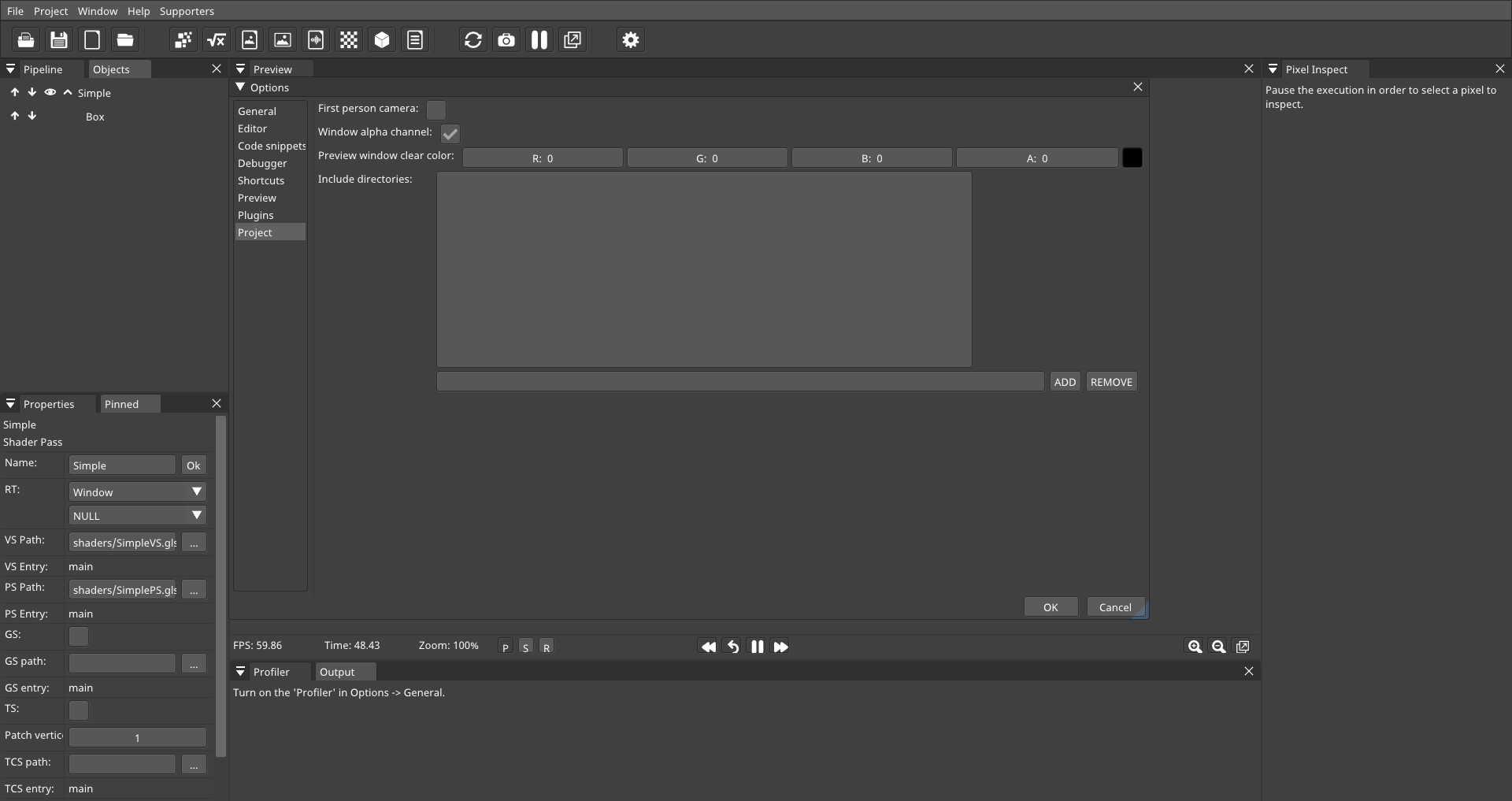
-
Then when I closed the dialog via "OK" the preview rendered correctly!
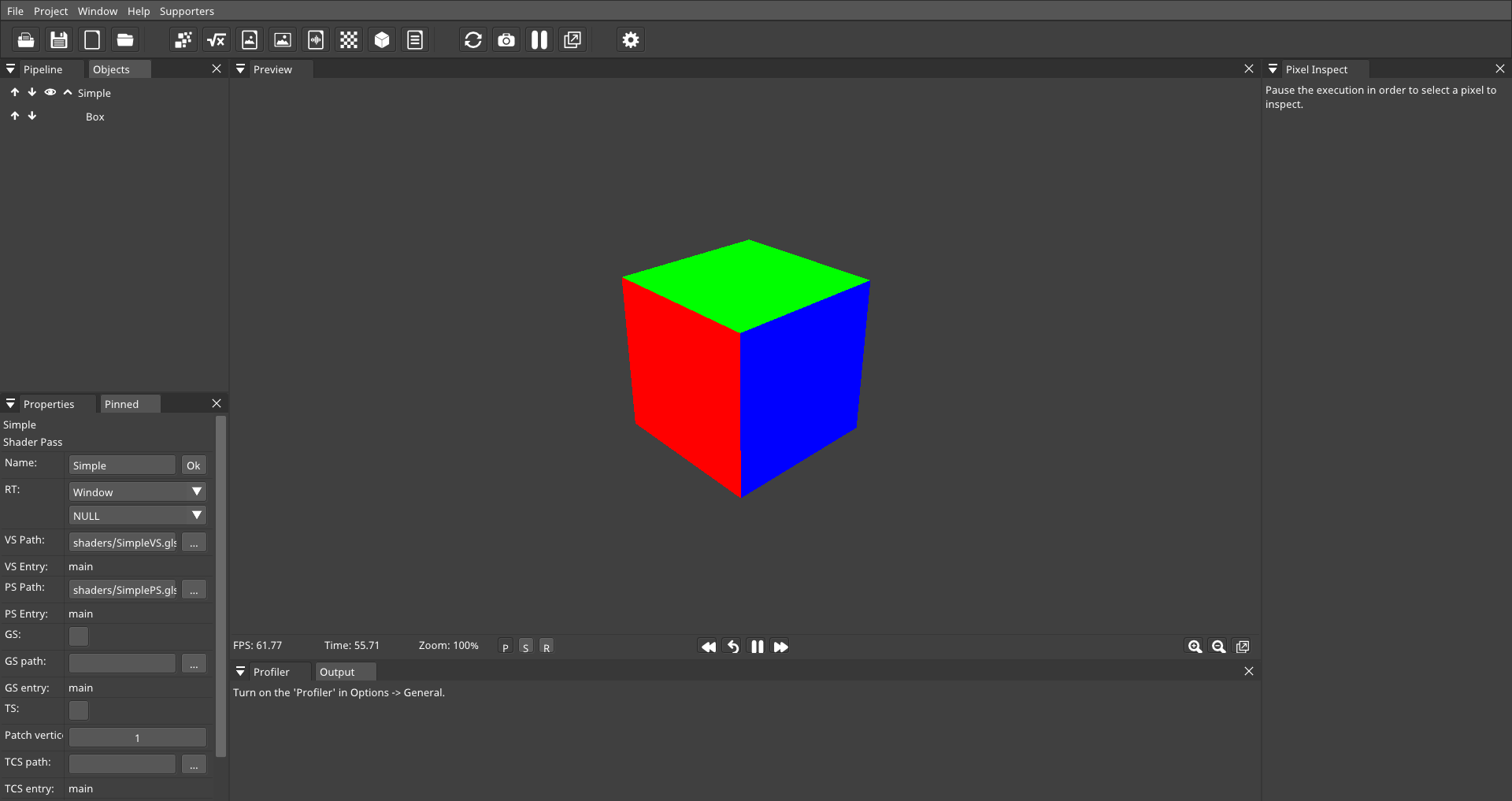
When I opened any other example project the black rectangle problem reappeared and I needed to re-enable "Window alpha channel" again. (Because it seems this setting is stored per-project not application-wide.)
(Initially I tried changing the colour alpha value to 1 which was how I interpreted the original post on this issue but that didn't seem to fix anything for me--so I'm not sure if I misinterpreted the text or if the OP actually has a problem different to mine.)
When I saved a shader project with "Window alpha channel" enabled it would subsequently open & preview correctly.
Further information
-
I also tried running the Win64 version of SHADERed via WINE & it exhibited the same symptoms.
-
A search of the repo seems to show this window alpha functionality was added in this commit: https://github.com/dfranx/SHADERed/commit/38b418eab0e7591efc77222676274f9b214748f0
But somewhat confusingly the commit message says "Add option to disable window's alpha channel" but seems to default the
UseAlphaChannelvalue to false. -
The current related code appears to primarily be in these locations:
- https://github.com/dfranx/SHADERed/blob/729b5fae747668057162a1ed8fab506a9e3a3d20/src/SHADERed/Objects/RenderEngine.cpp#L125-L137
- https://github.com/dfranx/SHADERed/blob/79e1e03412b423f26354bb064187090f031c4670/src/SHADERed/Objects/ProjectParser.cpp#L189
- https://github.com/dfranx/SHADERed/blob/79e1e03412b423f26354bb064187090f031c4670/src/SHADERed/Objects/ProjectParser.cpp#L871-L876
- https://github.com/dfranx/SHADERed/blob/79e1e03412b423f26354bb064187090f031c4670/src/SHADERed/Objects/ProjectParser.cpp#L3367-L3371
- https://github.com/dfranx/SHADERed/blob/d118369cbc5f18db3596e318c92557760ef0b466/src/SHADERed/UI/PreviewUI.cpp#L1410-L1415
- https://github.com/dfranx/SHADERed/blob/d118369cbc5f18db3596e318c92557760ef0b466/src/SHADERed/UI/PreviewUI.cpp#L1625-L1628
- https://github.com/dfranx/SHADERed/blob/70453b03826fb163baa3eb063d067c89e6b1629f/src/SHADERed/UI/OptionsUI.cpp#L1000-L1020
-
Although I note these locations may also be related, given the symptoms I observed:
- https://github.com/dfranx/SHADERed/blob/d118369cbc5f18db3596e318c92557760ef0b466/src/SHADERed/UI/PreviewUI.cpp#L1630-L1638
- https://github.com/dfranx/SHADERed/blob/d118369cbc5f18db3596e318c92557760ef0b466/src/SHADERed/UI/PreviewUI.cpp#L1673-L1683
-
Also this commit modified related code (changing the type?):
-
https://github.com/dfranx/SHADERed/blame/729b5fae747668057162a1ed8fab506a9e3a3d20/src/SHADERed/Objects/RenderEngine.cpp#L125
-
https://github.com/dfranx/SHADERed/commit/4733cd1272e7473c51064b1c7a0e75afdd9235a7#diff-32c7025e981cf2b50e5d8bef504664c76c5f4c8b2b1080d5a2c19e952da71617
-
Next steps
While having found a workaround is useful & means I can continue playing around with SHADERed (although I think I'll probably do more in the browser for now since that seems easier to get rust-gpu working with), a blank screen/lack of preview is obviously not ideal first run experience. :)
(Side note: If I pause the shader, then analyze & then use the debug view, heat map view etc, they are rendered as expected.)
So, I was thinking there would be a couple of things that would be good if we and/or @dfranx could clarify:
- What was the original purpose of making the alpha channel optional? What negative impact (if any) does having the alpha channel enabled by default have on other GPU/compositor/WM systems?
- Is this actually a bug in some SHADERed code, perhaps in the window/region/texture setup? (It wasn't clear from a brief skim of the different areas, if the alpha channel-related code was interacting as intended, especially given the non-preview views seem to render okay.)
- Otherwise, can we determine where in the graphics stack this unintended interaction is happen and, if so, can we detect it so we can handle it automatically?
- Can we default to setting it true?
- Can we add an application-wide override flag (or change to make the alpha channel setting application-wide rather than per-project) so we don't have to change each project individually?
Such a helpful bunch of questions to dump here. :D
Hopefully this additional context is useful for developing a fix for this issue & if nothing else might provide further details on the workaround if other people run into it.
Thanks for taking the time to read!
Edit 1: Added "Further information" section. Edit 2: Added "Next steps" section.