
vscode-languagetool-linter
 vscode-languagetool-linter copied to clipboard
 davidlday
request a command "Lint-on-Demand"
Is your feature request related to a problem? Please describe.
There is a warning to use the setting "Lint on change". So, I don't use it. But if I don't set this, how I can re-lint documents after doing some changes?
I want to be able to "lint on demand".
Describe the solution you'd like
Implement a command - lint on demand (or similar) to be able to re-lint a document.
Describe alternatives you've considered
- changing something, save the document, revert the change.
- close the document and reopen it, using the setting "Lint on Open"
Additional context Add any other context or screenshots about the feature request here.

The warning is only for when using the Public API provided by LanguageTool. If you're using an external or managed service, you can safely ignore that warning and enable "Lint on Change".
Also, there is already a lint on demand command. If you pull up the context menu, there should be a "Check Document" command available on any document that the linter can lint.

I have found it. I thought the command must be called like a "normal" VSC command.
Not sure what you mean by "normal" VSC command, so is there something more you're asking for? It should also be in the command palette under the "LanguageTool Linter" prefix.

It's not there because the linter doesn't recognize the format of the document you have open. That's why you get the "Force Check as Plain Text Document". If you open a Markdown or HTML file, you should see the "Check Document" and not see the "Force Check as Plain Text Document". Can you try that out and confirm? And what's the format of the file you had open on that screenshot?
You are right. If I use a markdown file, I see the "check" command.
My files where I used the linter and did not get the "check" command are asciidoc (.adoc) and the settings are:
 So my idea was: I marked asciidoc to be interpreted as plaintext and it should work this way.
I see what you're saying. Since you've added asciidoc as a plain text id, you would like to see the same command you see for the supported language ids (i.e. markdown and html). As other language ids are supported, they would be added to that list.
Without going into too much detail, the problem comes from how VS Code allows the extension developers to associate commands with a document. I can't dynamically query the settings to figure out if the id is in your list of plain text ids. Here's the extent of what the config permit:
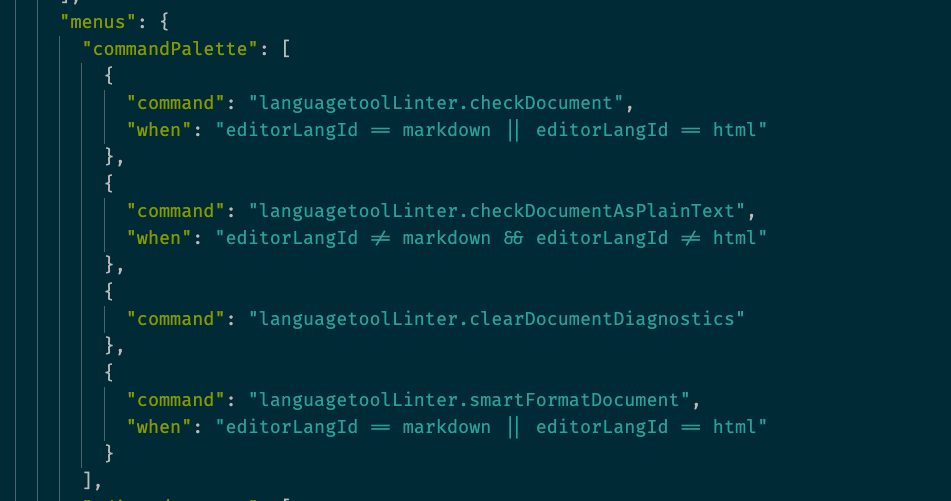
I split the commands into two different commands so users would know when they're getting supported linting or when it's a simpler linting that treats the document involved as plain text.
I could assign the same command to both and let have the linter figure out if it's a supported language id, but it's less transparent to the user. You wouldn't know if the linter was supposed to understand the language id or if the linter was just treating the document as plain text.
This was the situation at the time I added this feature, but in glancing over the current VS Code API docs, I might be able to go back and add the plain text ids as part of the Check Document command and leave the Force Check as Plain Text Document for anything else. (Note to self: https://code.visualstudio.com/api/references/when-clause-contexts)
Can you confirm this is what you're looking for?
Thank you for this detailed answer. I am fine with the current implementation. It wasn't so transparent for me, what happens and why.
Maybe you could add a small part from this detailed answer to the documentation to help other users to understand, what happens, if the will not find this issue here?