

 codota
Insane CPU & RAM use, even when idle
- OS version: macOS Mojave
- Editor: VSCode
- Editor version: 1.45.0
- Programming language: js, react
- TabNine extension version: 2.8.2
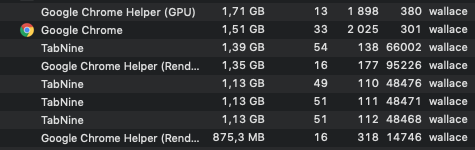
I'm a new TabNine user, who decided to give it a try.
I'm currently using TabNine 2.8.2 on VSCode and it's killing my MacBook Pro (mid 2018), which still is a pretty good machine by any standard.
At the time I took this screenshot, I had done absolutely no coding for at least an hour. I then proceeded to disabling TabNine, which required a reload of VSCode, and that solved it.
But after setting the macOS to sleep and waking it up, TabNine resumes its idle hijacking of my CPUs to a point of totally crippling the machine's performance. I open the Activity Monitor and see it's TabNine, again.
This "resume" behaviour was consistent for the last 3 days, and I disabled TabNine every time as soon as my machine started to hang. But I'm on the fourth day now, and this is so unnecessary... so I'm pulling the plug and uninstalling it.
I can appreciate the effort of putting all this functionality together, and understand it's not trivial. I'll be glad to try it again, but right now I'm just aghast at how something like this even gets to production...
Unsure if it is a new issue or not, but have found many similar issues on your issue tracker.
https://github.com/codota/TabNine/issues/206 https://github.com/codota/TabNine/issues/198 https://github.com/codota/TabNine/issues/186 https://github.com/codota/TabNine/issues/183 https://github.com/codota/TabNine/issues/110 https://github.com/codota/TabNine/issues/75

I uninstalled this plugin because of this. It drains out your resources. This has to be fixed


I have the same issue on macOS Mojave with SublimeText, I need to test and confirm this, but it seems like it takes up more RAM while idle than when not.


its upsetting. I didnt like kite. and it works great, on my newer work laptop it doesnt even impact me, but on my older personal 2015 macbook it makes VSCode lag out. it stays at 1.3gb PER VSCode window soon as i open my vscode project.


I can +1 on an entirely different platform and editor
Running TabNine 3.2.28 on vim 8.2.1989 via TabNine-vim (python 3.8.5)
Even opening a single empty editor window will quickly exhaust my VM's memory
Going a step deeper, I spawned a single TabNine process via the bundled executable, and found that it spawns 36 threads.
Running with a high log level appears to show that the excess memory usage might well be whatever lunar is - i would hazard a guess based on the logs that it is attempting to download to memory, causing this massive spike. it then fails with [FMA instructions not supported] whatever that means, and tries again.
As an addendum after a little googling, FMA appears to be a processor-specific thing, so I suppose this is why it has mainly hit Mac and VM users

Hi @FloatingGhost
How many TabNine processes do you see running and how much memory do they consume?

Attached are a trace and the log with timestamps of the process and usages therein
I used the script
ulimit -v $((1024*1024*3))
strace -o trace.log -tf -e trace=desc -y ./TabNine --log-level TRACE -l tabnine.log
to capture this and ensure we crash out when we hit 3gB of memory usage, with memory allocation of 1073741824 bytes failed being the final call.
the binary spawns 61 unique PIDs, some of which exit before we hit the memory condition. 38 were alive when we hit 3gB usage and SIGABRT was thrown
the mmap calls are included in the trace. it's a bit hard to reverse-engineer a rust binary, but i've also included a (probably naive) sum of the mmap calls from each thread
thread_usage.txt tabnine.log trace.log
@FloatingGhost thank you for that valuable and very detailed information.
We will try to reproduce this.
Can you specify - which VM are you running? OS? OS Version? What are the VM hardware settings - memory and cpu? Anything else you think might be relevant for us to reproduce this?
Thanks Amir
which VM are you running?
virtualbox 6.0.20
OS?
Arch linux
OS Version?
doesn't really have one, but kernel 5.9.11 x86_64
memory and cpu?
6144MB memory, 8vCPU (from a Ryzen 2700x)
To attempt to check my theory about the CPU type being the issue here, I ran the same command on ubuntu 19.10 and centos 7 and did not run into the condition, despite being the same host on the same CPU running the same binary. which is weird. weird. For a far easier reproduction, you can use docker which can consistently produce this effect
FROM archlinux:latest

RUN pacman -Sy
RUN pacman -S --noconfirm unzip curl
WORKDIR /opt
RUN curl -sS https://update.tabnine.com/bundles/3.2.29/x86_64-unknown-linux-musl/TabNine.zip >TabNine.zip && \
    unzip TabNine.zip && \
    chmod +x TabNine
Then just docker run -it tabnine /bin/bash and execute it to see the memory spiral out of control
@FloatingGhost This is an issue specific to TabNine 3.2.29. It was part of a gradual release that we issued, and luckily did not reach many users. We've stopped the gradual release, and we are creating a fix asap. Will be released soon.
Thank you for the time and effort - it was very easy to reproduce with the info you provided.
@FloatingGhost Thank you for the incredible help. We'd like to offer you 1yr free pro subscription.
Please contact us at [email protected] if you are interested. :1st_place_medal:

i have the same problem why using too many cpu??? is this cpu usage continusely or it is once?

Having the exact same issue with 3.7.25/x86_64-apple-darwin, it's sucking up all my CPU and memory resources.

Yeah, the usage is crazy, Once I installed it I am unable to start the editor again because whole computer freezes. Will need to find a way how to uninstall it without starting the editor.

This issue has been automatically marked as stale because it has not had recent activity. It will be closed if no further activity occurs. Thank you for your contributions.
![stale[bot] avatar](https://avatars.githubusercontent.com/in/1724?v=4 "Published by a pub.dev verified publisher")