

 chenxuhua
GitHub中国加速访问
GitHub中国加速访问
问:为什么访问速度会很慢
答:GitHub的CDN域名遭到DNS污染
GitHub在中国大陆访问速度慢的问题原因有很多,但最直接和最主要的原因是GitHub的分发加速网络的域名遭到DNS污染。
由于GitHub的加速分发CDN域名assets-cdn.github.com遭到DNS污染,导致无法连接使用GitHub的加速分发服务器,才使得中国大陆访问速度很慢。
问:如何解决DNS污染
答:通过修改Hosts解决污染问题
一般的DNS问题都可以通过修改Hosts文件来解决,GitHub的CDN域名被污染问题也不例外,同样可以通过修改Hosts文件解决。
将域名解析直接指向IP地址来绕过DNS的解析,以此解决污染问题。
问:如何修改Hosts文件
答:请按以下步骤操作
①获取被污染域名的实际IP地址
访问IPAddress.com使用IP Lookup工具获得这个域名的IP地址。
或者是访问http://github.global.ssl.fastly.net.ipaddress.com/#ipinfo查询域名的IP地址。
笔者撰写此文时,得出该域名IP地址为:151.101.100.133
②修改系统的Hosts文件
打开在Hosts文件,在文件尾部插入新行,添加以下代码并保存
151.101.100.133 assets-cdn.github.com
至此,GitHub的加速优化基本完成,只需等待本机的DNS缓存刷新生效,即可享受高速的GitHub访问。


抱歉,此文因长期为更新导致IP地址失效。 如需加速GitHub访问,请将下列Hosts加入系统:
# GitHub Start
192.30.253.112 github.com
192.30.253.119 gist.github.com
151.101.100.133 assets-cdn.github.com
151.101.100.133 raw.githubusercontent.com
151.101.100.133 gist.githubusercontent.com
151.101.100.133 cloud.githubusercontent.com
151.101.100.133 camo.githubusercontent.com
151.101.100.133 avatars0.githubusercontent.com
151.101.100.133 avatars1.githubusercontent.com
151.101.100.133 avatars2.githubusercontent.com
151.101.100.133 avatars3.githubusercontent.com
151.101.100.133 avatars4.githubusercontent.com
151.101.100.133 avatars5.githubusercontent.com
151.101.100.133 avatars6.githubusercontent.com
151.101.100.133 avatars7.githubusercontent.com
151.101.100.133 avatars8.githubusercontent.com
# GitHub End

20180711 update ip from https://www.ipaddress.com/
# GitHub Start
192.30.253.112 github.com
192.30.253.118 gist.github.com
151.101.112.133 assets-cdn.github.com
151.101.184.133 raw.githubusercontent.com
151.101.112.133 gist.githubusercontent.com
151.101.184.133 cloud.githubusercontent.com
151.101.112.133 camo.githubusercontent.com
151.101.112.133 avatars0.githubusercontent.com
151.101.112.133 avatars1.githubusercontent.com
151.101.184.133 avatars2.githubusercontent.com
151.101.12.133 avatars3.githubusercontent.com
151.101.12.133 avatars4.githubusercontent.com
151.101.184.133 avatars5.githubusercontent.com
151.101.184.133 avatars6.githubusercontent.com
151.101.184.133 avatars7.githubusercontent.com
151.101.12.133 avatars8.githubusercontent.com
# GitHub End


推荐一个简单高效的方式:直接把dns服务器修改为8.8.4.4(google开放dns服务器),ipaddress查询的不知道依赖的哪个dns服务器,感觉也是被污染的


20180711 update ip from https://www.ipaddress.com/
# GitHub Start
192.30.253.112 github.com
192.30.253.118 gist.github.com
151.101.112.133 assets-cdn.github.com
151.101.184.133 raw.githubusercontent.com
151.101.112.133 gist.githubusercontent.com
151.101.184.133 cloud.githubusercontent.com
151.101.112.133 camo.githubusercontent.com
151.101.112.133 avatars0.githubusercontent.com
151.101.112.133 avatars1.githubusercontent.com
151.101.184.133 avatars2.githubusercontent.com
151.101.12.133 avatars3.githubusercontent.com
151.101.12.133 avatars4.githubusercontent.com
151.101.184.133 avatars5.githubusercontent.com
151.101.184.133 avatars6.githubusercontent.com
151.101.184.133 avatars7.githubusercontent.com
151.101.12.133 avatars8.githubusercontent.com
# GitHub End
这个有效!从10KB直接飙到500KB


googlehosts/hosts: 镜像:https://coding.net/u/scaffrey/p/hosts/git https://github.com/googlehosts/hosts 这个hosts更新好像挺勤快的,同时还有别的host问题的解决,比如onedirve

不同地方不一样,对应域名找答案
GitHub Start
140.82.113.4 github.com 140.82.113.19 assets-cdn.github.com 151.101.185.194 github.global.ssl.fastly.net 185.199.108.153 assets-cdn.github.com 185.199.108.153 github.github.io 151.101.184.133 githubusercontent.com 192.30.253.118 gist.github.com
GitHub End
Additional
有需要的进入我的仓库,start 有贡献精神的可PR https://github.com/gaoljhy/MyHost-dns

52.216.96.115 github-production-release-asset-2e65be.s3.amazonaws.com 感觉提升也不明显呢?


52.216.96.115 github-production-release-asset-2e65be.s3.amazonaws.com 感觉提升也不明显呢?
amazonaws.com,很多不可以的,要翻墙,这种方法应该不行


我的是这样,确实快很多,地方不同可能ip不一样,自己可以去https://www.ipaddress.com/ip-lookup查一下
140.82.113.3 github.com
192.30.253.118 gist.github.com
185.199.109.153 assets-cdn.github.com
199.232.68.133 raw.githubusercontent.com
199.232.68.133  gist.githubusercontent.com
199.232.68.133 cloud.githubusercontent.com
199.232.68.133 camo.githubusercontent.com
199.232.28.133 avatars0.githubusercontent.com
199.232.28.133 avatars1.githubusercontent.com
199.232.28.133 avatars2.githubusercontent.com
199.232.28.133 avatars3.githubusercontent.com
199.232.28.133 avatars4.githubusercontent.com
199.232.28.133 avatars5.githubusercontent.com
199.232.28.133 avatars6.githubusercontent.com
199.232.28.133 avatars7.githubusercontent.com
199.232.28.133 avatars8.githubusercontent.com

这个根本没啥用,搭个梯子,配置一下域名代理,基本就 OK 了。

.github.com
||github.com
github.global.ssl.fastly.net
.githubassets.com
||githubassets.com
.githubusercontent.com
||githubusercontent.com
打开速度飞快
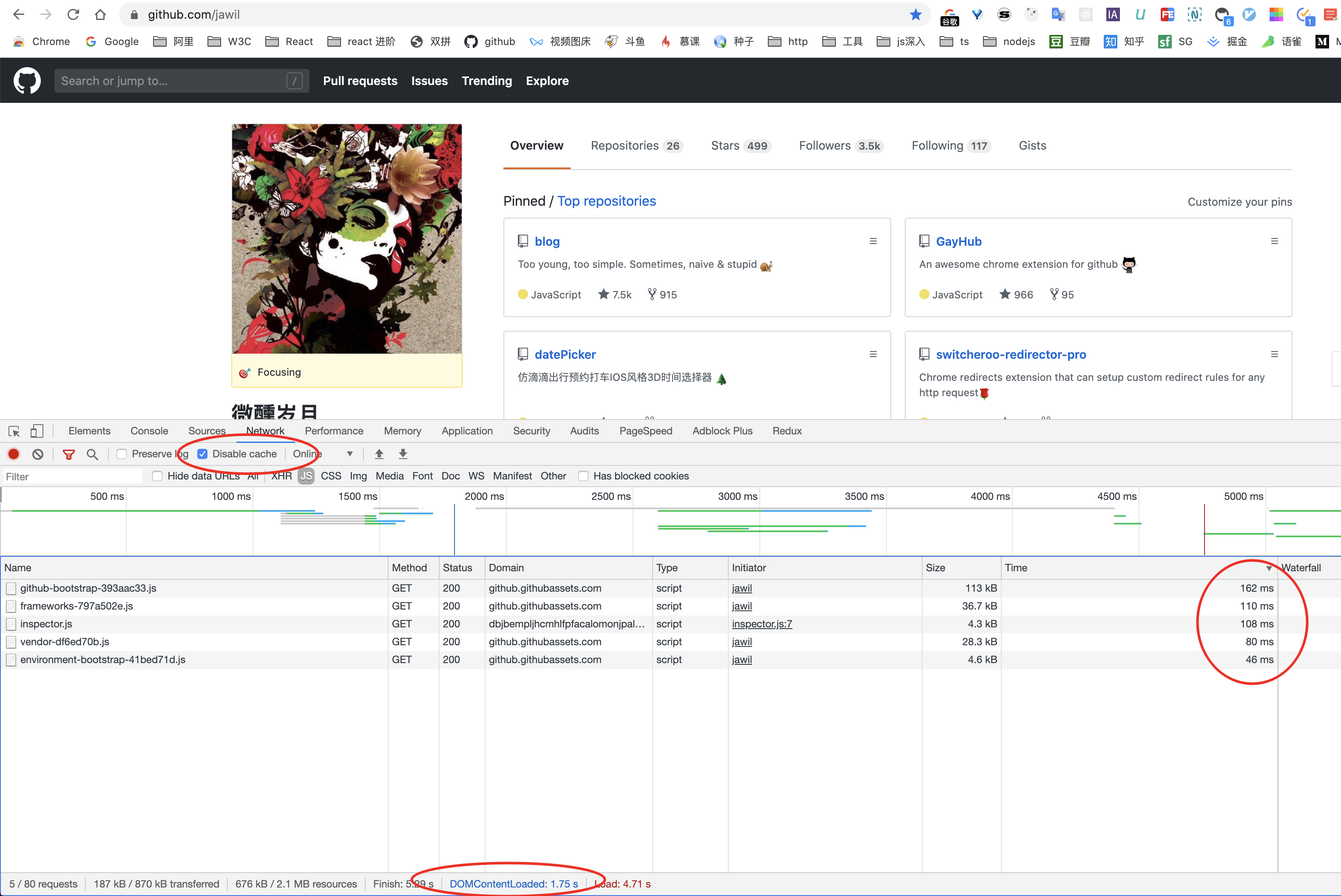
没用代理之前,慢到令人发指:

git clone 的时候也要配置一下 socket5 代理,速度也是提升很多。
git clone 代理设置
首先确保梯子可正常使用,软件建议使用 v2ray。
https访问
git config --global http.https://github.com.proxy socks5://127.0.0.1:1080
其中1080是 socks5 的监听端口, 这个可以配置的, 每个人不同, 在macOS上一般为1080.
设置完成后, ~/.gitconfig 文件中会增加以下条目:
[http "https://github.com"] proxy = socks5://127.0.0.1:1080
如果不想用梯子正常访问,可以考虑取消代理设置
git config --global --unset http.https://github.com.proxy
ssh访问
需要修改 ~/.ssh/config 文件, 没有的话新建一个. 同样仅为github.com设置代理:
Host github.com User git ProxyCommand nc -v -x 127.0.0.1:1080 %h %p
配置代理前后速度对比图

同理 homebrew 这种代理方式也适用,用 brew 下载速度飞起。

我也找加速git方法好久了,去DNS污染也就到几K十几K,最好的方式还是加代理,不过配起来麻烦,推荐下面这种方式转链,加个前缀效果杠杠的 https://github.com/hunshcn/gh-proxy 码云的官方克隆搬运也还行,不过也有一下缺点:
- 对于releases包就不行了,只是源码
- 搬运资源有限要不自己搬运


这个根本没啥用,搭个梯子,配置一下域名代理,基本就 OK 了。
.github.com
||github.com
github.global.ssl.fastly.net
.githubassets.com
||githubassets.com
.githubusercontent.com
||githubusercontent.com
打开速度飞快
没用代理之前,慢到令人发指:
git clone 的时候也要配置一下 socket5 代理,速度也是提升很多。
git clone 代理设置
首先确保梯子可正常使用,软件建议使用 v2ray。
https访问
git config --global http.https://github.com.proxy socks5://127.0.0.1:1080其中1080是 socks5 的监听端口, 这个可以配置的, 每个人不同, 在macOS上一般为1080.
设置完成后,
~/.gitconfig文件中会增加以下条目:[http "https://github.com"] proxy = socks5://127.0.0.1:1080如果不想用梯子正常访问,可以考虑取消代理设置
git config --global --unset http.https://github.com.proxyssh访问
需要修改
~/.ssh/config文件, 没有的话新建一个. 同样仅为github.com设置代理:Host github.com User git ProxyCommand nc -v -x 127.0.0.1:1080 %h %p配置代理前后速度对比图
同理 homebrew 这种代理方式也适用,用 brew 下载速度飞起。
设置了socket 很快

这个根本没啥用,搭个梯子,配置一下域名代理,基本就 OK 了。
.github.com
||github.com
github.global.ssl.fastly.net
.githubassets.com
||githubassets.com
.githubusercontent.com
||githubusercontent.com
打开速度飞快
没用代理之前,慢到令人发指:
git clone 的时候也要配置一下 socket5 代理,速度也是提升很多。
git clone 代理设置
首先确保梯子可正常使用,软件建议使用 v2ray。
https访问
git config --global http.https://github.com.proxy socks5://127.0.0.1:1080其中1080是 socks5 的监听端口, 这个可以配置的, 每个人不同, 在macOS上一般为1080.
设置完成后,
~/.gitconfig文件中会增加以下条目:[http "https://github.com"] proxy = socks5://127.0.0.1:1080如果不想用梯子正常访问,可以考虑取消代理设置
git config --global --unset http.https://github.com.proxyssh访问
需要修改
~/.ssh/config文件, 没有的话新建一个. 同样仅为github.com设置代理:Host github.com User git ProxyCommand nc -v -x 127.0.0.1:1080 %h %p配置代理前后速度对比图
同理 homebrew 这种代理方式也适用,用 brew 下载速度飞起。
老哥,Host github.com User git ProxyCommand nc -v -x 127.0.0.1:1080 %h %p 这个配置了,SSH clone 项目速度还是慢的跟乌龟一样啊,配置好后是需要做什么吗?
配置了 git config --global http.https://github.com.proxy socks5://127.0.0.1:1080 ,http clone的速度倒是提升了很多。


能加速github和git clone的梯子,完美解决方案:https://github.com/pigpigchacha/GitProxy

安装 Chrome 插件就可以 FasterHosts
- 下载 FasterHosts 然后解压,找到
extension子目录- 打开 Chrome,输入:
chrome://extensions/- 打开「开发这模式」
- 选择「加载已解压的扩展程序」,然后定位到刚才解压的文件夹里面的
extension目录,确定- 这就安装好了,关闭「开发这模式」
