
caprover
 caprover copied to clipboard
 caprover
Unable to deploy using images in a private registry in ACR
What is the problem?
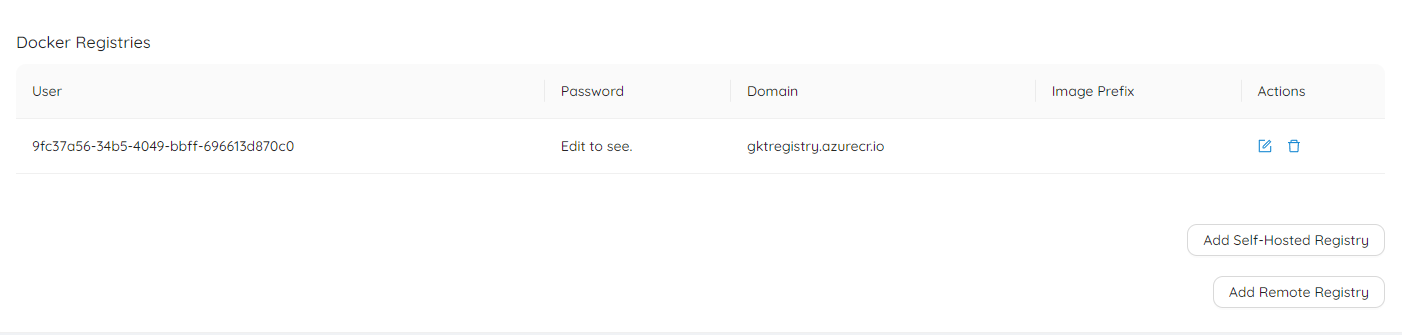
I have images that my CI pipeline pushes to the Azure Container Registry after each push to each specific branch. It seems that caprover doesn't run docker login prior to pulling the images with the container registry set.
Opening up powershell and running docker login with the details in the custom registry does allow me to pull and push images to that registry so it seems it is not logging in before trying to pull the image.
------------------------- Fri Mar 18 2022 17:45:37 GMT+0000 (Coordinated Universal Time)
Build started for fk-backend
An explicit image name was provided (gktregistry.azurecr.io/gkt/fk-backend-dev:latest). Therefore, no build process is needed.
Pulling this image: gktregistry.azurecr.io/gkt/fk-backend-dev:latest This process might take a few minutes.
Build has failed!
----------------------
Deploy failed!
Error: (HTTP code 500) server error - Get https://gktregistry.azurecr.io/v2/gkt/fk-backend-dev/manifests/latest: unauthorized: authentication required, visit https://aka.ms/acr/authorization for more information.
It also seems it doesn't login before pushing images aswell:
Successfully built 9ac963907c19
Successfully tagged img-captain-pl-backend:latest
Pushing to remote: gktregistry.azurecr.io/gkt/img-captain-pl-backend:185
Server: gktregistry.azurecr.io
This might take a few minutes...
{"message":"unauthorized: authentication required, visit https://aka.ms/acr/authorization for more information."}
unauthorized: authentication required, visit https://aka.ms/acr/authorization for more information.
Push failed...
Build has failed!
Steps to reproduce the problem:
- Create a private registry in azure.
- Setup a Service principal with access to pull and push from that registry.
- Setup the custom registry in caprover.
- Try to deploy an image from that registry OR
- Try to build a new project.
Output of the following command on your server:
uname -a && lsb_release -a && free -h

Linux vps70797.vps.ovh.ca 4.19.0-6-amd64 #1 SMP Debian 4.19.67-2+deb10u1 (2019-09-20) x86_64 GNU/Linux
No LSB modules are available.
Distributor ID: Debian
Description:    Debian GNU/Linux 10 (buster)
Release:        10
Codename:       buster
              total        used        free      shared  buff/cache   available
Mem:          7.6Gi       1.0Gi       1.0Gi        95Mi       5.6Gi       6.4Gi
Swap:            0B          0B          0B

CapRover doesn't run docker login because it doesn't use Docker CLI. But it uses the authentication headers.
Are you sure the credentials you're using are correct?

Yeah, I just double checked the credentials and they seem to be correct. Here they are if you want to try them:
Registry URL: gktregistry.azurecr.io
Username: 9fc37a56-34b5-4049-bbff-696613d870c0
Password: YNLYZveAGr56yMJD-E~o57j6.lDG4x6Tq~
I'll delete this user and create a new one in a couple of days.
One thing that I also noticed is that when no image prefix is specified for the registry it throws this error:
...
[Warning] One or more build-args [CAPROVER_GIT_COMMIT_SHA] were not consumed
Successfully built 132b66f21b8f
Successfully tagged img-captain-pl-backend:latest
Build has failed!
----------------------
Deploy failed!
Error: Push failed: Error: (HTTP code 500) server error - invalid reference format
Correct. I tried using using the username and password that you provided and confirmed that it needed doesn't work.
I retired with DockerHub and things work for for private images on DockerHub. This needs more investigations as it is only related to Azure's registry.
I've taken a look at the available ways for logging in into ACR and it seems it doesn't support logging in through the X-Registry-Auth header that seems to be used in the request by dockerode even though it should?
I also found this issue https://github.com/moby/moby/issues/41570 that is also related to ACR but cannot tell if it is related to this issue or not.
Having a similar issue when pulling images from ghcr.io (GitHub conatiner registry). After running docker login (with correct github access token) on the CapRover machine, I can successfully pull the image on the machine but pulling the image in a workflow results in:
------------------------- Sun Feb 26 2023 22:06:22 GMT+0000 (Coordinated Universal Time)
Build started for ***
An explicit image name was provided (ghcr.io/y2-digital/***:main). Therefore, no build process is needed.
Pulling this image: ghcr.io/y2-digital/***:main This process might take a few minutes.
Build has failed!
----------------------
Deploy failed!
Error: (HTTP code 500) server error - Head "https://ghcr.io/v2/y2-digital/***/manifests/main": unauthorized

@saaymeen CapRover doesn't have access to the host credentials. If you want to deploy a private image, you'll need to go to the Cluster tab and a remote registry on CapRover dashboard.