
UML-in-Markdown
 UML-in-Markdown copied to clipboard
 Zingam
How to use UML diagrams in GitHub Markdown documents
How to Use UML Diagrams in GitHub Markdown Documents
The Project Structure
 |
 +-- UML
 |    |
 |    +-- Instance.puml
 |         ...
 |
 +-- README.md
      ...
The Source
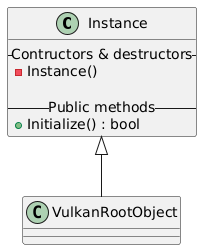
Instance <|-- VulkanRootObject

class Instance {
    -- Contructors & destructors --
    - Instance()

    -- Public methods --
    + Initialize() : bool
}
The Link
- PlantUML's proxy:
- http://www.plantuml.com/plantuml/proxy?src=
- Document's GitHub raw URL:
- https://raw.githubusercontent.com/Zingam/Markdown-Document-UML-Use-Test/master/UML/Instance.puml
- Combined URL (combine the PlantUML's proxy URL and the document's GitHub raw URL):
- http://www.plantuml.com/plantuml/proxy?src=https://raw.githubusercontent.com/Zingam/Markdown-Document-UML-Use-Test/master/UML/Instance.puml
The Markdown
 Zingam