

 SoftEtherVPN
How to turn off the default home page or web service?
The SoftEther VPN Server service has been started.
Let's get started by accessing to the following URL from your PC:
https://xxx:5555/ or https://xxx/
Note: IP address may vary. Specify your server's IP address.
A TLS certificate warning will appear beca


bump I also have this question. I tried setting DisableJsonRPCWebApi to true but that only disables the API and admin subdirectories. there's a need to disable this page else every one knows Softether is running on the server and introduces security risks

Changing the following line to return NULL will disable the web page completely.
https://github.com/SoftEtherVPN/SoftEtherVPN_Stable/blob/a81e4c2eb89896d3d12fd477bab90922eb79d843/src/Cedar/Protocol.c#L7305
I am going to add the switch to realize it on the public source code, but you can do it now in your computer.

@dnobori Thank you very much. will the next version contain the config parameters?
Edit: I checked the code and it seems if it returns null the Http response is a forbidden page. is it possible to completely disable the Http response? like there's no HTTP server running at all.
Very interesting feature. I searched a random search and found several websites.
There is a workaround, I can't shut down the web server, but I am able to replace the default welcome page, so that your server won't be identified and blocked by your government.
- Open your softether install directory
- create hamcore/wwwroot folder
- put your customized index.html into that folder
- restart vpn service

禁用HTTP.这是必要的。它不会和httpd强夺资源吗?这台服务器还会向所有监听端口广播(443,992,1192,5555)。遭到攻击是必然的,攻击来自全世界。
@dnobori please add the config parameters(like there's no HTTP server running at all.) in the next version .. thank you

There is a workaround, I can't shut down the web server, but I am able to replace the default welcome page, so that your server won't be identified and blocked by your government.
- Open your softether install directory
- create hamcore/wwwroot folder
- put your customized index.html into that folder
- restart vpn service
I tried this but it also broke the RPC interface which we use for internal automation.

Of course!
@dnobori, has this been implemented yet, if so which build/version?
Best Regards, Casey A.
@dnobori the code has been implemented, but even with DisableJsonRPCWebApi the internal ip address and port of the server are displayed to everyone on internet in the forbidden response
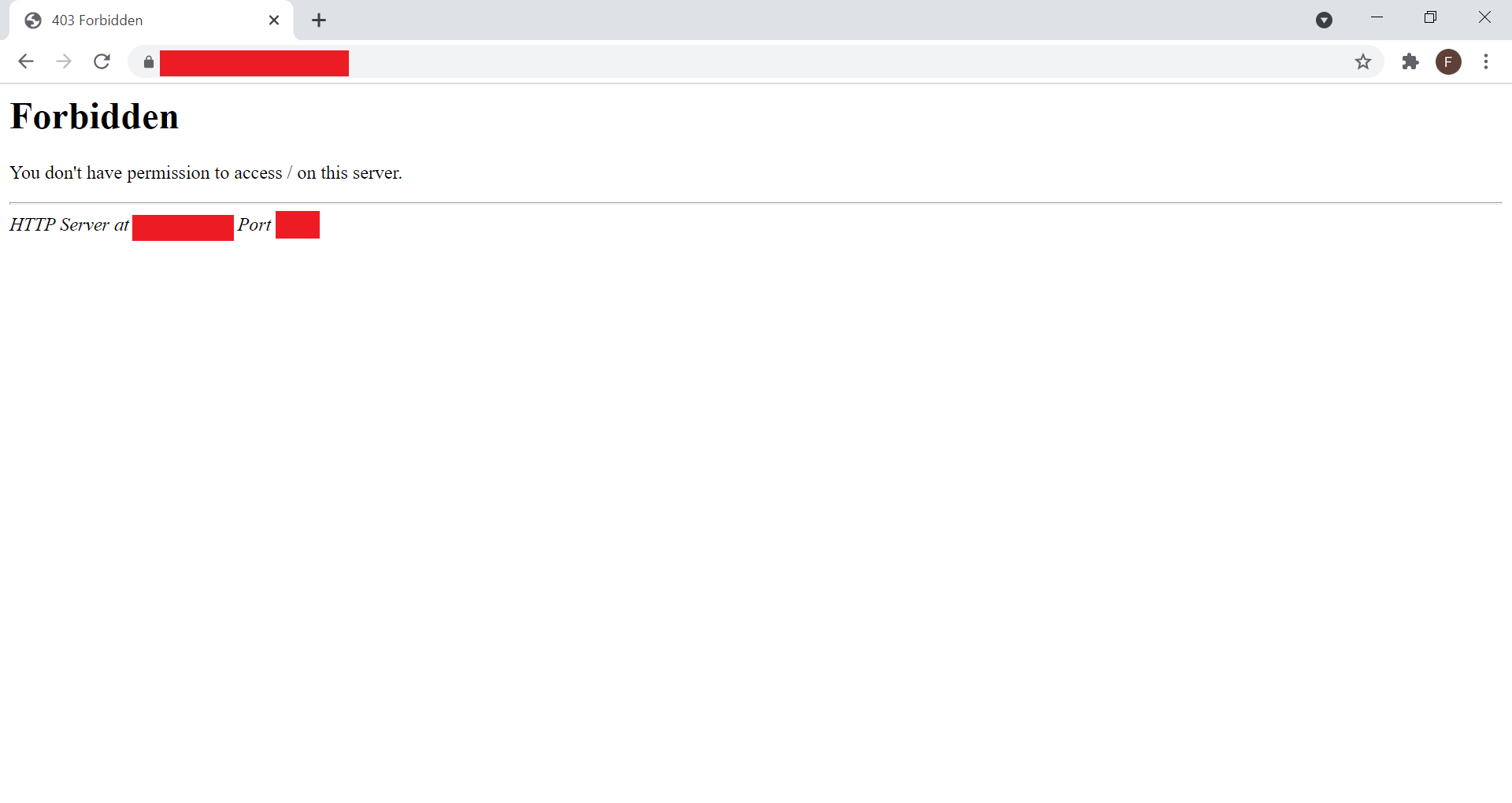
Is it possible not to even answer to the request with forbidden when DisableJsonRPCWebApi is set to true ?
I mean change the 6031 row to
if (server->DisableJsonRpcWebApi == false)
       HttpSendForbidden(c->FirstSock, h->Target, "");
?

@fededim I think this will do the trick.
https://github.com/SoftEtherVPN/SoftEtherVPN/blob/4b05de1a9342e59c78d9d4698397990f4476413f/src/Cedar/Admin.c#L1323-L1337
diff --git a/src/Cedar/Admin.c b/src/Cedar/Admin.c
index 667e9344..b77609aa 100644
--- a/src/Cedar/Admin.c
+++ b/src/Cedar/Admin.c
@@ -1322,18 +1322,8 @@ void JsonRpcProcGet(CONNECTION *c, SOCK *s, HTTP_HEADER *h, char *url_target)

        if (reply_sent == false)
        {
-               BUF *html_buf = ReadDump("|vpnserver_api_doc.html");

-               if (html_buf != NULL)
-               {
-                       AdminWebSendBody(s, 200, "OK", html_buf->Buf, html_buf->Size, "text/html; charset=UTF-8", NULL, NULL, h);
-
-                       FreeBuf(html_buf);
-               }
-               else
-               {
-                       AdminWebSend404Error(s, h);
-               }
+               AdminWebSend404Error(s, h);
        }

        if (a->LogFileList != NULL)

@metalefty Hmm I am not an expert of Softether code but your code seems to be relative to JsonRpc which should not be my case since by setting DisableJsonRpcWebApi to true it should already be bypassed. I do not know if my change is enough, maybe I should add "else return false;" e.g.
if (server->DisableJsonRpcWebApi == false)
       HttpSendForbidden(c->FirstSock, h->Target, "");
else
       return false;
It would be useful to close directly the socket when the request is not one of the activated VPN protocols without returning any data, neither 403 neither 404, but let's wait for an aswer from @dnobori.
Is there any update on this?
Creating /homcore/wwwroot changes the page, but after this, no longer GUI mangers works and can connect to a server.
Connecting via socks5 proxy or split tunnel failed too.

There is a workaround, I can't shut down the web server, but I am able to replace the default welcome page, so that your server won't be identified and blocked by your government.
- Open your softether install directory
- create hamcore/wwwroot folder
- put your customized index.html into that folder
- restart vpn service
GOD PLZ, YOU R THE ONE! THANK U!

There is a workaround, I can't shut down the web server, but I am able to replace the default welcome page, so that your server won't be identified and blocked by your government.
- Open your softether install directory
- create hamcore/wwwroot folder
- put your customized index.html into that folder
- restart vpn service
BTW, DUDE DO U KNOW HOW TO DEPLOY SSL-CERTIFICATES?
Is there any update on this? Creating
/homcore/wwwrootchanges the page, but after this, no longer GUI mangers works and can connect to a server. Connecting via socks5 proxy or split tunnel failed too.
through socks5 is possible to access , but anther issued I found which in double vpn scenario cascade connection on hop-1 fails :(
There is a workaround, I can't shut down the web server, but I am able to replace the default welcome page, so that your server won't be identified and blocked by your government.
- Open your softether install directory
- create hamcore/wwwroot folder
- put your customized index.html into that folder
- restart vpn service
BTW, DUDE DO U KNOW HOW TO DEPLOY SSL-CERTIFICATES?
follow
-
./vpncmd
-
select 1 (server management)
-
ServerCertSet
- first prompt: provide path for your cert file
- second prompt: provide path for you private key file
-
^D
1- Stop vpnserver 2- Edit vpn_config file 3- Set DisableJsonRpcWebApi to true 4- Start vpnserver
@dnobori the code has been implemented, but even with DisableJsonRPCWebApi the internal ip address and port of the server are displayed to everyone on internet in the forbidden response
Is it possible not to even answer to the request with forbidden when DisableJsonRPCWebApi is set to true ?
I mean change the 6031 row to
if (server->DisableJsonRpcWebApi == false)
       HttpSendForbidden(c->FirstSock, h->Target, "");
?
This is a very danger issue. Can we get a config option like "server_tokens off;" for nginx?

