

 PowerShell
'Add-Type' doesn't include dotnet standard reference assemblies in ReferencedAssemblies
Steps to reproduce
$avaloniaAssemblies = @(
    ".\Packages\Avalonia.0.8.0\lib\netcoreapp2.0\Avalonia.Animation.dll"
    ".\Packages\Avalonia.0.8.0\lib\netcoreapp2.0\Avalonia.Base.dll"
    ".\Packages\Avalonia.0.8.0\lib\netcoreapp2.0\Avalonia.Controls.dll"
    ".\Packages\Avalonia.0.8.0\lib\netcoreapp2.0\Avalonia.DesignerSupport.dll"
    ".\Packages\Avalonia.0.8.0\lib\netcoreapp2.0\Avalonia.Diagnostics.dll"
    ".\Packages\Avalonia.0.8.0\lib\netcoreapp2.0\Avalonia.dll"
    ".\Packages\Avalonia.0.8.0\lib\netcoreapp2.0\Avalonia.Input.dll"
    ".\Packages\Avalonia.0.8.0\lib\netcoreapp2.0\Avalonia.Interactivity.dll"
    ".\Packages\Avalonia.0.8.0\lib\netcoreapp2.0\Avalonia.Layout.dll"
    ".\Packages\Avalonia.0.8.0\lib\netcoreapp2.0\Avalonia.Logging.Serilog.dll"
    ".\Packages\Avalonia.0.8.0\lib\netcoreapp2.0\Avalonia.Markup.dll"
    ".\Packages\Avalonia.0.8.0\lib\netcoreapp2.0\Avalonia.Markup.Xaml.dll"
    ".\Packages\Avalonia.0.8.0\lib\netcoreapp2.0\Avalonia.OpenGL.dll"
    ".\Packages\Avalonia.0.8.0\lib\netcoreapp2.0\Avalonia.Styling.dll"
    ".\Packages\Avalonia.0.8.0\lib\netcoreapp2.0\Avalonia.Themes.Default.dll"
    ".\Packages\Avalonia.0.8.0\lib\netcoreapp2.0\Avalonia.Visuals.dll"
    ".\Packages\Avalonia.0.8.0\lib\netcoreapp2.0\Avalonia.DesktopRuntime.dll"
    ".\Packages\Avalonia.Desktop.0.8.0\lib\netstandard2.0\Avalonia.Desktop.dll"
    ".\Packages\Avalonia.Skia.0.8.0\lib\netstandard2.0\Avalonia.Skia.dll"
    ".\Packages\Avalonia.Win32.0.8.0\lib\netstandard2.0\Avalonia.Win32.dll"
    ".\Packages\Avalonia.ReactiveUI.0.8.0\lib\netstandard2.0\Avalonia.ReactiveUI.dll"
    ".\Packages\Serilog.2.8.0\lib\netstandard2.0\Serilog.dll"
    ".\Packages\Serilog.Sinks.Debug.1.0.0\lib\netstandard1.0\Serilog.Sinks.Debug.dll"
    ".\Packages\Serilog.Sinks.Trace.2.1.0\lib\netstandard1.3\Serilog.Sinks.Trace.dll"
    ".\Packages\System.Reactive.4.0.0\lib\netstandard2.0\System.Reactive.dll"
)

Add-Type -ReferencedAssemblies $avaloniaAssemblies -TypeDefinition @'
namespace PSAvalonia
{
    public class App : Avalonia.Application
    {
        public override void Initialize()
        {
            Avalonia.Markup.Xaml.AvaloniaXamlLoader.Load(this);
        }
    }
}
'@
Expected behavior
it works
Actual behavior
Add-Type : (3,24): error CS0012: The type 'Object' is defined in an assembly that is not referenced. You must add a reference to assembly 'netstandard, Version=2.0.0.0, Culture=neutral, PublicKeyToken=cc7b13ffcd2ddd51'
Add-Type : (7,13): error CS0012: The type 'Type' is defined in an assembly that is not referenced. You must add a reference to assembly 'netstandard, Version=2.0.0.0, Culture=neutral, PublicKeyToken=cc7b13ffcd2ddd51'
...
Add-Type : (7,13): error CS0012: The type 'Assembly' is defined in an assembly that is not referenced. You must add a reference to assembly 'netstandard, Version=2.0.0.0, Culture=neutral, PublicKeyToken=cc7b13ffcd2ddd51'
Workaround
$refFolder = Join-Path ( Split-Path ([PSObject].Assembly.Location) ) "ref"
$refAssemblies = Get-ChildItem -Path $refFolder -Filter "*.dll" | Select-Object -Expand FullName

Add-Type -ReferencedAssemblies @($avaloniaAssemblies + $refAssemblies) -TypeDefinition @'
namespace PSAvalonia
{
    public class App : Avalonia.Application
    {
        public override void Initialize()
        {
            Avalonia.Markup.Xaml.AvaloniaXamlLoader.Load(this);
        }
    }
}
'@
Environment data
Name                           Value
----                           -----
PSVersion                      6.2.0
PSEdition                      Core
GitCommitId                    6.2.0
OS                             Microsoft Windows 10.0.17763
Platform                       Win32NT
PSCompatibleVersions           {1.0, 2.0, 3.0, 4.0…}
PSRemotingProtocolVersion      2.3
SerializationVersion           1.1.0.1
WSManStackVersion              3.0

OMG! I have wasted whole day trying to port module with custom C# type definitions to PS Core just to find that when ReferencedAssemblies parameter is specified the Add-Type does not include .NET Core standard assemblies. I was losing my sanity because of that! Please fix it!
@fMichaleczek: Thanks for the workaround!

@SteveL-MSFT I think we need a conclusion should we fix this before 7.0 release. (Avalonia!)

Talked to @joeyaiello about this the other day. When -ReferencedAssemblies is specified, we currently only automatically include two ref assemblies in addition to what the user specifies, see the code at https://github.com/PowerShell/PowerShell/blob/master/src/Microsoft.PowerShell.Commands.Utility/commands/utility/AddType.cs#L703. I don't remember why we didn't include everything just like when -ReferencedAssemblies is not specified. Maybe we should just include everything under ref/ all the time.
GitHub
PowerShell for every system! Contribute to PowerShell/PowerShell development by creating an account on GitHub.


I don't remember why we didn't include everything just like when -ReferencedAssemblies is not specified.
It was at moving to .Net Core 2.0 time and I guess an intention was to avoid type conflicts.
Even if we add everything from /ref folder, I guess everything from dotnet standard will not be there.
dotnet standard stuff will be available as long as netstandard.dll is referenced. So maybe just add netstandard.dll to InitAutoIncludedRefAssemblies ... not sure if that's sufficient.
Best practice for me today is to create a temporary project, compile and then move code and references to Add-Type.
Maybe we could benefit from csproj files?
@daxian-dbw did we ever figure out if it work to just add all the reference assemblies to /ref?

May be related to #8121 in that we may just need to add another bucket of reference assemblies to the default PS package.
Since we use Roslyn API to compile and PowerShell is self-contained application perhaps we could have in the default assembly reference list all assemblies from PowerShell home directory as "SDK". This also could unblock scenario with compilation to standalone exe.
@iSazonov There is no feedback and I am agree with you, so should it be possible to ask for the committee to have a look ? If not it will be moved in the 7.4 timeline...
could have in the default assembly reference list all assemblies from PowerShell home directory as "SDK".
It's not clear to me what you mean by this. Do you mean including all the runtime dlls under $PSHOME to the assembly reference list? Referencing runtime dlls doesn't work and that was why we started to ship the reference assemblies along with PowerShell.
I think someone can started to experiment whether it's sufficient to get the reported scenario working by just including netstandard.dll itself from ref folder.
@daxian-dbw In OP there is Workaround which reference all dll-s from pwsh. I guess this resolveы all compile scenarios. netstandard.dll is only part of APIs.
@daxian-dbw @iSazonov I’ll dig in tomorrow and give you a detailed report on what works, what doesn’t.
and I will include Single Executable Compressed scenario because it's complicated to copy a ref folder inside a single executable after compilation ...
https://github.com/PowerShell/PowerShell/compare/master...leXPek:PowerShell:appcontext-basedirectory
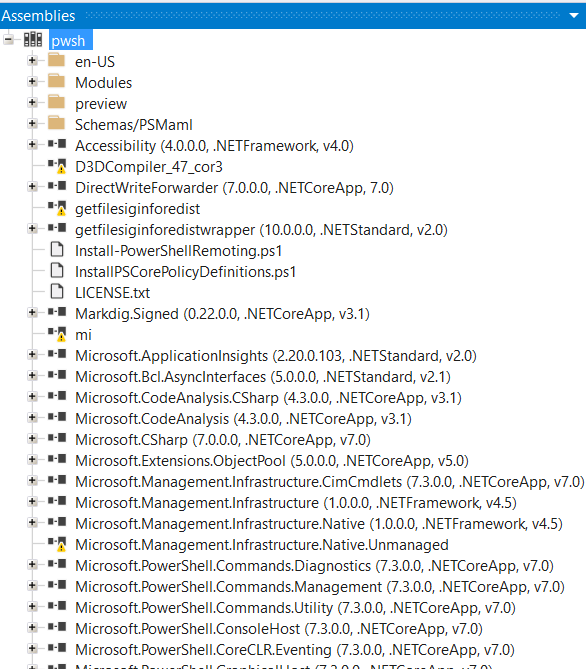
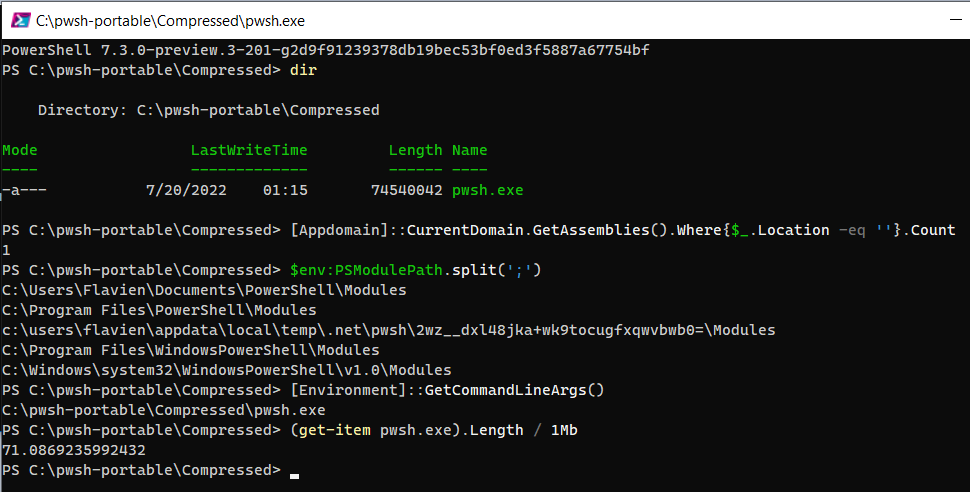
@fMichaleczek Thanks! Please also take into account the application-hosting-powershell scenario, where Microsoft.PowerShell.SDK is referenced and pwsh is not available. Today, the ref folder is shipped with the Microsoft.PowerShell.SDK nuget package.
I just came across this issue (I think). Reference the following code:
$code = @'
using System;
namespace VSYS.Powershell
{
	public class Device
	{
		public static void Main(){
			System.Console.WriteLine("Device Initialized");
		}
	}
}
'@
$a = ("System.Core","System.Xml.Linq","System.Data","System.Xml")
Add-Type -TypeDefinition $code -ReferencedAssemblies $a

[VSYS.Powershell.Device]::Main()
Running the above code yields:
(7,4): error CS0234: The type or namespace name 'Console' does not exist in the namespace 'System' (are you missing an assembly reference?)
Cannot add type. Compilation errors occurred.
Removing -ReferencedAssemblies makes it run.
How do I fix this? Is there a workaround? Are there plans to fix this?
Any help is greatly appreciated.

@visusys Your example should work on PowerShell 7.3.0 GA, however, for the time being, if you are not sure what standard assemblies your code is referencing, it is safe to reference all dotnet standard assemblies. Below yours slightly modified example:
$code = @'
using System;
namespace VSYS.Powershell
{
	public class Device
	{
		public static void Main(){
			System.Console.WriteLine("Device Initialized");
		}
	}
}
'@
$a = [IO.Directory]::GetFiles([IO.Path]::Combine($PSHOME, 'ref'), '*.dll', [IO.SearchOption]::TopDirectoryOnly)
Add-Type -TypeDefinition $code -ReferencedAssemblies $a

[VSYS.Powershell.Device]::Main()
This issue has not had any activity in 6 months, if this is a bug please try to reproduce on the latest version of PowerShell and reopen a new issue and reference this issue if this is still a blocker for you.
![microsoft-github-policy-service[bot] avatar](https://avatars.githubusercontent.com/in/95686?v=4 "Published by a pub.dev verified publisher")
This issue has not had any activity in 6 months, if this is a bug please try to reproduce on the latest version of PowerShell and reopen a new issue and reference this issue if this is still a blocker for you.
This issue has not had any activity in 6 months, if this is a bug please try to reproduce on the latest version of PowerShell and reopen a new issue and reference this issue if this is still a blocker for you.
This issue has been marked as "No Activity" as there has been no activity for 6 months. It has been closed for housekeeping purposes.