
pcsx2
 pcsx2 copied to clipboard
 PCSX2
PCSX2
Growlanser Generations (aka Growlanser 2 and 3) Save freeze
So...this has been a well known..documented...and discussed bug for about 2 years. Yet I see no progress or even attempted progress to fix it?
http://forums.pcsx2.net/Thread-Bug-Report-Growlanser-II-NTSC?page=5 http://psx-scene.com/forums/f98/growlanser-generation-save-problems-30142/ https://code.google.com/p/pcsx2/issues/detail?can=2&start=0&num=100&q=&colspec=ID%20Status%20Priority%20Component%20Plugin%20Owner%20Summary&groupby=&sort=&id=1085
So...what gives?

If it's not an issue with GSDX (and I doubt it is given the relation to saving), there should be some chance of a quick fix being possible if someone looks into it in depth.

My thoughts exactly. Its like no one even looked at it. But I read on the other bug report forum that they did fix a battle freezing bug, but then they labeled the game as "playable" and did not fix the save bug.
These particular games need the ability to save for New Game Plus to work.
i would love to see the improvement as well, all this time i was saving only using save state lol. tried all some known solution pscx2 forum but still not solve the saving freeze issue, from what i gather though seems it still the time stamp and ipu freeze problem

It already has been looked at. There was no conclusive result. The game has a timer method that it, most likely, uses to tag memory card saves. When the bug occurs, that method fails and the iop program dies. A fix requires finding and reversing that method, then we can tell what goes wrong.

I created a GitHub account just to respond on this issue. Grownlanser Generations (Both Growlanser 1 & 2) are completely playable from start to finish using the games own save system!
When I had noticed the freezing issue myself awhile back and started a forum posting (http://forums.pcsx2.net/Thread-Growlanser-Save-Game-Freeze-Playstation-Clock-Not-Saving-Time) about it Rama here was kind enough to check into it. In the end there wasn't any fix that was done in the functionality of the emulator itself, but the good news is that there is a perfectly useable workaround! I came up with a method that worked flawlessly and repeatably for me and allowed me to finish the games in their entirety without any freezing.
Heres the workaround which works in both games...
- Manage to get the game to save succesfully into a slot in the first place. Growlanser 2 especially had some issues with freezing on your first save attempt. Once you have a save to work with you're all set to use the workaround.
- When you fire up the emulator and run the game, load a saved game.
- IMMEDIATELY save the game into another slot. Personally, I had 3 slots total that I used in rotation. The reasoning behind saving in multiple slots is so that if it does freeze up you don't bork your only save slot.
- After you saved into another slot verify that the time and date shown on that save slot is a logical date! If the date is something impossible / glitched like "034:00:58 (00/00/2000 12:00 AM)" then you need to immediately reload your previous "working" save slot and try saving again. You can even save over the slot with the messed up date. on your second attempt If you get a proper time and date stamp on the save like "034:00:58 (04/10/2014 07:23 PM)" then you're good to go.
The freezing issue is somehow linked to the time and date stamp. If its screwed up then you're going almost certain to freeze on your next save attempt. If the date shows fine then you're fine to save without freezing.
Normally the first time you save after loading it will give an errored out time and date for the save slot and any further attempts to save will result in the game freezing. So long as you reload and save the game until you get a proper time and date showing then you should be free to play as long as you want and save as much as you want without fear of freezing.
I would still advise that you keep multiple save slots so that in the event that something does go wrong you don't lose too much progress. Also remember that you will need to repeat this process of loading and saving to get a good dated slot any time that you fire up the game after having closed the game or having closed the emulator.
Another warning... don't use save states without first doing the workaround and making sure you're able to save properly. Otherwise your save state could end up always resulting in a freeze on save attempts since saving the state will also save the fact that the game was going to freeze next save.
Hope this helps and sorry that its a bit long and wordy. I'm long winded and can't help it. Good luck to anyone playing the game! Enjoy the workaround.

Thanks for your input, Kolrath. One other thing I tried was freezing the RTC by the way. It didn't help with the issue.
Pretty helpful post, Kolrath. From people's typical descriptions of the problem I just kind of assumed there was absolutely no way to save using the game's save system ever (i.e. it would always crash no matter what).
I just wanted to say Thanks! to Kolrath and to add abit to his tip.
Create a Save State where the NPC says "You Leave at once. Good Luck to the both of you!" and retry from there if it fails, only took me about 3 tries to get a proper valid date!
I gave up on playing this game ages ago and just decided to try again in 2017... just to find out i forgot it about all the bugs that prevented me from playing it in the first place...
I also just made a Github account to say thanks and Love you!

@ThereRnoIDs - I appreciate the thank you!
I hadn't tried messing with the save states too much when it came to trying to get a working save file (valid timestamp / date). I would just be sure that you don't rely on a save state when quitting out and replaying the game. If you're going to quit be sure to make an actual, and valid, save on the memcard using the games own save system. Just to be on the safe side. Also... be sure to keep more than one save slot going... just incase.
I'm not sure what you mean by all the bugs preventing you from playing it. Aside from the save issue I don't recall encountering any other bugs. I completed all of Growlanser Generations from start to finish without issue (except for the saving one this topic is on) so there shouldn't be anything else preventing you from being able to play them.
I'm confused, is the issue still present in the latest GIT versions? I remember messing with the RTC recently, might've helped with this game.
EDIT: Apparently last year, not recently. (https://github.com/PCSX2/pcsx2/pull/1720) My memory sucks

FWIW, the save issue goes waaaay back to at least Playground builds 😛
https://forums.pcsx2.net/Thread-Bug-Report-Growlanser-II-NTSC?highlight=growlanser

There would still be a bug where the game would randomly hang after a battle. Like before the complete or victory screen shows up.
So even though the timestamp thing worked and can save in game, I'd still have to make a savestate inside battles too.
Oh i kinda remember it now, I remember looking it up and someone mentioned don't spam or mash buttons when killing the last mob to prevent it to crash after a battle. Or it was because a cutscene happens right after it...
Never confirmed what the issue was, but you can save state right before killing the last mob/boss and reload it to progress no dramas.
Has any progress on fixing this been made? I really want to play the game but this bug is going to constantly get in the way. The game seems to cause a lot of TBL Misses when booting up.

No. I think the problem with random freezes was with the SPU2, so you may want to try the (.ini only) debug option "DelayCycles=4" << set to 1.
It's a long shot but it might just do the trick!
Anyway, the freeze problem is unrelated to the Memory Card issues this PR is about.
No. I think the problem with random freezes was with the SPU2, so you may want to try the (.ini only) debug option "DelayCycles=4" << set to 1.
It's a long shot but it might just do the trick!
Anyway, the freeze problem is unrelated to the Memory Card issues this PR is about.
The game itself runs fine. It is just when you try to save that the game freezes. Here is a screenshot of where my game freezes and the TBL Misses.
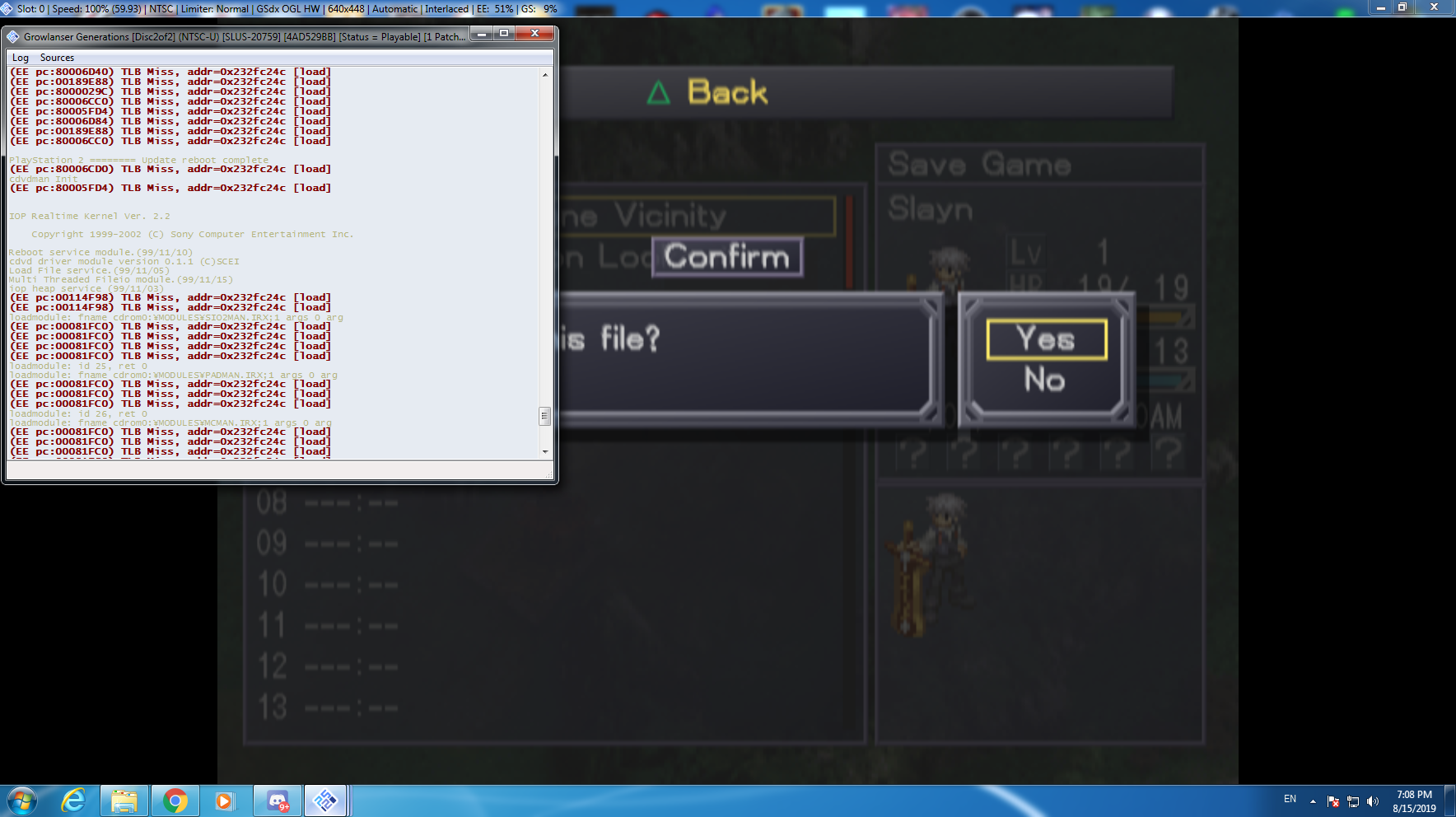
Dunno, I don't get these TLB misses at all. Yours seems to TLB miss during gameplay even?
Dunno, I don't get these TLB misses at all. Yours seems to TLB miss during gameplay even?
The TBL misses happen when the game reads the memory card at the very start of the game.
Hmm so this looks like an oldoldold still unresolved issue, that kinda sucks.
Wanted to run back through this for the memberberries but it freezes on every save and autosave so seems pointless to bother, and no resolution.

Seconded. I look forward to the day ever comes that this save issue can be fixed.

This seems to be some threading issue. When game fail at sceCdReadClock due to bad sema/thread state, it will just use 0 as timestamp. That make issues with next saves, and finally lead to freeze. I didn't checked that deeper, but this should give some hint if someone want to fix it properly.
I created patches for both games, but this solution patch SDK function responsible for CDVD S command to use WaitSema instead of PollSema. Should be harmless, but is not nice solution.
SLUS_207.58
CRC=03f9c6d1
patch=1,EE,001153DC,word,0C042618
SLUS_207.59
CRC=4ad529bb
patch=1,EE,00114CBC,word,0C042618
Note: Not tested with folder type cards. 00/00/00 slots should be recoverable with those patches. Savestates can possibly preserve bad time, so do clean boot to test patches. And of course BACKUP YOUR MEMORY CARD BEFORE EVEN TRYING THAT..

I would like to confirm that after applying this patch I was able to play through Growlanser 2 all the way without a single crash. Thank you so much for working on a solution and sharing it with us!
https://forums.pcsx2.net/index.php
https://discord.gg/WTjTcN2
Forums or the discord is the place for asking about config problems, GitHub is a place for bugs not support.

This seems to be some threading issue. When game fail at sceCdReadClock due to bad sema/thread state, it will just use 0 as timestamp. That make issues with next saves, and finally lead to freeze. I didn't checked that deeper, but this should give some hint if someone want to fix it properly.
I created patches for both games, but this solution patch SDK function responsible for CDVD S command to use WaitSema instead of PollSema. Should be harmless, but is not nice solution.
SLUS_207.58 CRC=03f9c6d1
patch=1,EE,001153DC,word,0C042618SLUS_207.59 CRC=4ad529bb
patch=1,EE,00114CBC,word,0C042618Note: Not tested with folder type cards. 00/00/00 slots should be recoverable with those patches. Savestates can possibly preserve bad time, so do clean boot to test patches. And of course BACKUP YOUR MEMORY CARD BEFORE EVEN TRYING THAT..
How do you apply patches? I created an account just to ask this because i saw the other comment saying it worked out just fine. Pls write a detailed step-by-step tutorial because i am new and i don't know what to do anymore to get rid of this irritating bug.

@capi2 You were just told to go to discord or the forums. So take this issue, and link it there and ask "how do I apply this patch?" instead of making the issue thread about how to use the emulator instead of the issue.

Any chance someone can link to the existing thread for "how to apply the patch" to save me the search and creating an account to ask and/or post there.
being at least 2 weeks ago hoping one exists by now.
Any chance someone can link to the existing thread for "how to apply the patch" to save me the search and creating an account to ask and/or post there.
This isn't the place for user support. As said right above your reply, go to the discord or forums. Here <--- is where you can find how to use the pnach format.

And I said, I didn't have an account for either, and if someone had a direct link to them, that would be nice.
Which you did, so thanks, didn't require the attitude though.