

 OnionBrowser
[Critical] IP leaking through webrtc
- Open iPhone : ip 1.1.1.1
- Connect to VPN : ip 2.2.2.2
- Check web etc leaks : no leak (2.2.2.2)
- Open onion browser 2.0.1 : ip 3.3.3.3
- Check web rtc leak : leaking 1.1.1.1


Thanks for the hint with the expedited review. We finally got it through after working out all the issues with Apple they suddenly found. They are sometimes quite cryptic, when it comes to explaining the issue...
Can you please check again and confirm if we got this fixed?
Also on Twitter now:
https://twitter.com/pwnsdx/status/961413267028619264
@ghost are you saying that Onion Browser 2 leaks outside of the VPN? The WebRTC leak happens even if the VPN is on?

(Update -- April 4 2019. After being fixed on iOS 12, this is apparently happening again on iOS 12.2.)
OK, this was not the same as #112.
Quick notes from some research here.
From the thread of the tweet that tladesignz linked, this started in iOS 11.
It also affects Red Onion and Brave (brave/browser-ios#1148).
My original guess was that we could plug this with the same content-security-policy injection from Onion Browser 1. OB1 disables websockets and 'connect' stuff by by default, it is only optional in Endless/OB2. That was a mistake and will be fixed, but that has no affect on WebRTC.
So this probably affects ALL Onion Browser on iOS 11.X.
Further, there used to be a mitigation in Brave https://github.com/brave/browser-ios/commit/f22e37be5dc59bb7762b1099f65794d3ba7fa7a0 , but it appears to have been removed https://github.com/brave/browser-ios/commit/893af7ea9754558e64a75445dd005241e600972f , and my own testing (adding the trapInstanceMethod bits from that file into https://github.com/mtigas/OnionBrowser/blob/2.X/Endless/Resources/injected.js which should add it to every page) also don't seem to have any affect in the iOS 11.2 simulator. (I'm investigating this further, since simply making RTCPeerConnection calls no-op should mitigate this.)
I'm also investigating whether iOS 11.3 beta changes things, because none of my devices using the 11.3 beta leak IP over WebRTC, even in Safari. https://twitter.com/mtigas/status/961665006344589312

This can also be mitigated by disabling Javascript entirely? Is that feature available still in iOS 11 / Endless codebase?
@n8fr8
yes:
Settings -> Host Settings -> Default Settings
Content policy: "Strict (no JavaScript, video, etc.)"

I would tweet that this can be immediately fixed by disable javascript by default for all sites, and show that screenshot: https://github.com/mtigas/OnionBrowser/issues/117#issuecomment-364232729
Perhaps JS should be off by default, and people can selectively enable by host?
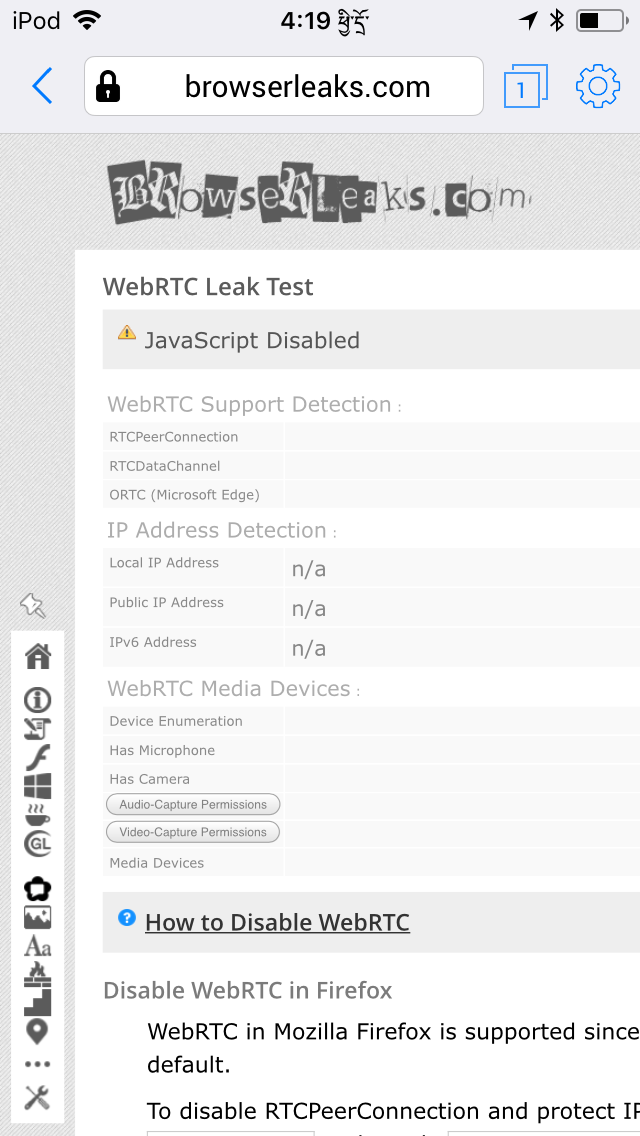
Just tested iOS 12. I changed Content Policy to Permissive then connected to https://browserleaks.com/webrtc. Below is the output. No IP addresses are detected but RTCPeerConnection and RTCDataChannel are both checked. Not sure if this means the issue is resolved or not.


iOS 12.2 - WebRTC leaks IP address with default configuration:
- Allow WebRTC: No
- Content Policy: No XHR/WebSocket/Video connections

When Content Policy is changed to "Strict (no JavaScript, video etc.)", leak becomes impossible.
@tladesignz, the "alt" title on the image you posted suggests it came from the iOS Simulator rather than a real iOS device. If this indeed was from the simulator, please test with a real device.
iOS 12.1 is fine. I just tested. But in view of this issue, I am holding off updating to 12.2.
@MarkCallow Thanks for your input!
Just tested with a real device running iOS 12.2. Same issue.
Also tested on IOS 11.4 in the simulator. It leaks. But you're right: that could be due to the underlying MacOS 10.14.4.
Unfortunately, I don't have a device around which runs iOS 11.0 - 12.1.
So, thanks again for your input, I really appreciate it!
@mtigas: We need a security warning on the landing page! And a tweet!
I just tested this on my iPad Pro 9.7" running iOS 12.2 and the latest version of Onion Browser from the App Store. As far as I can tell, my IP gets leaked as well. At first when I visited https://browserleaks.com/ip, it said n/a under "WebRTC Leak Test Public IP address". But then when I refreshed the page, I saw my real IP. See screenshots below.


I wonder if this was ever really fixed in iOS 12. I'm running iOS 12.1 and I have just discovered that browserleaks.com's "What is my IP Address" page shows my real IP address in its 2-line WebRTC Leak Test section. However the full WebRTC Leak Test page shows "n/a" even after refresh. When I tested in 12.0, I only looked at the WebRTC Leak Test page.
I have no idea what browserleaks.com is doing that would give it different results on these 2 test pages.
@tladesignz have you reported this leak to [email protected] ? They respond quickly and should be able to fix the ip Leak. https://support.apple.com/en-us/HT201220

@Baccount Thanks for mentioning that! @mtigas said, he will do this.
I did a little investigation.
The way we do blocking is by injecting either a Content-Security HTTP header or injecting JavaScript.
The "Content Policy" setting is done via the CSP header:
https://github.com/OnionBrowser/OnionBrowser/blob/a00405a02c7dcb103e1fbb9f7b3a8e8b2fdec446/Endless/URLInterceptor.m#L467-L472
The "Allow WebRTC" setting is done via JavaScript injection:
https://github.com/OnionBrowser/OnionBrowser/blob/a00405a02c7dcb103e1fbb9f7b3a8e8b2fdec446/Endless/Resources/injected.js#L303-L308
It was already mentioned: There's this dedicated WebRTC leak test at Browserleaks:
https://browserleaks.com/webrtc
To mitigate that, the "Allow WebRTC" setting is good enough. You can even have your "Content Policy" set to "Open", which doesn't inject any CSP.
However, the test on
https://browserleaks.com/ip
Isn't mitigated by that at all. The only chance to stop it there, is to completely disable JavaScript. I confirmed this by playing around with the CSP header. Only script-src 'none' or sandbox without allow-scripts stopped it.
So, the only viable mitigation I see at the moment, is to set "Content Policy" to "Strict" by default, which disables JavaScript.
A small UI-side-issue btw. is, that "Allow WebRTC" should be set to "No" when "Content Policy" is set to "Strict", as there's not going to be any WebRTC, if there's no JavaScript running.
Besides that: I tried to poke around in the browserleaks source code from within Safari's console, but that wasn't very effective. Does anybody know, if the source code is public and available?
Besides that: I tried to poke around in the browserleaks source code from within Safari's console, but that wasn't very effective. Does anybody know, if the source code is public and available?
I sent an e-mail 2 days ago to the address at the bottom of the browserleaks web page. So far no reply.
Gah. Tested it more closely this week. Have held off on emailing Apple since I actually don't think this is the same as the iOS 11 Safari/WebKit behavior that revealed true IP even on VPN.
https://d2p12wh0p3fo1n.cloudfront.net/onionbrowser/20190411-130057-1262.mp4
No VPN:
- Safari: Real IP (i went too fast in this video so it shows "n/a", but webrtc got my real IP in other)
- Chrome (WKWebView): Real IP (same as above)
- Endless (UIWebView): Real IP
- Onion Browser: client ip = Tor IP, webrtc = Real IP
VPN:
- Safari: VPN IP
- Chrome (WKWebView): VPN IP
- Endless (UIWebView): VPN IP
- Onion Browser: client ip = Tor IP, webrtc = VPN IP
The bad behavior we saw in iOS 11 is that all browsers were leaking Real IP, even if you were connected to a VPN. So the fact that browserleaks correctly shows the VPN IP in all the other browsers, I think, means that this isn't the OS-level issue anymore.
We do override the window.RTCPeerConnection and other related browser APIs to null, injecting this override at the top of every HTML page and JS file loaded:
https://github.com/OnionBrowser/OnionBrowser/blob/e6fbbd2141139f08023f6699fa32af716f3ffaaf/Endless/Resources/injected.js#L303-L308
But this is fragile and can be circumvented with some tricks. Below is a fairly simple case. (Console output below leaves out some of the output of intermediate lines to be a bit more readable.)
> window.RTCPeerConnection
< ƒ RTCPeerConnection() { [native code] }

> window.RTCPeerConnection = null;

> window.RTCPeerConnection
< null

> var iframe = document.createElement("iframe");
> document.body.appendChild(iframe);
> window.RTCPeerConnection = iframe.contentWindow.RTCPeerConnection;
< ƒ RTCPeerConnection() { [native code] }

> window.RTCPeerConnection
< ƒ RTCPeerConnection() { [native code] }
(Adapted from http://perrymitchell.net/article/restoring-overridden-window-and-document-methods-with-archetype/ )
The "Disable WebRTC" flag is not bulletproof with JS still enabled. (Same goes for the other things that may be overridden, like navigator.geolocation.getCurrentPosition(...), etc.)
WebRTC seems to be in the same category as embedded media -- videos played inside WebKit don't follow the same TCP stack as our HTTP(S) requests. HTTP(S) requests rely on URLInterceptor being registered to handle all URIs other than file://, data://, and mailto://. But video that are even on HTTP(S) don't appear in the log of things that the app sees through the NSURLProtocol registration.
So, like embedded media, I don't think there's a technical fix here that is 100% bulletproof other than outright blocking JavaScript. (One thing folks have proposed to me: wince we do intercept all content, we could just regex for all JS calls to these things and just strip some of that out of the incoming source before passing it along to the WebKit renderer. But things doing eval() or other workarounds could hide from such a rewriter, dynamically calling things by obfuscated string fn="win"+"dow.RT"+"CPeerConnection" or such. And that's an arms race we don't want to get into.)
So. Ugh. I think the best we can do is an adjustment to the defaults as @tladesignz mentioned, and prioritizing work on changing the settings UI to make clearer what the levels of safety are. (Rather than feature toggle switches that may or may not work, just use a 3-tier slider in line with what Tor Browser does.)
I have 12.3 and if I’m understanding it correctly, it appears to be fixed (looks like https://github.com/OnionBrowser/OnionBrowser/issues/117#issuecomment-425266738). 12.3.1 is available any way to tell if it is safe to upgrade?

It is not fixed in 12.3. It was not fixed in 12.1 and probably not in 12.0 either despite what the OB homepage says.
The problem is that if you go to the dedicated WebRTC page, https://browserleaks.com/webrtc, it shows "n/a" for Public IP address giving a false sense of security. However if you go to the overview page, https://browserleaks.com/ip, under WebRTC Leak Test, "Public IP" address shows your real IP address not the Tor IP address.
The OB home page needs to be fixed.
Note: I did not use VPN in my tests.
On my device, https://browserleaks.com/ip, the WebRTC Leak Test shows n/a for public IP.
Sorry, I misread the URL in your comment.
What device do you have? I have an iPad Pro. Try refreshing the page showing https://browserleaks.com/ip.
@zoof Did you enable JavaScript? i.e set Content Policy to "No WebXHR/WebSocket/Video connetions?"
I have an iPhone SE. Repeated refreshes show Public IP of n/a.
Yes, Content Policy is "No WebXHR/WebSocket/Video connections".
Hmm? Very strange. How could the same iOS version, 12.3.1, give different results? Are you sure you are on https://browserleaks.com/ip and not on https://browserleaks.com/webrtc?