

 OctoLinker
Broken on new GitHub UI beta
Expected Behavior

What actually happened?
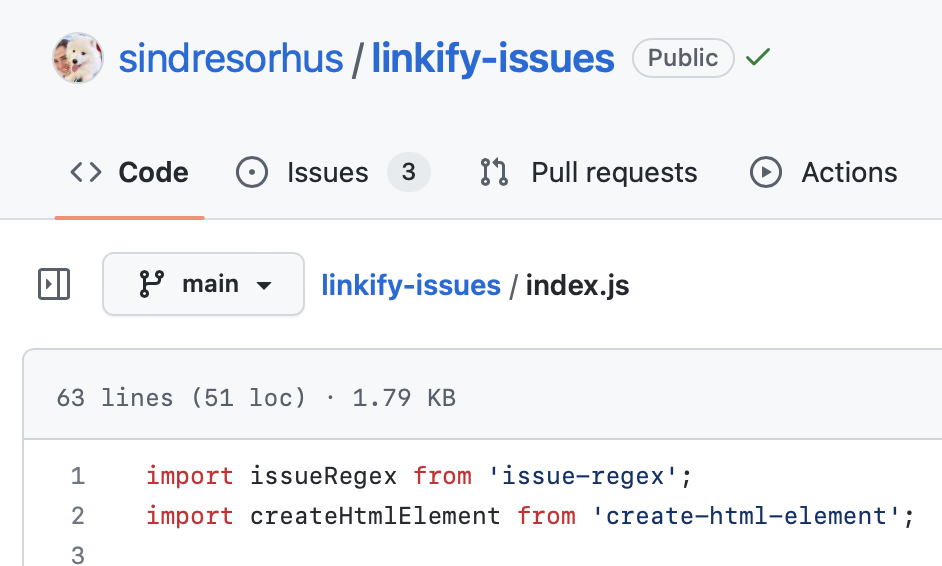
URL
https://github.com/sindresorhus/linkify-issues/blob/main/index.js
Anything else we should know?
See https://github.blog/changelog/2022-11-09-introducing-an-all-new-code-search-and-code-browsing-experience/#the-all-new-code-browsing-experience

I see there's already a PR open 💙
- https://github.com/OctoLinker/OctoLinker/pull/1694
6.10.5 is in the chrome web store now. This gets OctoLinker working again but the new site is adding extra classes to the elements we're adding links to, so on hover they're styled just like GitHub's code navigation.
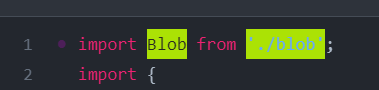

Yeah, I've noticed the same but decided to ignore it for now. However, I just noticed another issue that turbo-link don't re-invoke OctoLinker anymore.

Was just about to say the same. I have a fix for the link styling but not for triggering us to run on page change.
Is it just me or does the extension not work at all? doesn't seem like the PR fixed anything (or they changed the DOM structure again?)

What browser are you using?
I tried on Chrome, Firefox, and Firefox nightly
(I'm not sure when did it break, I only know for sure that I noticed today that it doesn't work)

I just noticed that it works inside codeblocks that are in markdown files… 😅

but not in actual code files

There's a bigger issue now: GitHub started using an overlaid textarea so even if you linkify the dom you can't click it. Maybe a z-index on the links will work, otherwise you'll have to rewrite the replacer to use GitHub’s way of highlighting symbols instead.
Related:
- https://github.com/refined-github/refined-github/issues/6336#issuecomment-1498645639

Extension still works fine on old ui 😆.
No longer working as of today, GH is forcing the shitty ui onto logged out users well.
I tried to make OctoLinker work with the new UI, but due to the fundamental changes they made, getting OctoLinker working is quite challenging

It's a hard issue and it requires a rewrite of the parser/linkifier. If anyone comes up with a practical solution or PR it can definitely help. The main issue is basically lack of time to explore possible solutions.
Just an update that the new UI is now default and can no longer be disabled.


Someone is hiding every comment. The last commit human commit 03b5e9e was in 2022. It was an incredibly useful extension while it existed. Due to no fault of the maintainers my impression is it would be convoluted to make work again. Consider abandoned for now 🎖️
They are being hidden because they are not providing anything useful to the issue. If the issue is open, then it isn't resolved. Asking "still broken?" helps no one. If you feel strongly about the issue, submit a pull request to address it.
Someone is hiding every comment
It's me. As @jsumners said, "still broken" and "broken in my browser" doesn't add any information that isn't already here.
it would be convoluted to make work again
Yes, this has been the state since my May 2023 comment above: https://github.com/OctoLinker/OctoLinker/issues/1695#issuecomment-1534099619
Octolinker still works in some views, like readmes, comments, commits and PRs, but not on the React-based code viewer. This view has been a major pain for all GitHub extensions, e.g.
- https://github.com/refined-github/refined-github/issues/6554
Back when the new React UI was announced, @maximedegreve asked me on Twitter what we'd need to keep this and other extensions working. At the time #1694 got us going again, but now that a lot more has changed and broken this even more is there anything they might be able to do to help?
I think the only thing they could do is open up their symbols UI. If you can add symbols, then they would take care of making them clickable
Hey @xt0rted
I will forward this internally. I can't promise anything though. Thanks for bringing this to our attention.

Hi folks, I'm from the repos team, and I have some ideas for how it could work for you. We unfortunately make the visible code lines that you see un-interactable for a variety of reasons not worth going into here, but there should be a way to make it work relatively easily. Underneath the visible code lines that you see is an invisible text area which contains the full body text of a given file. When a user clicks within the code lines, their cursor position within the text area is being updated to represent where they clicked. The text area, which has the id of read-only-cursor-text-area (and we will not be changing it), should be easily queryable by an extension to grab the selectionStart and selectionEnd. Adding an extra on click handler to the text area should be able to capture any potential clicks to do with what you wish. The selectionStart and selectionEnd` are just character offsets within the value of the text area (which includes newlines).
I'm not sure how you all were determining which paths should be clickable, but assuming it was some sort of text scraping, you should be able to grab the value of the text area (which would be the entire body of the file) and see if the selectionStart and selectionEnd of the text area (which are the same if it is not a highlight) lined up with what should be a clickable path. Getting the value of the text area and precomputing which ranges of character offsets line up with file paths to match against selectionStart when that changes should be relatively easy to do. The hard part you likely already did and can re-use, which would be determining where that path should resolve to.

Underneath the visible code lines that you see is an invisible text area which contains the full body text of a given file. When a user clicks within the code lines, their cursor position within the text area is being updated to represent where they clicked.
Off-topic: but I think this finally explains why all of a sudden clicking anywhere in a code view breaks keyboard history navigation (i.e. it breaks cmd+backspace to navigate backward). I would fervently welcome a setting that disables this.
@AdamShwert thank you for the input! I think two parts are still hard to achieve:
- showing that a specific piece of text is clickable: the last time I checked, the component used :before instead of regular text nodes, so splitting and linkifying a part of that wasn't straightforward
- showing a hover state: with your suggestion I'm not sure it's possible/simple to find the exact word under the cursor via
mousemove
I think that if the first part can be done, we can just wrap it in a proper link and bring it up via z-index.
While you're here, could GitHub natively do what OctoLinker does? It doesn't look substantially different from the cross-file symbol detection that GitHub already has, at least for some of the formats OctoLinker supports.
I ran into a few issues adding links to the rendered source:
- The
textareahas a z-index of 1 so anything in the visible text remains under thetextareano matter what z-index you give it - Wrapping the
spanwith<a>like OctoLinker currently does works fine and you get a link, but you can't click on it and there's no hover state (maybe this could be done with js?) - The visible text has
pointer-events: nonewhich prevents clicking on any of the links that are added when you start changing z-indexes
The textarea was added for accessibility and so you can navigate/copy the source with just the keyboard. I'm sure there's others, but those were the two main ones I was told.
In all my tests the only way I see to make OctoLinker work is to change the z-indexes and then accessibility/keyboard navigation goes out the window. Tabbing through the page/code may be awkward since you have to go through to code in the textarea before you wrap back up to the top of the rendered code and start going through the links. The other behavior issue was I stopped being able to interact with the textarea completely so I couldn't copy any text even with a mouse.
Since the raw text of the file is on the page now that actually simplifies how we parse it (no longer have to hit the api in this view, but still would elsewhere). The issues I see are all in displaying a link that you can interact with.
While you're here, could GitHub natively do what OctoLinker does? It doesn't look substantially different from the cross-file symbol detection that GitHub already has, at least for some of the formats OctoLinker supports.
We're discussing doing this, so stay tuned on that front! If we did end up implementing it, we would be doing it without any sort of hover state or anything of the sort, similar to how symbols work now. The issue for making it standard behavior is that people wouldn't necessarily expect clicking on the import to work in that way with no hover state, so we'd need to figure out a good way to let people know that clicking on imports will open a new tab.
As for making it appear as a link, I think currently it would be very hard to do unfortunately. We have some changes in the works along with firefox/chromium, which when chromium 124 comes out later this month, should make it considerably easier to at least apply the underline. We're doing the ::before stuff now as you mention, but that will not be necessary for users with firefox and chromium versions above 124. We will be using the inert property which hides content from browser find and also makes it so mouse events don't occur on any inert segments. This means hover state still would not be possible, but wrapping it in an <a> tag so that it is underlined should be much easier.
You could probably do something extremely hacky and listen on every mouse move and determine which code line the user is hovering over by using scroll offsets and mouse offsets, but with various features such as text only zoom this would likely be very brittle. It would also be a big performance drag.
clicking on imports will open a new tab
I hope you mean "clicking on imports will change the file" since almost no links on GitHub.com open new tabs (also, nngroup article)
In any case it would be very helpful because, as you say, linkifying the current editor will continue to be tough for extensions.