

 MoistCoder
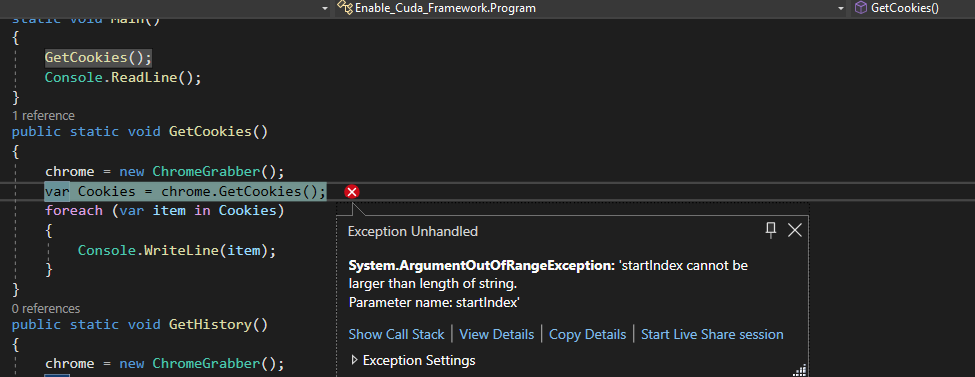
Grabbing cookies doesn't work.
I understand what the error means, but the thing is I cannot edit it or fix it since it takes no overloads. Could someone help me ?|


The project is open source. Just change the file that does the trouble if you know how to fix it. Then rebuild the project. You will get a .dll file as build output.
try this
To fix this, you can add a check to make sure that the cookies exist before trying to look at them. That way, if there are no cookies, you won't get an error.
chrome = new ChromeGrabber();
var Cookies = chrome.GetCookies();

if (!string.IsNullOrEmpty(Cookies))
{
    foreach (var item in Cookies)
    {
        Console.Writeline(item);
    }
} else
{
    Console.WriteLine("No cookies found.");
}

@cuciuu
try this
To fix this, you can add a check to make sure that the cookies exist before trying to look at them. That way, if there are no cookies, you won't get an error.
chrome = new ChromeGrabber();
var Cookies = chrome.GetCookies();

if (!string.IsNullOrEmpty(Cookies))
{
    foreach (var item in Cookies)
    {
        Console.Writeline(item);
    }
} else
{
    Console.WriteLine("No cookies found.");
}
The error seems to occur inside var cookies = chrome.GetCookies();, thus your suggestion would not work at all.
