

 LMMS
LMMS
Record beat and baseline using midi controllers
- [x] Please search the issue tracker for existing feature requests before submitting your own. Delete this line to confirm no similar request has been posted yet.
Enhancement Summary
There are a bunch of midi pads that support input as midi controllers instead of traditional usage over sound fonts.
A sound font has a few aspects that make it unusable in some cases.
Bad Aspects of sound fonts
- Hard to setup
- Working with beat midi tracks is confusing and hard over software (Caused by the additional features like note length which you don't need when working with beats)
- Can't add Effects on the single instruments
- Can't control the volume on the single instruments
- Can't separate the instruments which makes some effects like side chain compression unusable
Idea
Add a way to record a beat and baseline using midi controller, that are attached to an individual instrument.
Justification
Attaching
In the beat and baseline tab you could attach a controller to an instrument which you have added before (for example the snare drum).
Playing
When we now activate the specific midi controller it plays a note from the instrument we bound the controller too. This works with multiple instruments at the same time.
Record button
There will be a new record button which allows us to record beat and baselines using our previously attached midi controllers.
Mockup
As stated before, we would have to add a record button to the beat and baseline tab. It would look somewhat like the record button in the Piano-Roll window.

We would also need to add a window to attach a controller to an instrument. This window will be available by clicking on the Settings icon and selecting 'Attach to controller'. The window itself would look somewhat like the 'Connect to controller' window for connecting controllers to sliders and knobs.
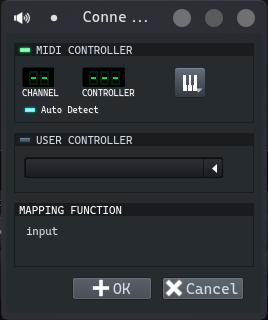

I am not sure if I understand your issue but if you are talking about assigning e.g. the pads of a drumpad to different tracks (also in the BB Editor - now PatternEditor) it is already possible to define a note range down to a single note for an input midi controller and a corresponding track - I tried to improve the handling slightly in this PR: #6224 .
So some could set up e.g. a drumpad (it is not very convenient though) and play the sound of different tracks - BUT: unfortunately it is not possible to record multiple tracks.
I was thinking about it and and it seems easier to me to provide a special "meta" instrument which would allow other instruments inside. Similar like this one: #4075 - but not only for samples.

I was thinking more about actual midi controllers not channels. The ones which you can asign to knobs and sliders.