

 HeidiSQL
Export Database as SQL for MSSQL
Expected behavior
When exporting a table from an MSSQL database it should create a file with the correct syntax for MSSQL.
Current behavior
The exported backup file creates inserts with MySQL syntax.
Steps to reproduce
Please provide detailed steps for reproducing the issue.
- Connect to an MSSQL database
- Right click a table and choose Export database as SQL
- Set to Insert ignore (do not update existing)
Context
Please provide any relevant information about your setup. This is important in case the issue is not reproducible except for under certain conditions.
- HeidiSQL version: 9.5.0.5196
- Database system + version: I believe this db is running MSSQL 2008 R2
- Operating system: Windows 10
Failure Logs
The exported file has the command INSERT IGNORE INTO which isn't valid MSSQL. Now I'm trying to figure out how to restore these 12000 records that I shouldn't have deleted. :-(

Have you tried a recent nightly version to see if it still happens? https://www.heidisql.com/installers/HeidiSQL_9.5.0.5245_Setup.exe is the latest nightly version as of the time I am writing this comment.

-- Host: ************************************* -- Server version: Microsoft SQL Server 2014 (SP1-CU4) (KB3106660) - 12.0.4436.0 -- Server OS: Windows NT 6.3 <X64> (Build 9600: ) (Hypervisor) -- HeidiSQL Version: 9.5.0.5196
/*!40101 SET @OLD_CHARACTER_SET_CLIENT=@@CHARACTER_SET_CLIENT /; /!40101 SET NAMES /; /!40014 SET @OLD_FOREIGN_KEY_CHECKS=@@FOREIGN_KEY_CHECKS, FOREIGN_KEY_CHECKS=0 /; /!40101 SET @OLD_SQL_MODE=@@SQL_MODE, SQL_MODE='NO_AUTO_VALUE_ON_ZERO' */;
-- Dumping data for table **************.OLRTranslationLiterals: -1 rows /*!40000 ALTER TABLE "OLRTranslationLiterals" DISABLE KEYS */; INSERT IGNORE INTO "OLRTranslationLiterals" ("OLRtranslationLiteralsID", "name", "OLRLiteralsID", "translationGroupID") VALUES (1, 'Back', 1, 1), (2, 'Cancel', 2, 1), (3, 'Delete', 3, 1), ...
Yes
That log you posted indicates that you were using 5196 which is not a nightly build but the latest stable build released like last year. Try a nightly build and see if that helps?
Sorry about that. The Update button in help failed to auto update to the nightly build. It got hung and crashed and I forgot this happened... I've installed the latest nightly build manually.
-- Host: ################### -- Server version: Microsoft SQL Server 2014 (SP1-CU4) (KB3106660) - 12.0.4436.0 -- Server OS: Windows NT 6.3 <X64> (Build 9600: ) (Hypervisor) -- HeidiSQL Version: 9.5.0.5245
/*!40101 SET @OLD_CHARACTER_SET_CLIENT=@@CHARACTER_SET_CLIENT /; /!40101 SET NAMES /; /!40014 SET @OLD_FOREIGN_KEY_CHECKS=@@FOREIGN_KEY_CHECKS, FOREIGN_KEY_CHECKS=0 /; /!40101 SET @OLD_SQL_MODE=@@SQL_MODE, SQL_MODE='NO_AUTO_VALUE_ON_ZERO' */;
-- Dumping data for table ################.AcceptFDFDownload: -1 rows /*!40000 ALTER TABLE "AcceptFDFDownload" DISABLE KEYS */; INSERT IGNORE INTO "AcceptFDFDownload" ("userID", "toolID", "acceptedDate") VALUES (34, 1043, '2015-10-27 10:50:00'), (49, 586, '2016-10-26 08:17:00'), ...
So, yes it still does this.
@matthttam can you provide an "as is" and a "how it should be" SQL code?

Unfortunately, MSSQL doesn't have a neat little construct for INSERT IGNORE. I'll be honest, I don't know the best way to do this type of insert into MSSQL.
Per https://dba.stackexchange.com/questions/30662/how-can-i-ignore-duplicate-inserts It looks like there should be an IGNORE_DUP_KEY = ON flag set and then do inserts like normal.
If anyone who is better at MSSQL has a suggestion please advise. I just know the INSERT IGNORE INTO that gets generated from Heidi SQL throws errors.
Here another buggy export :
-- Hôte :                        127.0.0.1
-- Version du serveur:           Microsoft SQL Server 2017 (RTM-CU3-GDR) (KB4052987) - 14.0.3015.40
-- SE du serveur:                Windows 10 Pro 10.0 <X64> (Build 15063: )
-- HeidiSQL Version:             9.5.0.5196

 .....

DROP TABLE IF EXISTS "MS_LIGNE";
CREATE TABLE IF NOT EXISTS "MS_LIGNE" (
	"Numero" INT(10,0) NULL DEFAULT NULL,
	"Description" VARCHAR(40) NULL DEFAULT NULL,
	"Nom_Variable" VARCHAR(20) NULL DEFAULT NULL,
	"Actif" SMALLINT(5,0) NULL DEFAULT NULL,
	"Numero_UD" INT(10,0) NULL DEFAULT NULL,
	"Protocole" SMALLINT(5,0) NULL DEFAULT NULL,
	"Parametres" TEXT(2147483647) NULL DEFAULT NULL
);

-- Export de données de la table TEST.MS_LIGNE : -1 rows
DELETE FROM "MS_LIGNE";
/*!40000 ALTER TABLE "MS_LIGNE" DISABLE KEYS */;
INSERT INTO "MS_LIGNE" ("Numero", "Description", "Nom_Variable", "Actif", "Numero_UD", "Protocole", "Parametres") VALUES
	(1, 'test', '', 1, 0, 11, 'toto')
CREATE TABLE IF NOT EXISTS : not supported Type text : too long Integer type syntax : KO
Here is the original create table :
CREATE TABLE MS_LIGNE(
	[Numero] [int] NULL,
	[Description] [varchar](40) NULL,
	[Nom_Variable] [varchar](20) NULL,
	[Actif] [smallint] NULL,
	[Numero_UD] [int] NULL,
	[Protocole] [smallint] NULL,
	[Parametres] [text] NULL
) ON [PRIMARY] TEXTIMAGE_ON [PRIMARY]
CREATE UNIQUE NONCLUSTERED INDEX [IdxMS_LIGNE0001] ON [MS_LIGNE]
(
	[Numero] ASC
);
The code CREATE table tab seems OK. I also experiment bugs with timestamps and image column fields.

I am trying to export from our LIVE MSSQL DB to our DEV MSSQL DB. I have tried exporting to file, clipboard and database. The settings we are using are these:

As you can see the issue is something with the syntax. I get this same error if I tried Insert (ignore existing).
Here is a sample of the INSERT IGNORE which throws the same error.
INSERT IGNORE INTO "XYZ" ("Id", "Id2", "Id3") VALUES (1, 6, 32)
Might be helpful to add a "db language" drop down to the export page. Ideally it would detect the language by default but based on the value in this field it would give you the applicable options for that language.

I get error when trying to export ms sql DB from Azure. Maybe this bugreport is somehow related to this and will be helpful.
Expected behavior When right click a database and select "Export database as SQL" table editor window pops up
Current behavior When right click on database and select "Export database to SQL" error occurs
Steps to reproduce Connect to an MSSQL database lockated on Azure (Azure DB) Right click a database and choose Export database as SQL

Accidentally filed #1101 for this same issue. Still an issue in HeidiSQL Version 11.0.0.6055 (64 Bit).

SQL export was written for MySQL/MariaDB originally. There are so many differences and incompatibilities for DDL queries between MySQL and MSSQL. I suppose it's a good option to first disable structure exporting for MSSQL, so you can just export data.

@ansgarbecker Please don't disable the import, it's working for data dumps, so I'm using two separated dumps - tables structure which I've converted from MySQL manually, and for data which I'm making in Heidi, so data import is working. And it's not so many differences between MySQL and PostgreSQL (will be for MSSQL too?) - almost all of them with solutions I've fetch in my issue for your convenience.
P. S. I don't believe that there's no any managers for Postgres except yours, and phpPgAdmin which is for php only and discontinued since 2018 and don't working with new versions of php.

@acuna-public I think he's only talking about disabling the associated checkboxes in the Export Database as SQL menu:
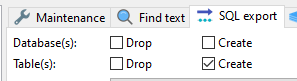
This is separate from the import mechanism.
I have the same problem with HeidiSQL 11.3.0
This is what it outputs if I let it export a table schema:
-- not working ...
CREATE TABLE "test" (
	"col1" NVARCHAR(20) NULL DEFAULT NULL COLLATE 'Latin1_General_CI_AS
);
This is how I had to change the syntax to make it working on MS SQL SERVER 2016
CREATE TABLE "test" (
	"col1" NVARCHAR(20) COLLATE Latin1_General_CI_AS DEFAULT NULL
)


yes, I thought I'd found the elusive diamond in the rough when I saw HeidiSQL supporting MSSQL. I totally love the export to database functionality for MySQL and so would love to see it for MSSQL. All other tools seem, well I don't know of any other tool to do this quite as easily.
