

 FreeOpcUa
Creating OPC UA Client with certificate and key - Error message "Password was not given but private key is encrypted"
I've been struggling to create an OPC UA client with python's freeopcua and the Prosys UA server simulator. I can create the client without using the certificates and keys without any issues, but when I try and include the security related code (using the certificates and keys that come with the Prosys simulator) into my program it throws out the error message "Password was not given but private key is encrypted". As I understand it this means that the key (i.e. .pem file) is encrypted. Opening the .pem file in a text editor confirms this. How did I get around this? Even if I knew what the password for the key was (which I don't), the set_security_string argument can't accept a password for the key file. Or do I somehow need to replace the .pem file used by Prosys with one that wasn't encrypted? My code is as follows:
import sys import logging from opcua import Client, ua
if name == "main": logging.basicConfig(level=logging.DEBUG) url = "opc.tcp://Angeloss-MacBook-Pro.local:53530/OPCUA/SimulationServer" client = Client(url) client.set_security_string("Basic256Sha256,Sign,SimulationServer@angeloss-mbp_2048.der,SimulationServer@angeloss-mbp_2048.pem")
try:
    client.application_uri = "urn:angeloss-mbp:OPCUA:SimulationServer"
    client.set_user("AngelosY")
    client.set_password("Testing123")
    client.secure_channel_timeout = 10000
    client.session_timeout = 10000
    client.connect()

    root = client.get_root_node()
    print("Root is", root)
    print("name of root is", root.get_browse_name())
    print("children of root are: ", root.get_children())
    objects = client.get_objects_node()
    print("children of objects are: ", objects.get_children())

finally:
    client.disconnect()

the cert must be a valid x509v3 certificate that matches your ip and application_uri in the subjectAltname extension if you use a cert from a different application you deserve a certificate rejection ;) alwas create a individual cert for your app never use someone elses one! in order to build secure applications i recommend every developer to read the specs before using encryption (https://reference.opcfoundation.org/v104/Core/docs/Part2/)
it is kind of unclear what you problem is please provide some screenshots or explain your setup a litte more in detail because your code looks like you try to connect to prosys and the title says you can not connect to kepware !?!?!?!?

Hey Andreas Thanks for your quick reply! I'm still very new to python's freeOPCua, so I'm not surprised! :) Right now I'm still just learning the ins and outs of building an OPC UA Client with Python that runs. I'm using the Prosys UA Server Simulator to do so. I agree that building a Client is one thing, while building one that is secure (as far as OPC standards go) is a whole other animal that will require a lot more time that I'll need to invest. I read through the documentation in your link and there is a lot that one will need to consider. I believe that my certificate will need to conform to RFC 3280 as well. I will make sure that the certificate I use is my own certificate and of the correct kind. For now I just want to get the basics right and successfully build an OPC UA Client that can run using the boiler-plate opcua code. Thanks for this reminder though!
Could you perhaps clarify what you mean when you say that the certificate must match my ip and application_uri in the subjectAltname extension" ? And I won't be offended if you treat me like a toddler in order for me to understand!
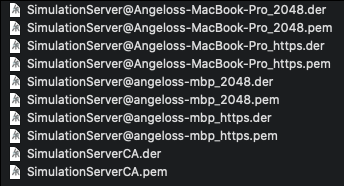
The Prosys server simulator comes with 5 certificates and 5 keys. See screenshot, below.
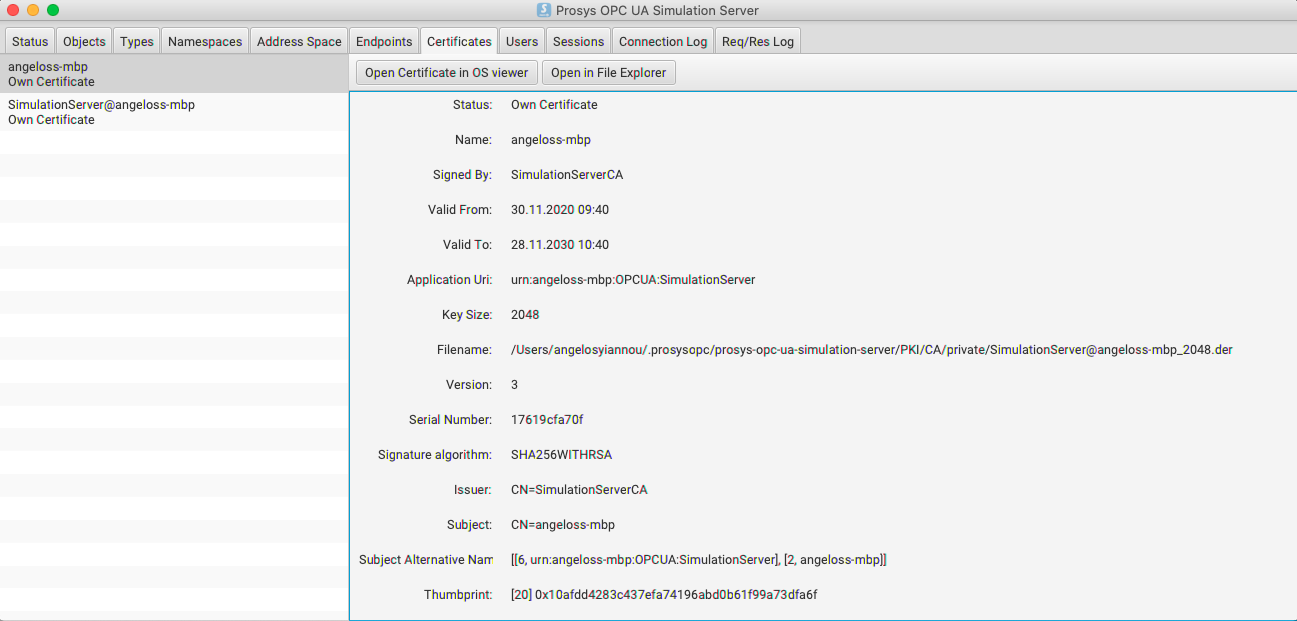
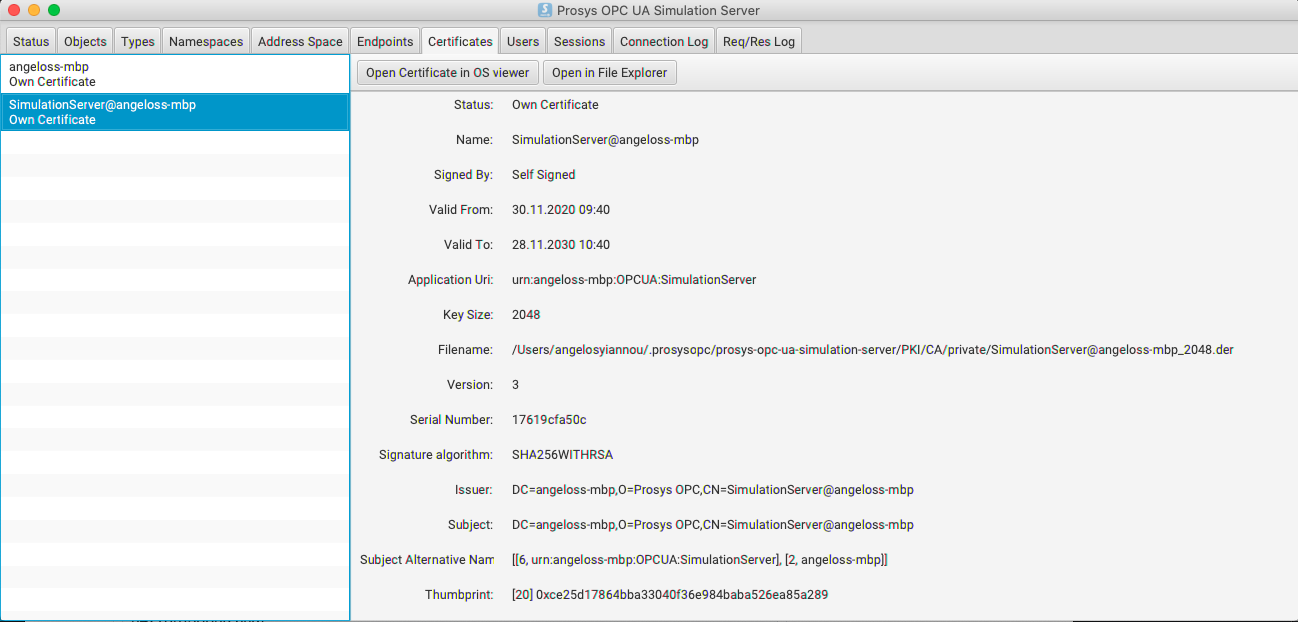
I believe that the certificate is a valid x509 v3 certificate. Or am I mistaken? See second screenshot, below.

Or have I assigned the incorrect certificate and key to my client in my code? On the Prosys dashboard, Certificates tab, I have the following (below). I believe I have provided the correct application uri and the correct .dem and .per files. Or am I mistaken?
Sorry for the incorrect reference to Kepware! I know I deserve a lashing for asking an unrelated question in that thread. So I created this new thread instead and you can ignore the reference to issue number 978. My apologies again!
I appreciate your help!
- install openssl
- https://github.com/AndreasHeine/SecurePythonOpcUaClient/tree/master/x509v3
- unpack change comand prompt in the folder
- change ssl.conf (subjectAltname, country, organizationName, ...)
- comand1 generates a key: "openssl genrsa -out key.pem 2048"
- comand2 generates a x509v3 certificate: "openssl req -x509 -days 365 -new -out cert.pem -key key.pem -config ssl.conf"
for more information lookup openssl dokumentation!
Hi, maybe some solution. I'm trying to create a server and connect to a client, but I can't do it even with UA Expert. I am generating the certificates with Openssl, I am uploading the cert.der and the key.pem to the server and client but both in the UA Expert and in the py Client and I cannot connect. Thank you very much for taking the time to reply to this message.
Attached generated project files. https://gist.github.com/admolina19/9cab8bc7bf0d09d70ca769828d571796
Error Server: Exception raised while parsing message from client, closing Traceback (most recent call last): File "C:\Users\PC\AppData\Local\Programs\Python\Python310\lib\site-packages\opcua\server\binary_server_asyncio.py", line 75, in _process_data ret = self.processor.process(hdr, buf) File "C:\Users\PC\AppData\Local\Programs\Python\Python310\lib\site-packages\opcua\server\uaprocessor.py", line 86, in process msg = self._connection.receive_from_header_and_body(header, body) File "C:\Users\PC\AppData\Local\Programs\Python\Python310\lib\site-packages\opcua\common\connection.py", line 306, in receive_from_header_and_body self.select_policy(security_header.SecurityPolicyURI, security_header.SenderCertificate) File "C:\Users\PC\AppData\Local\Programs\Python\Python310\lib\site-packages\opcua\common\connection.py", line 215, in select_policy self.security_policy = policy.create(peer_certificate) File "C:\Users\PC\AppData\Local\Programs\Python\Python310\lib\site-packages\opcua\ua\uaprotocol_hand.py", line 265, in create return self.cls(peer_certificate, self.certificate, self.private_key, self.mode) File "C:\Users\PC\AppData\Local\Programs\Python\Python310\lib\site-packages\opcua\crypto\security_policies.py", line 570, in init self.asymmetric_cryptography.Verifier = VerifierSha256(server_cert) File "C:\Users\PC\AppData\Local\Programs\Python\Python310\lib\site-packages\opcua\crypto\security_policies.py", line 338, in init self.key_size = self.server_cert.public_key().key_size // 8 AttributeError: 'bytearray' object has no attribute 'public_key'

@admolina19 did you update to the newest version of opcua or switched to opcua-asyncio?
