

 Federerer
InvalidOperationException LayoutTransform.ScaleX
Hi, I have an issue when using Notification with areaname like
notificationManager.Show(new NotificationContent
            {
                Title = "Comando inviato",
                Message = message,
                Type = NotificationType.Success

            }, "ControlloAmbWindowArea");
<Grid>
        <DockPanel>

            <ProgressBar Visibility="{Binding ProgressBarVisibility}" DockPanel.Dock="Top" IsIndeterminate="True" Height="10"/>
            <Label x:Name="lblName" DockPanel.Dock="Top" FontSize="16" FontWeight="Bold" HorizontalAlignment="Center" Content="{Binding DispositivoAudio.Nome}"/>


            <ui:ControlloAmbView IsEnabled="{Binding IsControlEnabled}" ></ui:ControlloAmbView>
        </DockPanel>
        <notifications:NotificationArea x:Name="ControlloAmbWindowArea" Width="250"  Position="TopRight" MaxItems="3"/>

    </Grid>
Sometime before the notification close itself there is an unhandled exception:
Eccezione non gestita: System.InvalidOperationException: Impossibile risolvere tutti i riferimenti di proprietà nel percorso della proprietà 'LayoutTransform.ScaleX'. Verificare che gli oggetti applicabili supportino le proprietà. in System.Windows.Media.Animation.Storyboard.VerifyPathIsAnimatable(PropertyPath path) in System.Windows.Media.Animation.Storyboard.ClockTreeWalkRecursive(Clock currentClock, DependencyObject containingObject, INameScope nameScope, DependencyObject parentObject, String parentObjectName, PropertyPath parentPropertyPath, HandoffBehavior handoffBehavior, HybridDictionary clockMappings, Int64 layer) in System.Windows.Media.Animation.Storyboard.ClockTreeWalkRecursive(Clock currentClock, DependencyObject containingObject, INameScope nameScope, DependencyObject parentObject, String parentObjectName, PropertyPath parentPropertyPath, HandoffBehavior handoffBehavior, HybridDictionary clockMappings, Int64 layer) in System.Windows.Media.Animation.Storyboard.BeginCommon(DependencyObject containingObject, INameScope nameScope, HandoffBehavior handoffBehavior, Boolean isControllable, Int64 layer) in Notifications.Wpf.Controls.Notification.Close() in Notifications.Wpf.Controls.NotificationArea.<Show>d__12.MoveNext() in System.Windows.Application.RunInternal(Window window)


Hi, Could we do a quick fix for this by wrapping the content of the Close() function in a try/catch? (last function in this file) https://github.com/Federerer/Notifications.Wpf/blob/master/Notifications.Wpf/Controls/Notification.cs This would prevent the programs using the library from crashing until we have a better solution. Thank you!

Are you able to update this dll in Visual Studio Market with fixing this problem ?

Are you able to update this dll in Visual Studio Market with fixing this problem ?
Your might want to try a different branch. I took one of the branches and wrapped it in a nuget package. https://www.nuget.org/packages/Notifications.Wpf.Updated/

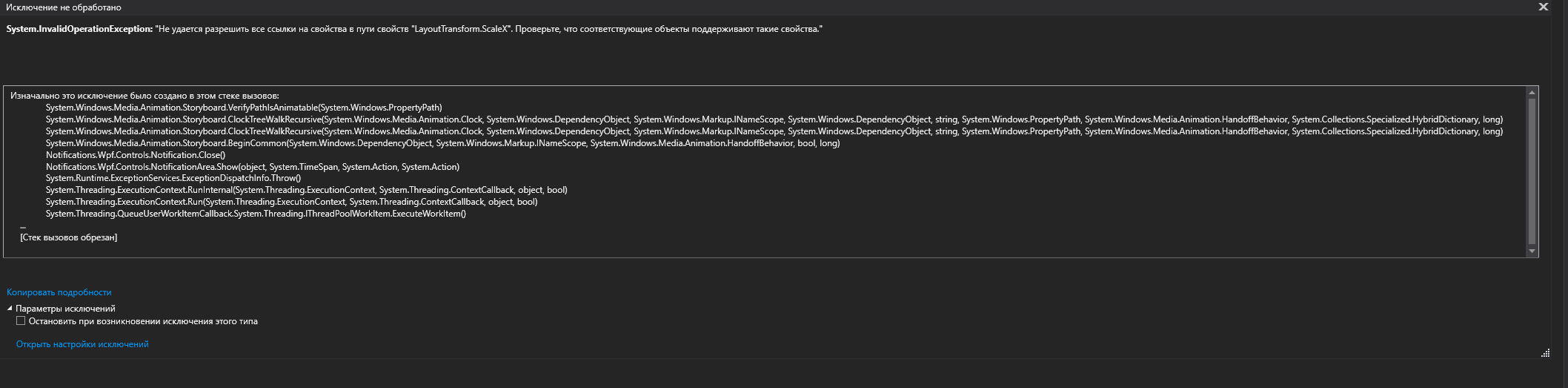
Hey. Error in Autodesk Revit. I tried the standard dll and update.dll. Tell me what to do?

Are you able to update this dll in Visual Studio Market with fixing this problem ?
Your might want to try a different branch. I took one of the branches and wrapped it in a nuget package. https://www.nuget.org/packages/Notifications.Wpf.Updated/
When will this fix be merged in master?
