
dependency-track
 dependency-track copied to clipboard
 DependencyTrack
Projects not kept while upgrading dependencytrack version
The defect may already be reported! Please search for the defect before creating one.
Current Behavior:
I am currently using the v. 4.2.2 with the attached docker-compose.yml and I would like to upgrade to v. 4.4.2 keeping all my projects
Steps to Reproduce:
1)docker-compose down 2)modify image version like the following : image: dependencytrack/apiserver:4.4.2 3)docker-compose up -> application is restarted but completely losing all projects and settings
Expected Behavior:
Keep existing properties
Environment:
- Dependency-Track Version: 4.4.2
- Distribution: Docker
- BOM Format & Version:
- Database Server: PostgreSQL
- Browser:
Additional Details:
See attached docker-compose.yml:
version: '3.7' volumes: dependency-trackvol: dt_postgresql_data:
services: dtrackdb: image: postgres:10.5 environment: POSTGRES_USER: dtrack POSTGRES_PASSWORD: dtrack volumes: - /root/deptrack/data:/var/lib/postgresql/data dtrack-apiserver: image: dependencytrack/apiserver:4.2.2 environment: # Database Properties - 'ALPINE_DATABASE_MODE:external' - 'ALPINE_DATABASE_URL:jdbc:postgresql://dtrackdb:5432/dtrack' - 'ALPINE_DATABASE_DRIVER:org.postgresql.Driver' - 'ALPINE_DATABASE_USERNAME:dtrack' - 'ALPINE_DATABASE_PASSWORD:dtrack' # Optional Cross-Origin Resource Sharing (CORS) Headers - 'ALPINE_CORS_ENABLED=true' - 'ALPINE_CORS_ALLOW_ORIGIN=' - 'ALPINE_CORS_ALLOW_METHODS=' - 'ALPINE_CORS_ALLOW_HEADERS=Origin, Content-Type, Authorization, X-Requested-With, Content-Length, Accept, Origin, X-Api-Key, X-Total-Count, *' - 'ALPINE_CORS_EXPOSE_HEADERS=Origin, Content-Type, Authorization, X-Requested-With, Content-Length, Accept, Origin, X-Api-Key, X-Total-Count' - 'ALPINE_CORS_ALLOW_CREDENTIALS=true' - 'ALPINE_CORS_MAX_AGE=3600' deploy: resources: limits: memory: 13288m reservations: memory: 8192m restart_policy: condition: on-failure ports: - '8081:8080' depends_on: - dtrackdb volumes: - /root/deptrack/data2:/data' restart: unless-stopped
dtrack-frontend: image: dependencytrack/frontend depends_on: - dtrack-apiserver environment: - API_BASE_URL=http://localhost:8081 ports: - "8080:8080" restart: unless-stopped

Could you specify
application is restarted but completely losing all projects and settings
a little more?
- Are there any errors in the logs when restarting?
- Can you login?
- Have you looked into the database to verify whether your data is still there?
dtrack-apiserver:
  image: dependencytrack/apiserver:4.2.2
  environment:
    # Database Properties
    - 'ALPINE_DATABASE_MODE:external'
    - 'ALPINE_DATABASE_URL:jdbc:postgresql://dtrackdb:5432/dtrack'
    - 'ALPINE_DATABASE_DRIVER:org.postgresql.Driver'
    - 'ALPINE_DATABASE_USERNAME:dtrack'
    - 'ALPINE_DATABASE_PASSWORD:dtrack'
I fear that may be an invalid configuration. Environment variables have to be provided as KEY=VALUE (see https://docs.docker.com/compose/compose-file/compose-file-v3/#environment), but your configuration suggests that you used a colon (KEY:VALUE) instead. It's possible that you have been running on the embedded H2 database the whole time.

Hi, I can login but the application is empty : no projects and admin password is expired like the first time I run the previous version Below an extract of the first part of backend logs: docker logs 085de8348f4b 14:41:37.369 INFO [Config] -------------------------------------------------------------------------------- 14:41:37.372 INFO [Config] OS Name: Linux 14:41:37.372 INFO [Config] OS Version: 3.10.0-1160.el7.x86_64 14:41:37.373 INFO [Config] OS Arch: amd64 14:41:37.376 INFO [Config] CPU Cores: 4 14:41:37.389 INFO [Config] Max Memory: 10.4 GB (11,147,935,744.0 bytes) 14:41:37.389 INFO [Config] Java Vendor: AdoptOpenJDK 14:41:37.391 INFO [Config] Java Version: 11.0.10+9 14:41:37.391 INFO [Config] Java Home: /opt/java/openjdk 14:41:37.391 INFO [Config] Java Temp: /tmp 14:41:37.391 INFO [Config] User: dtrack 14:41:37.392 INFO [Config] User Home: /data/ 14:41:37.392 INFO [Config] -------------------------------------------------------------------------------- 14:41:37.392 INFO [Config] Initializing Configuration 14:41:37.392 INFO [Config] System property alpine.application.properties not specified 14:41:37.392 INFO [Config] Loading application.properties from classpath 14:41:37.400 INFO [Config] -------------------------------------------------------------------------------- 14:41:37.400 INFO [Config] Application: Dependency-Track 14:41:37.400 INFO [Config] Version: 4.2.2 14:41:37.401 INFO [Config] Built-on: 2021-05-07T04:56:54Z 14:41:37.401 INFO [Config] -------------------------------------------------------------------------------- 14:41:37.401 INFO [Config] Framework: Alpine 14:41:37.401 INFO [Config] Version : 1.9.2 14:41:37.401 INFO [Config] Built-on: 2021-03-21T02:06:11Z 14:41:37.401 INFO [Config] -------------------------------------------------------------------------------- 14:41:37.412 INFO [RequirementsVerifier] Initializing requirements verifier 14:41:37.413 INFO [UpgradeInitializer] Initializing upgrade framework 14:41:38.862 INFO [PersistenceManagerFactory] Initializing persistence framework 14:41:39.163 INFO [EventSubsystemInitializer] Initializing asynchronous event subsystem 14:41:39.250 INFO [DefaultObjectGenerator] Initializing default object generator 14:41:39.261 INFO [DefaultObjectGenerator] Dispatching event to reindex licenses
Just a question from psql I see what is shown in the attached image
where should be dependency track tables?
 ?
?
Connect to the dtrack database:
\c dtrack
Verify you're on the right database via \dt, printing all tables within it:
dtrack=# \dt
                      List of relations
 Schema |                Name                | Type  | Owner
--------+------------------------------------+-------+--------
 public | ANALYSIS                           | table | dtrack
 public | ANALYSISCOMMENT                    | table | dtrack
 public | APIKEY                             | table | dtrack
 public | APIKEYS_TEAMS                      | table | dtrack
 public | BOM                                | table | dtrack
 public | COMPONENT                          | table | dtrack
 public | COMPONENTANALYSISCACHE             | table | dtrack
 public | COMPONENTS_VULNERABILITIES         | table | dtrack
...
To see if there are any projects:
dtrack=# select "UUID","NAME","VERSION" FROM "PROJECT";
                 UUID                 |     NAME     | VERSION
--------------------------------------+--------------+---------
 7a36e5c0-9f09-42dd-b401-360da56c2abe | Acme Example | 1.0.0
 47cd3d7a-8398-45a2-9f50-58670f250438 | Keycloak     | 10.0.2
(2 rows)
There's something not working as expected: give the attached docker-compose-yml, I obtain the following results:
- i tried to view postgres contents but it seems to be empty: [root@dev-pcvdeptrack .dependency-track]# docker exec -it 57232667a3a0 bash root@57232667a3a0:/# psql -h localhost -p 5432 -U dtrack -W Password for user dtrack: psql (10.5 (Debian 10.5-2.pgdg90+1)) Type "help" for help. dtrack=# \l List of databases Name | Owner | Encoding | Collate | Ctype | Access privileges -----------+--------+----------+------------+------------+------------------- dtrack | dtrack | UTF8 | en_US.utf8 | en_US.utf8 | postgres | dtrack | UTF8 | en_US.utf8 | en_US.utf8 | template0 | dtrack | UTF8 | en_US.utf8 | en_US.utf8 | =c/dtrack + | | | | | dtrack=CTc/dtrack template1 | dtrack | UTF8 | en_US.utf8 | en_US.utf8 | =c/dtrack + | | | | | dtrack=CTc/dtrack (4 rows)
dtrack=# \c dtrack Password for user dtrack: You are now connected to database "dtrack" as user "dtrack". dtrack=# \dt Did not find any relations.
2)inside the docker volume /var/lib/docker/volumes/deptrack_dependency-trackvol/_data/.dependency-track found a 500MB H2 db(db.mv.db) that seems to be dependencytrack DB ( I recognized some of my past projects) [root@dev-pcvdeptrack .dependency-track]# ls -la total 523404 drwxr-sr-x. 5 1000 1000 175 Nov 16 21:20 . drwxr-sr-x. 3 1000 1000 51 Nov 17 09:27 .. -rw-r--r--. 1 1000 1000 533368832 Dec 3 19:39 db.mv.db -rw-r--r--. 1 1000 1000 38934 Dec 3 19:09 db.trace.db -rw-r--r--. 1 1000 1000 6376 Dec 2 18:50 dependency-track-audit.log -rw-r--r--. 1 1000 1000 2278583 Dec 3 19:39 dependency-track.log -rw-r--r--. 1 1000 1000 36 Nov 16 21:19 id.system drwxr-sr-x. 8 1000 1000 109 Nov 22 14:10 index drwxr-sr-x. 2 1000 1000 61 Nov 16 21:19 keys drwxr-sr-x. 2 1000 1000 4096 Nov 18 19:01 nist
My assumption is that dependencytrack is using internal H2 DB instead of using the postgres container, now I wonder a)is it a docker-compose or an application issue ? b)if it's a docker-compose issue how can I change the docker-compose.yml in order to create tables inside postgres ? c)is there any chance to migrate data from H2 DB to postgres?
a)is it a docker-compose or an application issue ?
As I pointed out in https://github.com/DependencyTrack/dependency-track/issues/1620#issuecomment-1126157895, it's an issue with your compose file. More specifically, the format in which you pass environment variables.
b)if it's a docker-compose issue how can I change the docker-compose.yml in order to create tables inside postgres ?
Change
dtrack-apiserver:
  image: dependencytrack/apiserver:4.2.2
  environment:
    # Database Properties
    - 'ALPINE_DATABASE_MODE:external'
    - 'ALPINE_DATABASE_URL:jdbc:postgresql://dtrackdb:5432/dtrack'
    - 'ALPINE_DATABASE_DRIVER:org.postgresql.Driver'
    - 'ALPINE_DATABASE_USERNAME:dtrack'
    - 'ALPINE_DATABASE_PASSWORD:dtrack'
to
dtrack-apiserver:
  image: dependencytrack/apiserver:4.2.2
  environment:
    # Database Properties
    - 'ALPINE_DATABASE_MODE=external'
    - 'ALPINE_DATABASE_URL=jdbc:postgresql://dtrackdb:5432/dtrack'
    - 'ALPINE_DATABASE_DRIVER=org.postgresql.Driver'
    - 'ALPINE_DATABASE_USERNAME=dtrack'
    - 'ALPINE_DATABASE_PASSWORD=dtrack'
c)is there any chance to migrate data from H2 DB to postgres?
There is, but it's non-trivial and I haven't ever done it myself. It would involve dumping the data from H2 and importing it into Postgres. However, because the schemas are a little different for each database technology, you'd have to ensure that the data you're trying to import is compatible with the schema in Postgres.
If you can, start from scratch.
OK ,thanks for the help now I recreated from scratch and update API token in jenkins plugin but now the owasp-dependency-track (v.4.0.0) is not retrieving projects id from dependencytrack.See images below.

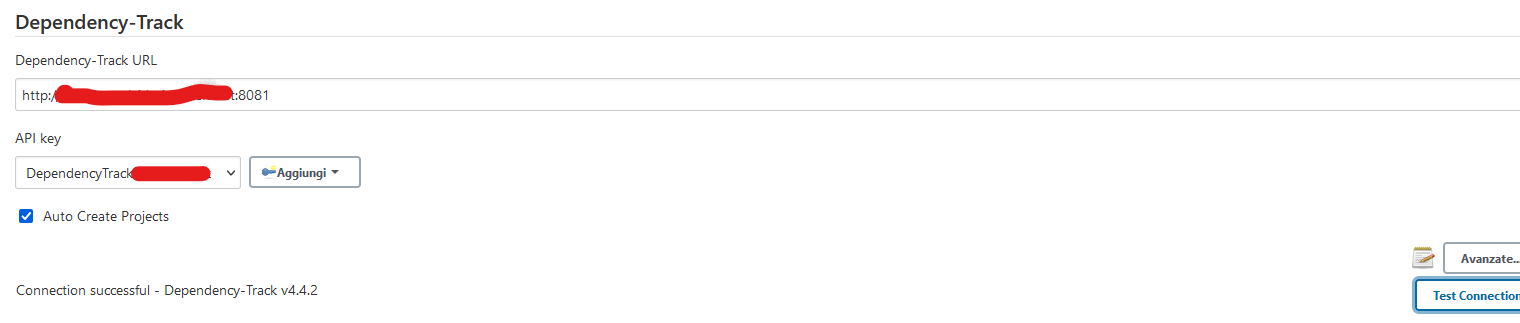 Any hint about this?
Well, are there any projects in your new DT instance?
I'm not familiar with the Jenkins plugin, you may want to ask in the plugin's project: https://github.com/jenkinsci/dependency-track-plugin