

 CommunityToolkit
[Question] Red border always visible
Hello, I have a problem with validations. The validation border is still present after performing the validation of the property. I work with WPF
I create a course list (with 2 properties: start and end). For each race I pass the course list as a parameter.
Course class :
    public class Course : ObservableValidator
    {
        #region Fields

        private IEnumerable<Course> _courses;

        private int _start;

        private int _end;

        #endregion

        #region Properties

        [CustomValidation(typeof(Course), nameof(ValidateStart))]
        public int Start
        {
            get { return _start; }
            set
            {
                SetProperty(ref this._start, value, true);
                // ValidateProperty(this.End, nameof(End));
                ValidateCourses();
            }
        }

        [CustomValidation(typeof(Course), nameof(ValidateEnd))]
        public int End
        {
            get { return _end; }
            set
            {
                SetProperty(ref this._end, value, true);
                // ValidateProperty(this.Start, nameof(Start));
                ValidateCourses();
            }
        }

        #endregion

        #region Constructors

        public Course(IEnumerable<Course> courses)
        {
            _courses = courses;
                ValidateCourses();
        }

        #endregion

        #region Methods

        private void ValidateCourses()
        {
            foreach (var course in _courses)
                course.ValidateAllProperties();
        }

        #endregion

        #region Validations

        public static ValidationResult ValidateStart(int start, ValidationContext context)
        {
            Course course = (Course)context.ObjectInstance;

            List<Course> courses = course._courses.ToList();

            List<string> results = new List<string>();

            int index = courses.IndexOf(course);

            if (index == 0 && start != 0)
                results.Add("Start must be equal to zero");

            if (start >= course.End)
                results.Add("Start must be less end");

            if (index != -1 && index - 1 != -1)
                if (start != courses[index - 1].End)
                    results.Add("Start must be equal previous end");

            if (results.Count == 0)
            {
                return ValidationResult.Success;
            }

            return new ValidationResult(string.Join("\n", results), new List<string>() { nameof(Course.Start) });
        }

        public static ValidationResult ValidateEnd(int end, ValidationContext context)
        {
            Course course = (Course)context.ObjectInstance;

            List<Course> courses = course._courses.ToList();

            List<string> results = new List<string>();

            int index = courses.IndexOf(course);

            if (course.Start >= end)
                results.Add("End must be greater Start");

            if (index + 1 <= courses.Count - 1)
                if (end != courses[index + 1].Start)
                    results.Add("End must be equal next Start");

            if (results.Count == 0)
            {
                return ValidationResult.Success;
            }

            return new ValidationResult(string.Join("\n", results), new List<string>() { nameof(Course.End) });
        }

        #endregion
    }
MainViewModel class :
 public class MainViewModel : ObservableObject
    {
        #region Fields

        private ObservableCollection<Course> _courses = new ObservableCollection<Course>();

        #endregion

        #region Properties

        public ObservableCollection<Course> Courses
        {
            get { return _courses; }
            set { _courses = value; }
        }

        #endregion

        #region Constructors

        public MainViewModel()
        {
            CreateCourses();
        }

        #endregion

        #region Methods

        private void CreateCourses()
        {
            Courses.Add(new Course(Courses)
            {
                Start = 0,
                End = 10
            });
            Courses.Add(new Course(Courses)
            {
                Start = 11,
                End = 20
            });
            Courses.Add(new Course(Courses)
            {
                Start = 21,
                End = 30
            });
            Courses.Add(new Course(Courses)
            {
                Start = 31,
                End = 30
            });
        }

        #endregion
    }
MainWindow class
<DataGrid ItemsSource="{Binding Courses, Mode=OneWay, UpdateSourceTrigger=PropertyChanged}"
                  AutoGenerateColumns="False">
            <DataGrid.Resources>
                <Style x:Key="errorStyle" TargetType="{x:Type TextBlock}">
                    <Style.Triggers>
                        <Trigger Property="Validation.HasError" Value="True">
                            <Setter Property="ToolTip"
                                    Value="{Binding RelativeSource={RelativeSource Self},
                                Path=(Validation.Errors)[0].ErrorContent}"/>
                        </Trigger>
                    </Style.Triggers>
                </Style>
            </DataGrid.Resources>
            <DataGrid.Columns>
                <DataGridTextColumn Header="Start TextColumn"
                                    ElementStyle="{StaticResource errorStyle}"
                                    Binding="{Binding Start, ValidatesOnExceptions=True}"/>
                <DataGridTextColumn Header="End TextColumn"
                                    ElementStyle="{StaticResource errorStyle}"
                                    Binding="{Binding End, ValidatesOnExceptions=True}"/>

                <DataGridTemplateColumn Header="Start TemplateColumn (TextBox)">
                    <DataGridTemplateColumn.CellTemplate>
                        <DataTemplate>
                            <TextBox Text="{Binding Start, Mode=TwoWay, UpdateSourceTrigger=PropertyChanged, ValidatesOnNotifyDataErrors=True}">
                                <TextBox.Style>
                                    <Style TargetType="TextBox">
                                        <Style.Triggers>
                                            <Trigger Property="Validation.HasError" Value="true">
                                                <Setter Property="ToolTip" Value="{Binding (Validation.Errors)[0].ErrorContent, RelativeSource={RelativeSource Self}}"/>
                                            </Trigger>
                                        </Style.Triggers>
                                    </Style>
                                </TextBox.Style>
                            </TextBox>
                        </DataTemplate>
                    </DataGridTemplateColumn.CellTemplate>
                </DataGridTemplateColumn>
                <DataGridTemplateColumn Header="End TemplateColumn (TextBox)">
                    <DataGridTemplateColumn.CellTemplate>
                        <DataTemplate>
                            <TextBox Text="{Binding End, Mode=TwoWay, UpdateSourceTrigger=PropertyChanged, ValidatesOnNotifyDataErrors=True}">
                                <TextBox.Style>
                                    <Style TargetType="TextBox">
                                        <Style.Triggers>
                                            <Trigger Property="Validation.HasError" Value="true">
                                                <Setter Property="Validation.ErrorTemplate">
                                                    <Setter.Value>
                                                        <ControlTemplate>
                                                            <AdornedElementPlaceholder/>
                                                        </ControlTemplate>
                                                    </Setter.Value>
                                                </Setter>
                                                <Setter Property="ToolTip" Value="{Binding (Validation.Errors)[0].ErrorContent, RelativeSource={RelativeSource Self}}"/>
                                            </Trigger>
                                        </Style.Triggers>
                                    </Style>
                                </TextBox.Style>
                            </TextBox>
                        </DataTemplate>
                    </DataGridTemplateColumn.CellTemplate>
                </DataGridTemplateColumn>
            </DataGrid.Columns>
        </DataGrid>
When I edit a property, I check all the properties in the course list.
My problem is that the border still appears even though the property returned ValidationResult.Success
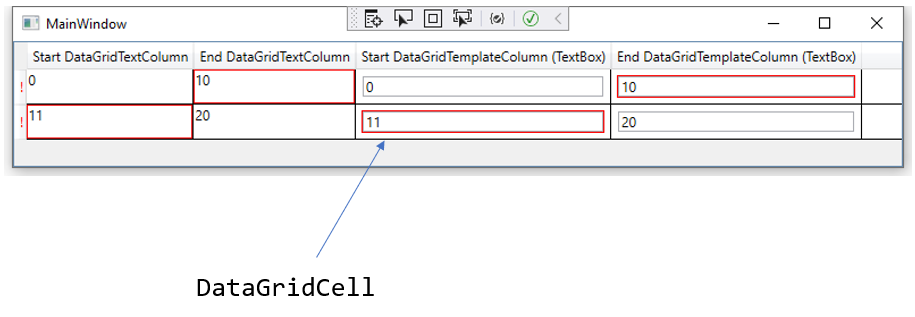
we can see that in the image below

I attach the test project. ProjetTest.zip
Please can you help me

Hello grizoood, thank you for your interest in Windows Community Toolkit!
I have automatically added a "needs triage" label to help get things started. Our team will analyze and investigate the issue, and escalate it to the relevant team if possible.. Other community members may also answer the question and provide feedback 🙌

Thanks for providing more details @grizoood, didn't see this initially when I responded to your discussion here.
Going to transfer this to the .NET Community Toolkit repo where the MVVM Toolkit lives. FYI @Sergio0694

Hi @grizoood! Would you be able to provide us a minimal repro? That would help us a lot to investigate this. By that I mean the minimum possible amount of code that can reproduce the issue (eg. literally just a single control in XAML with just a line for a binding, and the smallest viewmodel you can get, with like a single property and the minimum amount of validation possible, no comments, no extra code, etc.). Additionally, does the issue only happen with that custom setter you have, or can you also repro with eg. a TextBlock binding its text? Thanks! 🙂

Sorry for the late reply, I put the issue on hold.
Validation works if I add a null style to hide cell validation:
Validation.ErrorTemplate" Value="{x:Null}"
<DataGridTemplateColumn.CellStyle>
    <Style TargetType="{x:Type DataGridCell}">
        <Style.Resources>
            <Style TargetType="{x:Type ContentPresenter}">
                <Setter Property="Validation.ErrorTemplate" Value="{x:Null}"/>
            </Style>
        </Style.Resources>
    </Style>
</DataGridTemplateColumn.CellStyle>
Before: I have 2 borders (DataGridCell and TextBox)

Après: I have 1 border (TextBox)
<DataGridTemplateColumn Header="Start DataGridTemplateColumn (TextBox)">
    <DataGridTemplateColumn.CellStyle>
        <Style TargetType="{x:Type DataGridCell}">
            <Style.Resources>
                <Style TargetType="{x:Type ContentPresenter}">
                    <Setter Property="Validation.ErrorTemplate" Value="{x:Null}"/>
                </Style>
            </Style.Resources>
        </Style>
    </DataGridTemplateColumn.CellStyle>
    <DataGridTemplateColumn.CellTemplate>
        <DataTemplate>
            <TextBox Text="{Binding Start, UpdateSourceTrigger=PropertyChanged}" Margin="5">
                <TextBox.Style>
                    <Style TargetType="TextBox">
                        <Style.Triggers>
                            <Trigger Property="Validation.HasError" Value="true">
                                <Setter Property="ToolTip" Value="{Binding (Validation.Errors)/ErrorContent, RelativeSource={RelativeSource Self}}"/>
                            </Trigger>
                        </Style.Triggers>
                    </Style>
                </TextBox.Style>
            </TextBox>
        </DataTemplate>
    </DataGridTemplateColumn.CellTemplate>
</DataGridTemplateColumn>
I didn't have the problem with the DataGridTextColumn because I was directly modifying the cell style of the DataGridTextColumn but not for the DataGridTemplateColumn.