
mac-precision-touchpad
 mac-precision-touchpad copied to clipboard
 imbushuo
Support for 13" inch Macbook Pro Mid-2010 (MacBookPro7,1)??
Not sure if this is the right place to ask this but...
Asking for support on this specific macbook pro, have tried many of the drivers and none have worked so far. It doesn't seem to be listed on the supported devices either. Does anyone happen to have the same model?

I don't think I implemented support for MacBookPro7,1. What's your device VID/PID?

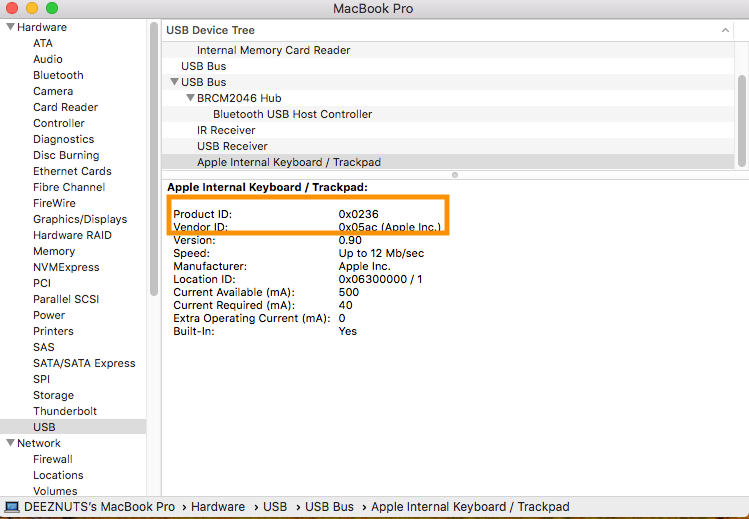
Not sure if I should open another ticket for this, but I also have a mid-2010 MacBook Pro, but mine is a 15" (MacBookPro6,2)

0x0236 is defined in the source but have not yet exposed via the INF file. I think I can add support for it shortly. May I know the physical dimension of the trackpad?
Please try https://ligstd.visualstudio.com/Apple%20PTP%20Trackpad/_build/results?buildId=3806&view=results and see if that works. If so, I am going to close this issue and push a new release.
Hey there! Could you also add support for the White Macbook 2010 (13'' not PRO), the size is the same and all but my product ID is: 0x0237 Thanks!

Hello, I apologize for the very delayed response.
I'm having a bit of a trouble with installing the build you just sent. I went and downloaded the files from the commit, right clicked and installed the inf file from src>AmtPtpDeviceUniversalPkg and I get the error "The third-party INF does not contain digital signature information."
In the first I'm not exactly sure how to install the build so I'm not even sure if I'm doing it right.
Please download the CI package instead of the commit itself. CI packages are signed.
Thanks, Bingxing Wang
From: anuscleaner [email protected] Sent: Saturday, May 16, 2020 9:49 PM To: imbushuo/mac-precision-touchpad [email protected] Cc: Bingxing Wang [email protected]; Assign [email protected] Subject: Re: [imbushuo/mac-precision-touchpad] Support for 13" inch Macbook Pro Mid-2010 (MacBookPro7,1)?? (#254)
Hello, I apologize for the very delayed response.
I'm having a bit of a trouble with installing the build you just sent. I went and downloaded the files from the commit, right clicked and installed the inf file from src>AmtPtpDeviceUniversalPkg and I get the error "The third-party INF does not contain digital signature information."
In the first I'm not exactly sure how to install the build so I'm not even sure if I'm doing it right.
— You are receiving this because you were assigned. Reply to this email directly, view it on GitHubhttps://github.com/imbushuo/mac-precision-touchpad/issues/254#issuecomment-629742885, or unsubscribehttps://github.com/notifications/unsubscribe-auth/ABP6IQM3GOQIEZX2T2YCSLTRR5UD5ANCNFSM4KDO2DDQ.
Pardon my ignorance, how exactly do I do that? Have been looking around trying to download it, the only way I've been able to download something so far was from GitHub, from the commit I mentioned. I'm not really sure what you mean by CI package. Tried to look around the site you sent and I wasn't able to find a way to download this CI package but the only thing I was able to download from it were the logs.
Pick a recent commit with green check mark. Click the check mark, you will see a link to AzDevOps. Then download packages from “artifacts” section. Use the amd64 artifact: there’s an option to download all files as a zip package.
Get Outlook for iOShttps://aka.ms/o0ukef
From: anuscleaner [email protected] Sent: Sunday, May 17, 2020 1:57:02 AM To: imbushuo/mac-precision-touchpad [email protected] Cc: Bingxing Wang [email protected]; Assign [email protected] Subject: Re: [imbushuo/mac-precision-touchpad] Support for 13" inch Macbook Pro Mid-2010 (MacBookPro7,1)?? (#254)
Pardon my ignorance, how exactly do I do that? Have been looking around trying to download it, the only way I've been able to download something so far was from GitHub, from the commit I mentioned. I'm not really sure what you mean by CI package. Tried to look around the site you sent and I wasn't able to find a way to download this CI package but the only thing I was able to download from it were the logs.
— You are receiving this because you were assigned. Reply to this email directly, view it on GitHubhttps://github.com/imbushuo/mac-precision-touchpad/issues/254#issuecomment-629747914, or unsubscribehttps://github.com/notifications/unsubscribe-auth/ABP6IQLJIOZA5CI24Y6CANTRR54C5ANCNFSM4KDO2DDQ.
I clicked on the artifacts and apparently no feeds are found. Also tried searching for amd64 on the search box, still nothing.
[cid:e79a45e9-13b6-4ef7-97e1-fef81a573850] [cid:f4a7dd4c-2d15-4187-a9e1-b6a84e993b20]
Thanks, Bingxing Wang
From: anuscleaner [email protected] Sent: Saturday, May 16, 2020 11:13 PM To: imbushuo/mac-precision-touchpad [email protected] Cc: Bingxing Wang [email protected]; Assign [email protected] Subject: Re: [imbushuo/mac-precision-touchpad] Support for 13" inch Macbook Pro Mid-2010 (MacBookPro7,1)?? (#254)
I clicked on the artifacts and apparently no feeds are found. Also tried searching for amd64 on the search box, still nothing.
— You are receiving this because you were assigned. Reply to this email directly, view it on GitHubhttps://github.com/imbushuo/mac-precision-touchpad/issues/254#issuecomment-629749264, or unsubscribehttps://github.com/notifications/unsubscribe-auth/ABP6IQKNWOJKNGCUEJ66TPDRR557NANCNFSM4KDO2DDQ.
Hi there, I have a MacBookPro6,2, the track pad product id, vendor id, and phsical dimensions are the same as anuscleaner's above.
I tried installing from the artifacts of the build you posted by right clicking the AmtPtpDevice.inf file and clicking install. But it didn't seem to have any effect on the trackpad. How do we know if it has installed correctly and is working?
Thanks again for your work
If it is successfully installed, you should see a Precision Touchpad device under the HID category.
Ok, in that case it didn't install correctly.
I had another 3rd party touchpad driver installed Trackpad++ so I don't know if that was causing issues. I'm not sure how to uninstall that first.
Yes, you should uninstall Trackpad++ first. Press Command key and R key. You should see a dialog box in the bottom left corner of the screen. Type in 'appwiz.cpl' and press enter. Locate Trackpad++ in the list of programs and uninstall it. Then perform the installation of this trackpad using the latest release available. Hope this helps you out.
