

 imapsync
200GB+ memory usage on Mac M1
Title says it all really. I've installed imapsync with brew.
Syncing seems to work fine, but process keeps getting killed. Investigation shows it using 200GB+ RAM in Activity Monitor before getting killed.
Anyone else can confirm this problem? Brew seems to install the perl packages, so I assume they are up-to-date.

That's strange, memory usage us usually 500 MB. What gives a run with:
imapsync ... --debugmemory

At the first copying of messages:
Memory consumption at C1: 400319.5 MiB
Memory consumption at M1: 400319.5 MiB
Memory consumption at M2: 400748.8 MiB
Memory consumption at M3: 400748.8 MiB
Memory consumption at C2: 400748.8 MiB
Memory consumption at A1: 400748.8 MiB
And this number increases slowly, sometimes at 100MiB per message, sometimes no increase for a while...
When terminating with ctrl+c:
++++ Statistics
Transfer started on                     : dinsdag 21 december 2021-12-21 09:57:33 +0100 CET
Transfer ended on                       : dinsdag 21 december 2021-12-21 10:01:02 +0100 CET
Transfer time                           : 208.5 sec
Folders synced                          : 7/63 synced
Messages transferred                    : 148
Messages skipped                        : 32503
Messages found duplicate on host1       : 24
Messages found duplicate on host2       : 0
Messages found crossduplicate on host2  : 0
Messages void (noheader) on host1       : 0
Messages void (noheader) on host2       : 0
Messages found in host1 not in host2    : 815 messages
Messages found in host2 not in host1    : 0 messages
Messages deleted on host1               : 0
Messages deleted on host2               : 0
Total bytes transferred                 : 38876055 (37.075 MiB)
Total bytes skipped                     : 4475073965 (4.168 GiB)
Message rate                            : 0.7 messages/s
Average bandwidth rate                  : 182.1 KiB/s
Reconnections to host1                  : 2
Reconnections to host2                  : 2
Memory consumption at the end           : 437732.6 MiB (started with 399476.0 MiB)
Use of uninitialized value in join or string at /opt/homebrew/Cellar/imapsync/2.140/libexec/bin/imapsync line 14136.
Use of uninitialized value in join or string at /opt/homebrew/Cellar/imapsync/2.140/libexec/bin/imapsync line 14136.
Use of uninitialized value in join or string at /opt/homebrew/Cellar/imapsync/2.140/libexec/bin/imapsync line 14136.
Load end is                             :    on 10 cores
CPU time and %cpu                       : 58.38 sec 28.0 %cpu 2.8 %allcpus
Biggest message transferred             : 12731377 bytes (12.142 MiB)
Memory/biggest message ratio            : 36052.3
Start difference host2 - host1          : -14265 messages, -5036059133 bytes (-4.690 GiB)
Final difference host2 - host1          : NA messages, NA bytes (NA)
The sync is not finished, there are 815 among 33400 identified messages in host1 that are not on host2.
There is no unidentified message on host1.
The sync is strict, all 32585 identified messages in host2 are on host1.
Detected 0 errors

This imapsync is up to date. ( local 2.140 >= official 2.140 )( Use --noreleasecheck to avoid this release check. )
Is is the imapsync script or a binary?
What gives the following:
imapsync --testslive
I build a Mac binary recently, it is https://imapsync.lamiral.info/imapsync_bin_Darwin Have a go on it
I installed it through brew, mac package manager. It seems to build from source: https://github.com/Homebrew/homebrew-core/blob/HEAD/Formula/imapsync.rb
Testslive gives following:
++++ Statistics
Transfer started on                     : dinsdag 21 december 2021-12-21 20:06:46 +0100 CET
Transfer ended on                       : dinsdag 21 december 2021-12-21 20:06:49 +0100 CET
Transfer time                           : 2.2 sec
Folders synced                          : 1/1 synced
Messages transferred                    : 0
Messages skipped                        : 268
Messages found duplicate on host1       : 0
Messages found duplicate on host2       : 329
Messages found crossduplicate on host2  : 0
Messages void (noheader) on host1       : 0
Messages void (noheader) on host2       : 0
Messages found in host1 not in host2    : 0 messages
Messages found in host2 not in host1    : 61 messages
Messages deleted on host1               : 0
Messages deleted on host2               : 0
Total bytes transferred                 : 0 (0.000 KiB)
Total bytes skipped                     : 109068 (106.512 KiB)
Message rate                            : 0.0 messages/s
Average bandwidth rate                  : 0.0 KiB/s
Reconnections to host1                  : 0
Reconnections to host2                  : 0
Memory consumption at the end           : 399394.5 MiB (started with 399339.0 MiB)
Use of uninitialized value in join or string at /opt/homebrew/Cellar/imapsync/2.140/libexec/bin/imapsync line 14136.
Use of uninitialized value in join or string at /opt/homebrew/Cellar/imapsync/2.140/libexec/bin/imapsync line 14136.
Use of uninitialized value in join or string at /opt/homebrew/Cellar/imapsync/2.140/libexec/bin/imapsync line 14136.
Load end is                             :    on 10 cores
CPU time and %cpu                       : 0.51 sec 22.7 %cpu 2.3 %allcpus
Biggest message transferred             : 0 bytes (0.000 KiB)
Memory/biggest message ratio            : NA
Start difference host2 - host1          : 390 messages, 161045 bytes (157.271 KiB)
Final difference host2 - host1          : 390 messages, 161045 bytes (157.271 KiB)
The sync looks good, all 268 identified messages in host1 are on host2.
There is no unidentified message on host1.
The sync is not strict, there are 61 among 329 identified messages in host2 that are not on host1. Use --delete2 and sync again to delete them and have a strict sync.
Detected 0 errors

This imapsync is up to date. ( local 2.140 >= official 2.140 )( Use --noreleasecheck to avoid this release check. )
Homepage: https://imapsync.lamiral.info/
# Entering tests_live_result()
Live tests ended successfully
# Leaving  tests_live_result()
Exiting with return value 0 (EX_OK: successful termination) 0/50 nb_errors/max_errors PID 50115
When I run the binary you linked I get very similar output:
++++ Statistics
Transfer started on                     : dinsdag 21 december 2021-12-21 20:16:22 +0100 CET
Transfer ended on                       : dinsdag 21 december 2021-12-21 20:16:25 +0100 CET
Transfer time                           : 3.4 sec
Folders synced                          : 1/1 synced
Messages transferred                    : 0
Messages skipped                        : 268
Messages found duplicate on host1       : 0
Messages found duplicate on host2       : 329
Messages found crossduplicate on host2  : 0
Messages void (noheader) on host1       : 0
Messages void (noheader) on host2       : 0
Messages found in host1 not in host2    : 0 messages
Messages found in host2 not in host1    : 61 messages
Messages deleted on host1               : 0
Messages deleted on host2               : 0
Total bytes transferred                 : 0 (0.000 KiB)
Total bytes skipped                     : 109068 (106.512 KiB)
Message rate                            : 0.0 messages/s
Average bandwidth rate                  : 0.0 KiB/s
Reconnections to host1                  : 0
Reconnections to host2                  : 0
Memory consumption at the end           : 33949.9 MiB (started with 33666.8 MiB)
Load end is                             : 4.02 3.29 3.37 on 10 cores
CPU time and %cpu                       : 1.21 sec 35.4 %cpu 35.4 %allcpus
Biggest message transferred             : 0 bytes (0.000 KiB)
Memory/biggest message ratio            : NA
Start difference host2 - host1          : 390 messages, 161045 bytes (157.271 KiB)
Final difference host2 - host1          : 390 messages, 161045 bytes (157.271 KiB)
The sync looks good, all 268 identified messages in host1 are on host2.
There is no unidentified message on host1.
The sync is not strict, there are 61 among 329 identified messages in host2 that are not on host1. Use --delete2 and sync again to delete them and have a strict sync.
Detected 0 errors

This imapsync is up to date. ( local 2.175 >= official 2.140 )( Use --noreleasecheck to avoid this release check. )
Homepage: https://imapsync.lamiral.info/
# Entering tests_live_result()
Maybe this can be of use:
Modules version list ( use --no-modulesversion to turn off printing this Perl modules list ):
Authen::NTLM         1.09
CGI                  4.48
Compress::Zlib       2.084
Crypt::OpenSSL::RSA  0.31
Data::Uniqid         0.12
Digest::HMAC_MD5     1.01
Digest::HMAC_SHA1    1.03
Digest::MD5          2.55
Encode               3.01
Encode::IMAPUTF7     1.05
File::Copy::Recursive 0.45
File::Spec           3.78
Getopt::Long         2.5
HTML::Entities       3.69
IO::Socket           1.40
IO::Socket::INET     1.40
IO::Socket::INET6    2.72
IO::Socket::IP       0.41
IO::Socket::SSL      2.068
IO::Tee              0.65
JSON                 4.03
JSON::WebToken       0.10
LWP                  6.44
MIME::Base64         3.15
Mail::IMAPClient     3.43
Net::Ping            2.71
Net::SSLeay          1.88
Term::ReadKey        2.38
Test::MockObject     1.20200122
Time::HiRes          1.976
URI::Escape          3.31
Unicode::String      2.10
The script --testslive gives for you Memory consumption at the end : 399394.5 MiB (started with 399339.0 MiB)
The binary --testslive gives 10 times less Memory consumption at the end : 33949.9 MiB (started with 33666.8 MiB)
but it is still 10 times the usual memory consumption I get on a Mac Memory consumption at the end : 4311.9 MiB (started with 4295.5 MiB)
On a Linux system I get this: Memory consumption at the end : 131.9 MiB (started with 124.3 MiB)
I'm puzzled for now.
I'm puzzled for now.
The same for me. For now I will run on a VPS to circumvent the issue. Maybe someone else with an M1 Mac can give their experience on this issue and we can work towards finding te problem.
I'm still a beginner on Mac, it's Unix but I have never used it on a daily basis. I investigated and I'm less puzzled now. The way imapsync gets the memory consumption on Linux and Mac is the same for now but the results are not the same at all. imapsync prior to 2.176 gets the Linux and Mac memory consumption with the command
ps -o vsz -p PID
where PID is the imapsync self process ID. This command has a very different result on Linux and Mac, for any process. For example, try this on the command line:
ps -o vsz,rss  -p 1,$$

# Linux result
   VSZ   RSS
 25504  4564
  7996  5420
#Mac result
      VSZ    RSS
 4339688  18752
 4296980   1500
On Linux, vsz and rss values are quite similar, but on Darwin/Mac the difference is huge and the vsz brings nothing relevant. I don't understand what it represents yet.
I added the solution I will take to fix this issue, take rss instead of vsz on Mac. I don't want to mess up past Linux statistics in imapsync log files. Linux ones were good, they stay the same, Mac ones were wrong, they can change.
It doesn't solve your out of memory issue, I guess your problem is something else related to a big folder in an IMAP server. But we moved forward to a better diagnosis made by imapsync. itself. The --debugmemory will look less crasy on Mac starting with imapsync 2.176
imapsync 2.176, source script and mac binary:
- https://imapsync.lamiral.info/imapsync
- https://imapsync.lamiral.info/imapsync_bin_Darwin
Another way to get the memory consumption on Mac/Darwin:
/usr/bin/time -l ./imapsync --testslive
/usr/bin/time -l ./imapsync_bin_Darwin --testslive
This new release indeed shows a more reasonable 116MiB memory usage on my Mac with tests live.
In the meantime I have successfully synced my account using imapsync on a VPS, with reasonable memory usage maxing out around 500MB. So this makes me doubt that the memory usage was caused by messages in this account.
To test again the same contents of this account, I made a new mailbox on the same server as the source. I tried syncing with both the old and the new binary you provided in this thread. In both cases memory usage (in Mac Activity Monitor) was normal, and the process did not get killed. In my previous sync job (to external server), the process got killed after approx. 30 minutes.
My theory now is that it perhaps has something to do with my target server, as the problem does not occur anymore now that I am syncing from/to the same server. Problematic was copying from Mailcow to Runbox, now from Mailcow to Mailcow no problems...
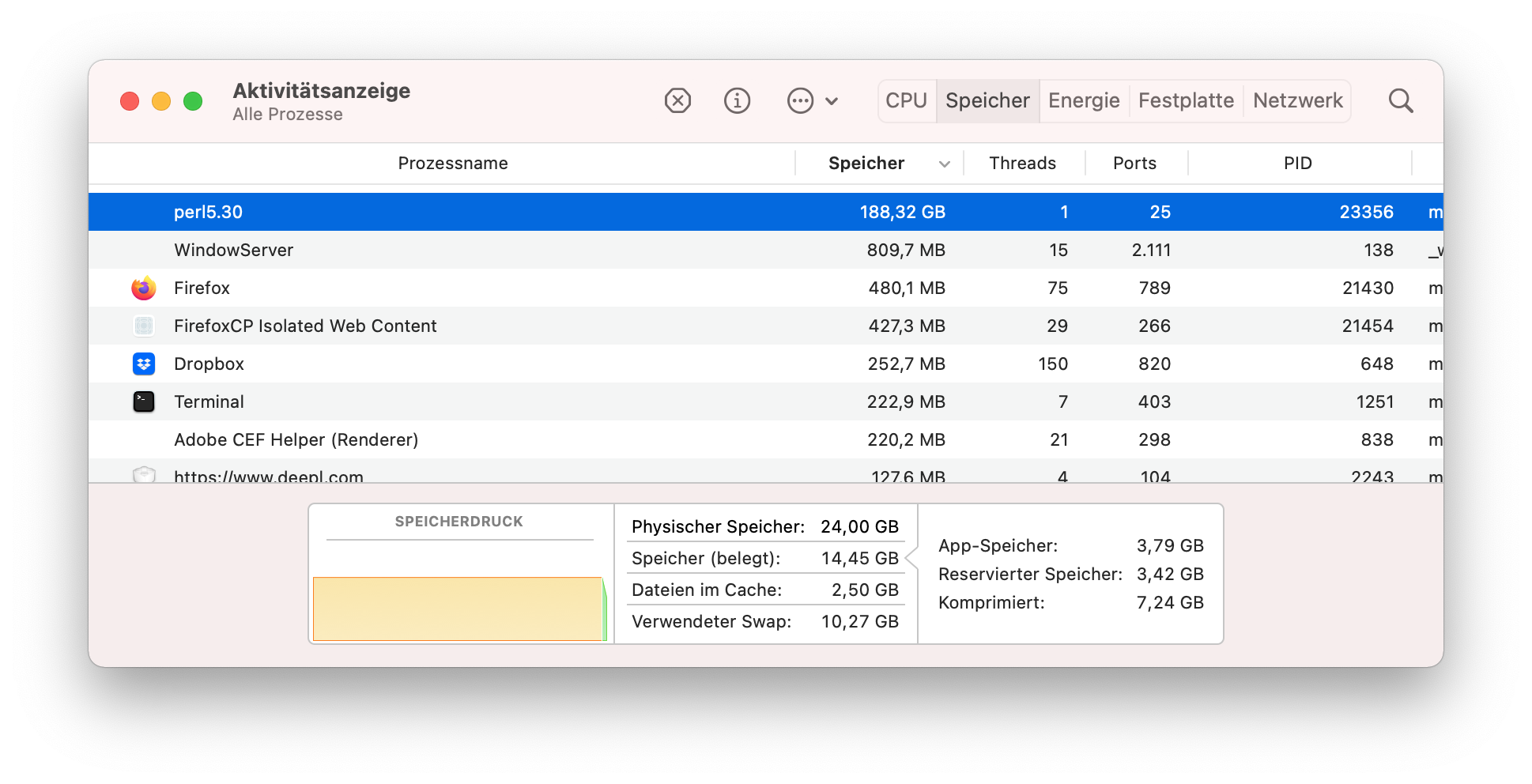 I have the same issue on a 3,3 GHz Quad-Core Intel i5 with 24 GB RAM. Its running on Big Sur with imacsync 2.140 installed via brew.
Last output with parameter --debugmemory:
Memory consumption at C3: 196280.4 MiB
Memory consumption at C1: 196280.4 MiB
Memory consumption at M1: 196280.4 MiB
Memory consumption at M2: 196299.4 MiB
Memory consumption at M3: 196299.4 MiB
Memory consumption at C2: 196299.4 MiB
Memory consumption at A1: 196299.4 MiB

/usr/bin/time -l imapsync --host1 ... --user1 ... --password1 ... -host2 ... --user2 ... --password2 ... --testslive
Command terminated abnormally.
      871.55 real       336.90 user       108.44 sys
         15266902016  maximum resident set size
                   0  average shared memory size
                   0  average unshared data size
                   0  average unshared stack size
            49210707  page reclaims
                   0  page faults
                   0  swaps
                   0  block input operations
                   0  block output operations
            32391110  messages sent
              355436  messages received
                   0  signals received
              128050  voluntary context switches
              228002  involuntary context switches
       1821945390312  instructions retired
       1533895945007  cycles elapsed
        201176809472  peak memory footprint
Can you try this binary https://imapsync.lamiral.info/imapsync_bin_Darwin
With this binary the script looks stable now. The memory comsumption is not higher than 300 MB. Is it possible to get this into the mac package manager brew somehow?
I installed brew and imapsync via brew and I couldn't reproduce this memory issue.
/usr/bin/time -l /usr/local/bin/imapsync --testslive
Here is imapsync 2.178 on host 5521.local, a darwin system with 2.4/3.4 free GiB of RAM
with Perl 5.30.2 and Mail::IMAPClient 3.43
...
Memory consumption at the end           : 206.1 MiB (started with 188.1 MiB)
...
        4.86 real         0.77 user         0.18 sys
           216203264  maximum resident set size
...
           190529536  peak memory footprint
It looks like a normal run on macOS Big Sur 11.5.2 20G95
Today the update to 2.178 arrived, I am now on the same version and have no issues anymore. Thank you very much.
Evers since I switched to Apple m1 (arm64) and Big Sur I have got this memory issue. Currently Perl5.30 is taking up 66 GB of (virtual) Ram. It's absolutely running fine under Intel on an older Mac with El Capitan.

By the way, I also installed via brew using version 2.178. When I use the provided binary mentioned above (multiport intel/arm64) I don't run into memory issues. The working binary has the version 2.177.
When I use the provided binary mentioned above (multiport intel/arm64) I don't run into memory issues. The working binary has the version 2.177.
I fixed that, 2.178 now https://imapsync.lamiral.info/imapsync_bin_Darwin
Version 2.178
/usr/bin/time -l /opt/homebrew/bin/imapsync --testslive
Exiting with return value 0 (EX_OK: successful termination) 0/50 nb_errors/max_errors PID 53101
Removing pidfile /var/folders/xq/rk__57c51v114kvbj9mz2rgr0000gp/T/imapsync.pid
Log file is LOG_imapsync/2022_01_22_13_07_14_792_test1_test2.txt ( to change it, use --logfile filepath ; or use --nolog to turn off logging )
       11.71 real         0.56 user         0.15 sys
           213565440  maximum resident set size
                   0  average shared memory size
                   0  average unshared data size
                   0  average unshared stack size
               20443  page reclaims
                 398  page faults
                   0  swaps
                   0  block input operations
                   0  block output operations
                 216  messages sent
                 831  messages received
                   0  signals received
                 973  voluntary context switches
                 371  involuntary context switches
          4478812876  instructions retired
          1627943497  cycles elapsed
           183912512  peak memory footprint
Am 22.01.2022 um 10:47 schrieb Gilles LAMIRAL @.***>:
What gives :
/usr/bin/time -l /usr/local/bin/imapsync --testslive
— Reply to this email directly, view it on GitHub, or unsubscribe. Triage notifications on the go with GitHub Mobile for iOS or Android. You are receiving this because you commented.
213565440 maximum resident set size
I don't see a memory issue here since 213565440 bytes, ~ 213 MB, is usual.
Can you reproduce the same with the arguments causing the memory issue?
/usr/bin/time -l /opt/homebrew/bin/imapsync ...
That's interesting.. my perl process gets to 33GB (yes, GB!). I think at some point the OS kills the process because of the memory used. I'm using imapsync 2.178 from brew.
It's also true that my inbox is not that small: 382595 messages
UPDATE: the binary you provided seems to work OK, I'm at 460Mb and it has started the transfer.
UPDATE2: it's still working OK but I'm at 880MB. I'm doing various syncs.

I don't know the exact correlation between the number of messages and memory consumption. The more messages in a single folder the more memory footprint. It looks like 10k times the number of messages is a working rule of thumb. So you shouldn't exceed 4GB of memory consumption.
same issue here on mac MacBook Pro (16 Zoll, 2019) with 16gb ram. three imapsync processes via homebrew are killing the whole machine within ~2hours. //edit: switched to binary for now.

I had this problem in a folder with just 17 messages -- too much memory consumed, process killed. Some of the messages had large attachments. Switching to the binary recommended by @gilleslamiral in https://imapsync.lamiral.info/imapsync_bin_Darwin fixed it; 141. MB in use
