

 imWildCat
Leaving the program open for days--continues to consume memory to exhaustion.
The program seems to continue to consume memory until it runs out. Ctrl+C and restarting clears it--and keeps in place proxies found...

If you do not follow the template, this issue can hardly be helpful. https://github.com/imWildCat/scylla/issues/new?template=bug_report.md

Hey.
I apologize for not following the template.
Here it is:
Describe the bug
After running scylla uninterrupted for a few days (say 5, or 120 hours), the memory of the OS goes to 99%. When running 'top', it shows that the process is python (scylla).
To Reproduce
Open scylla, and allow it to run uninterrupted. I usually ran into issues after a couple of days.
Also, this may/or may not be part of the issue: I would run a scraper that would use the scylla API every minute or so. I would also occasionally open up the browser to view the scraped proxies/countries.
Expected behavior That the scylla process would not continue to consume memory to the the point of exhaustion, rendering the OS unusable for both scylla, and other processes.
Screenshots N/A.
Desktop (please complete the following information): Debian Stretch Chrome version = '1.1.4'
Smartphone (please complete the following information): Doesn't apply.
Additional context Really just curious if anyone does NOT experience this. If you have the program open for more than a week at a time, is the memory usage what is expected?
I found that I can ctrl+c/close out the program, and re-open, and the memory will completely clear up. The scraped/working proxies are left in place, and scylla will return to scraping (and verifying scraped proxies are still working) as expected. Memory usage does not continue to grow until in use for many days.
@imWildCat I hope this is a little better. Again, my apologies.
I can confirm this issue. After leaving it to run for two days, linux oom killer was triggered. There seems to be a memory leak somewhere but I couldn't find it.
My syslog:
[56917.949294] Out of memory: Kill process 2344 (scylla) score 670 or sacrifice child
[56917.952297] Killed process 2461 (scylla) total-vm:281812kB, anon-rss:61084kB, file-rss:24kB

Found the culprit!
https://github.com/imWildCat/scylla/blob/19c8a2e9035aaef5cd2bc117c24c9049f7d793e7/scylla/scheduler.py#L55-L62
OOM was not caused by memory leak, but resource exhaustion.
The exhaustion happens outside of python's vm, therefore can be very hard to trace.
I narrowed it down to the code above in which a ThreadPoolExecutor is used to assign jobs to worker threads.
Upon further investigation, ThreadPoolExecutor maintains a internal/native queue to store pending jobs.
If enqueue speed is somehow faster than dequeue speed to the internal queue, the queue will grow indefinitely.
Situations like this happens when the machine memory is scarce(e.g. running on a raspberry pi) thus can not spawn more workers to validate ip.
Fixes I could think of are:
- Slow down validation job submission according to number of worker threads.
- Implement a custom ThreadPoolExecutor w/e max internal queue size, reject or block when queue is full.
- Give user more control over when to fetch and validate ips.
What do you guys think?
Observing similar behaviour too on Ubuntu 18.04.1 LTS
Processes sorted by VIRT in htop during OOM situation after running scylla for several days:

This happens regularly (peaks correspond to OOM, nothing heavy is running alongside on the server):
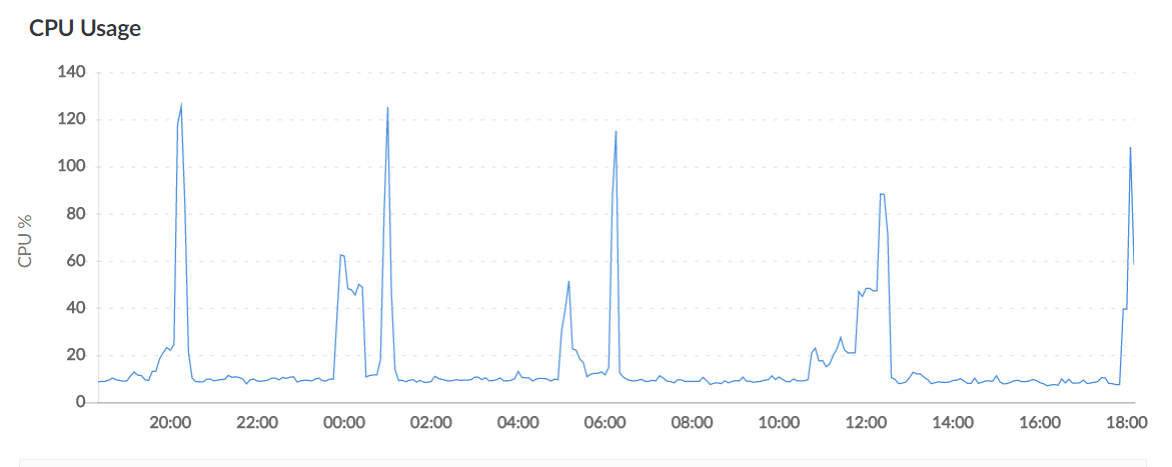
If scylla is turned off, no such peaks can be seen. Restarting the process, as mentioned by previous users, helps, indeed.
