

 ikorb
ikorb
Settings reset when using GCdual and 8BitDo receiver together
Hi,
Found out that using the 8BitDo GameCube receiver (Retro Receiver for NGC) with my GameCube using a GCdual causes the settings to reset.
- If the system boots without this receiver plugged in, the settings will load up as they are stored, but the moment you plug in the receiver, the settings reset to default and the GCVideo menu appears.
- This is still the case when the receiver is plugged in before booting, the settings get reset and GCVideo menu appears.
I'm not sure how a Bluetooth controller adapter is causing the settings to get defaulted, unless there is button combination to reset the GCVideo settings?
I've uploaded a video where you can see that anytime it's unplugged, you can hear the audio and see the scanline settings I've applied. When plugged in, you can see them disappear. Video here.

There is indeed a button combination to reset settings to default: Hold Start+L+R+X+Y to call up the menu. Maybe the receiver responds as if it were a pad with all buttons held during its initialization?

That's probably the issue then, I quickly picked up a controller tester homebrew to see if I could replicate but no buttons appear to be pressed when I plug it in, I'm assuming it's happening so quick the tester doesn't display it.
I also saw that plugging it back in over and over always opens the GCVideo menu.
Any way I can disable the reset combination?
No, unless you want to change it in the source code and rebuild (which I can't do at this time)
I did try to take a look at rebuilding this but I think that's outside my wheelhouse, I'll have to wait for an update from you/someone else, sorry.
@papa-MG I have few Ideas I hope I can explain them: Try this: power on the Gamecube, plug the receiver partially until you see the blue light from the receiver, wait about a second or two (or wait for the wireless controller to pair), then plug the receiver fully. Because GND and VCC pins are longer than the data pin the idea is to power the receiver but without the data pin being connected. This way it's possible for the Gamecube to miss some data and not reset the settings. Try few time it may work. If you remove the button combination for resetting the settings from the source plugging the controller should still bring the gc-video menu. Some kind of delay to check if the button combination is being held maybe is better. You can desolder the wire between the gc-video and the data pin (or to solder it to a different player data pin).
Edit: I saw another person on reddit reporting the issue. You should report this 8bitdo to fix it in future update.

I've successfully build identical binaries:
Files orig/gcvideo-dvi-shuriken-gc-3.1-M25P40-complete.xsvf and mine/gcvideo-dvi-shuriken-gc-3.1-M25P40-complete.xsvf are identical
Files orig/gcvideo-dvi-shuriken-gc-3.1-spirom-complete.bin and mine/gcvideo-dvi-shuriken-gc-3.1-spirom-complete.bin are identical
Files orig/gcvideo-dvi-shuriken-gc-3.1-spirom-impact.cfi and mine/gcvideo-dvi-shuriken-gc-3.1-spirom-impact.cfi differ
Files orig/gcvideo-dvi-shuriken-gc-3.1-spirom-impact.mcs and mine/gcvideo-dvi-shuriken-gc-3.1-spirom-impact.mcs are identical
@ikorb This is what I plan but I accept better ideas:
--- Firmware/screen_idle.c	2025-02-17 18:14:02.040577077 +0200
+++ screen_idle.c	2025-02-17 18:14:16.860650168 +0200
@@ -57,11 +57,6 @@
     /* check for menu button combination on controller */
     if ((pad_buttons & (PAD_L | PAD_R | PAD_X | PAD_Y)) == (PAD_L | PAD_R | PAD_X | PAD_Y) &&
         time_after(now, pad_last_change + HZ)) {
-      if (pad_buttons & PAD_START) {
-        /* restore defaults */
-        settings_init();
-        settings_commit();
-      }
       return;
     }
@papa-MG Do you know how to program the memory with either spi programmer or jtag? I don't plan on making updater because It's really easy to brick your device ~and you can't recover without a programmer~.
You can always force-enter the flasher mode by holding the IR config button at powerup, so recovery without a programmer should be possible.
I am not sure if I can resolve all dependencies for building the updater .dol file and if I screw something up many boards will be bricked.
You can always force-enter the flasher mode by holding the IR config button at powerup, so recovery without a programmer should be possible.
I don't understand that. I thought holding the IR button only resets the settings to the defaults.
I don't understand that. I thought holding the IR button only resets the settings to the defaults.
Different starting states - holding it while turning on the console enters the flasher mode, holding it while the console is already on and you enter the regular GCVideo OSD resets settings to default.
Hey, sorry have been busy.
For the meantime I have been using a workaround where I power the receiver using the USB C port on the front connected to my tv, this has prevented the settings being reset on boot.
I do not own an spi/jtag programmer so not currently possible for me to update my GCDual that way.
For the meantime I have been using a workaround where I power the receiver using the USB C port on the front connected to my tv, this has prevented the settings being reset on boot.
This is similar to my initial suggestion above. But the way you do it most likely feeds back 5v to the Gamecube (if the console is turn off) then when you turn it on you short the two 5v rails to each other.
Try this: power on the Gamecube, plug the receiver partially until you see the blue light from the receiver, wait about a second or two (or wait for the wireless controller to pair), then plug the receiver fully. Because GND and VCC pins are longer than the data pin the idea is to power the receiver but without the data pin being connected. This way it's possible for the Gamecube to miss some data and not reset the settings...
Thanks for that, have just tried to give it a go but I get a message "No firmware for "DK02" found" when trying to update.
Saw from other issues raised that I'll need to contact where I got my GCDual from as they have made proprietary changes.
Oh, that's such a shame and waste of time. Actually I was working on much better solution but without their version of the source code there is nothing I can do. I'll give you all changes I have in mind and you can contact them to fix it for you. But the problem is in the Bluetooth receiver you better contact them.
This one disables the button combination for the first 10 seconds after boot.
@@ -56,7 +56,7 @@

     /* check for menu button combination on controller */
     if ((pad_buttons & (PAD_L | PAD_R | PAD_X | PAD_Y)) == (PAD_L | PAD_R | PAD_X | PAD_Y) &&
-        time_after(now, pad_last_change + HZ)) {
+        time_after(now, pad_last_change + HZ) && time_after(now, HZ * 10)) {
       if (pad_buttons & PAD_START) {
         /* restore defaults */
         settings_init();
This one increases the time you have to hold the button combination from 1 to 3 seconds.
@@ -56,7 +56,7 @@

     /* check for menu button combination on controller */
     if ((pad_buttons & (PAD_L | PAD_R | PAD_X | PAD_Y)) == (PAD_L | PAD_R | PAD_X | PAD_Y) &&
-        time_after(now, pad_last_change + HZ)) {
+        time_after(now, pad_last_change + HZ * 3)) {
       if (pad_buttons & PAD_START) {
         /* restore defaults */
         settings_init();
The following two are improvments of "v1", I gave you, but without the OSD popping up.
@@ -58,9 +58,8 @@
     if ((pad_buttons & (PAD_L | PAD_R | PAD_X | PAD_Y)) == (PAD_L | PAD_R | PAD_X | PAD_Y) &&
         time_after(now, pad_last_change + HZ)) {
       if (pad_buttons & PAD_START) {
-        /* restore defaults */
-        settings_init();
-        settings_commit();
+        /* ignore */
+        continue;
       }
       return;
     }
@@ -55,13 +55,7 @@
     tick_t now = getticks();

     /* check for menu button combination on controller */
-    if ((pad_buttons & (PAD_L | PAD_R | PAD_X | PAD_Y)) == (PAD_L | PAD_R | PAD_X | PAD_Y) &&
-        time_after(now, pad_last_change + HZ)) {
-      if (pad_buttons & PAD_START) {
-        /* restore defaults */
-        settings_init();
-        settings_commit();
-      }
+    if (pad_buttons == (PAD_L | PAD_R | PAD_X | PAD_Y) && time_after(now, pad_last_change + HZ)) {
       return;
     }
Just to follow up on this, 8BitDo said the following when I raised this to their support. I mentioned that all buttons are being pressed when initialised which causes issues with GCvideo.
"We appreciate your support of 8BitDo products! For your information, the NGC retro receiver was specially designed for the original, unmodified and vanilla console, so we cannot guarantee the compatibility or feasibility between the NGC retro receiver and a modified NGC console. Thank you for your understanding!"
At this point, I may just fork out the money and get an internal adapter from lazer bear....
Am I able to bypass this "No firmware for DK02 found" error by using a programmer?
That's even bigger shame on 8BitDo. I was thinking of buying their wireless Gamecube controller kit (if they rotate the main analog stick to match the original) but I will reconsider now.
About the "No firmware for DK02 found". I think they've changed the pin configuration (or even nothing but the identifier). I am pretty sure I can change the ID to match your device but you don't have a backup of the original firmware and you can't make one. So if it doesn't work you can't roll back. Another option is to reverse engineer their pinout and adjust the source code but I won't do that.
I see, I did go back to 8BitDo stating my frustrations and they came back with a beta for the next firmware version, this hasn't fixed it though. I'll update here on the conclusion with the 8BitDo ticket when possible.
@ikorb What is the potential risk if we force install the open source firmware? For example if they use different pins and we send voltage on signals we should only listen to. Can this damage the TV/GameCube/GCVideo?
@papa-MG Do you have the option to control the GCVideo menu with IR remote? Also do you have updater .dol file which works on your GameCube? One you've used before to update or is there a website you can download it?
If two outputs are working against each other that is at least in "not good" territory and if it's a Wii and the console-side output is the video data bus, it's probably in the "extremely not good" territory because the Wii runs its logic at 1.8V but the FPGA would try to send 3.3V on its output.
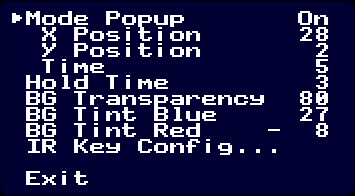
This fork adds four extra settings. The "Hold Time" option addresses this issue, just increase the value and save the settings. The other options are things I've added for myself.
https://github.com/Extremious/gcvideo-Xtra
