

 icsharpcode
Can not reload correctly when running multiple instances
Steps to reproduce
- enable
Options -> Misc -> Allow multiple instancesand clickOK - open
a.exe (1.0)fromD:\1\a.exe - open a new window by double clicking
ILSpy.exeand opena.exe (2.0)fromD:\2\a.exe - go to the 1st window of
a.exe (1.0)and pressF5to reload
Error result
The 1st window will load a.exe (2.0), and then the 2 window are all the same.
Expected behavior
The 1st window should reload a.exe (1.0); while only F5 on the 2nd window should reload a.exe (2.0).
Details
- Product in use: ILSpy on Win 10 x64 21H2
- Version in use: ILSpy version 8.0.0.7007-preview1 (.NET version 6.0.7-servicing.22322.2+0ec02c8c96e2eda06dc5b5edfdbdba0f36415082)

F5 is used to refresh everything, the settings, the list of assembly lists, the assembly list, the assembly. I think it is almost impossible to get this work correctly with multiple instances. When storing the settings, which instance wins? The one you closed last? Note that we currently write the list of assemblies to disk more often, because it helps with debugging and also the settings and changes in the assembly list are not lost, if ILSpy crashes.
I believe you want to just reload one selected assembly, without changing any settings or lists, right? You can do that by selecting the assembly - right click - and select Reload.
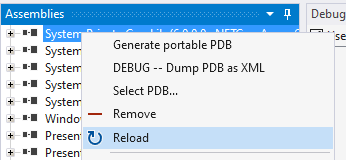
Does this solve the problem?

Yes it works. Thanks for your work.
Though I think it's very natural and easy for F5 to keep an old list - it just needs to: 1) copy the list as a new in-memory object before reloading; 2) do reload; 3) if in multiple-instance mode, abort a current list and load the backup list again.