
icewm
 icewm copied to clipboard
 ice-wm
Unusual focus problem
We moved from IceWM 1.7.0 to 2.9.6 and discovered a very strange and specific problem with click to focus. We are using Linux workstations as Xterminals (16 bit color through X11) with IceWM/XDMCP on CentOS 8/AlmaLinux as the server. With LibreOffice 6.3.6 (with "gen" VCL driver), when we open multiple windows, it will not shift focus from one window to another if the user clicks on is the "file, edit, view..." pulldown menus. They can click on ANYTHING else, including the LO toolbar icons, the window content, the scrollbars, titlebar, and it will shift focus properly. This problem does not occur within any other application or between some other application and LO.
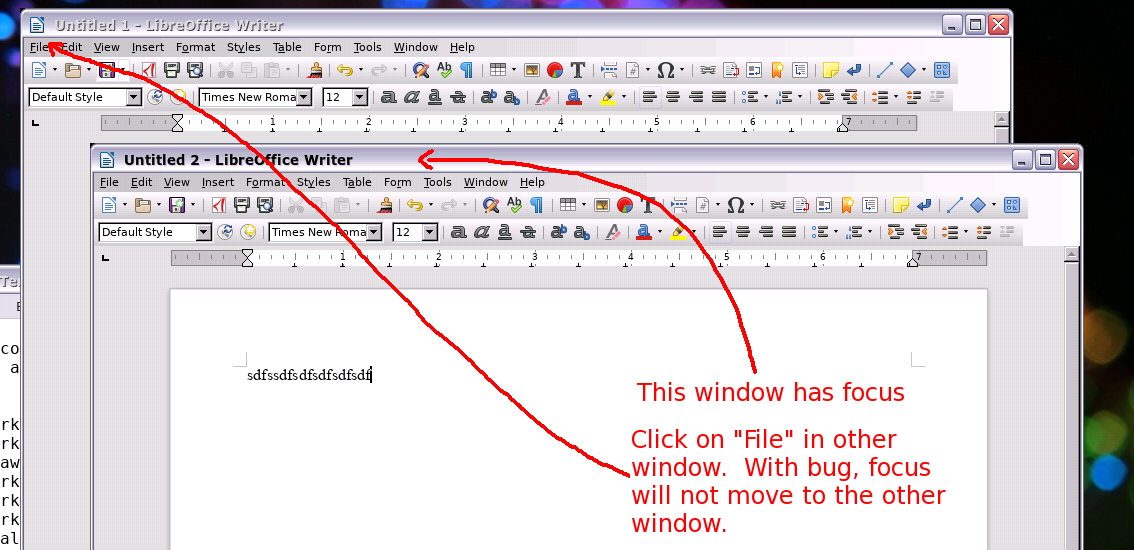
Example: launch LO, open two windows/documents. Select window A for focus, then try to click on "file" on the other window (window B), it will refuse to move focus, just blinking the taskbar icon of A instead.
I performed a version regression test and identified the first icewm version with the problem is 2.6.0 and it persists in each version through 2.9.6. No problem in 2.5.0 or lower.
Note: I have not tested with newer LO versions because in 16 bit color, it will crash LO in any 6.X version newer than 6.3 if using "gen" VCL and if we don't use "gen" VCL, performance is miserable with scrolling, selections,and menus. LO 7.X crashes no matter what VCL we use.

In CentOS 8.0 with libreoffice 6.4.7.2 it works fine sofar, when libreoffice is started with SAL_USE_VCLPLUGIN=gen. The problem now is how to reproduce it. Can you elaborate details in easy to copy-paste steps?

I will try. Note, that I am not sure it will happen with 6.4. Anyway...
- Bring up an icewm session.
- Open LibreOffice.
- Create a new writer document.
- Size this window (A) to be maybe 1/2 the screen resolution.
- Type some body stuff
- Use File-> New-> Text document to open another window.
- Type some body stuff in the other window.
- Size this window (B) to be maybe 1/2 the screen resolution.
- Position window B in front of window A, but such that you can still see the "file, edit, view" menu of window A while B has still has focus.
- Click on "file" on window B.
- If the problem is present, it will NOT shift focus to window A. Focus will remain on window B.
- What means "16 bit color" and how can I get it?
- Does it matter if you use click to focus or sloppy focus?
- Can you give the output of
xprop | grep -e '[:=]'and click on the unfocusable window ? - How can I be sure that I get the gen VCL driver?
- What means "16 bit color" and how can I get it?
That is the color depth of the Xserver. Most systems now are 24 bit color, but we use 16 bit color because it is 33% faster/less network traffic. It is also caleld "TrueColor" or 65,536 color mode. You would have to change the settings for your Xorg config. This varies from system to system. On mine it is editing the appropriate config file with something like:
Section "Screen" Identifier "Color-depth" DefaultDepth 16 EndSection
I doubt the color depth will affect the showing of the bug, however. But I did mention it just in case.
2. Does it matter if you use click to focus or sloppy focus?
We only ever use click to focus, the icewm default. ClickToFocus = 1. There is no setting for "sloppy", so I can't try it without further instructions. When I change to ClickToFocus = 0, nothing changes (not even the regular focus behavior, which is odd.
3. Can you give the output of `xprop | grep -e '[:=]'` and click on the unfocusable window ?
I am testing in Xephyr. I repeated the test with window A behind, then used "sleep 5 ; xprop | grep -e '[:=]'" in a terminal, clicked on window B in front, waited for "+", then clicked on the "File" menu on window A and attached the result. However, the act of launching xprop might interfere with the results.
4. How can I be sure that I get the gen VCL driver?
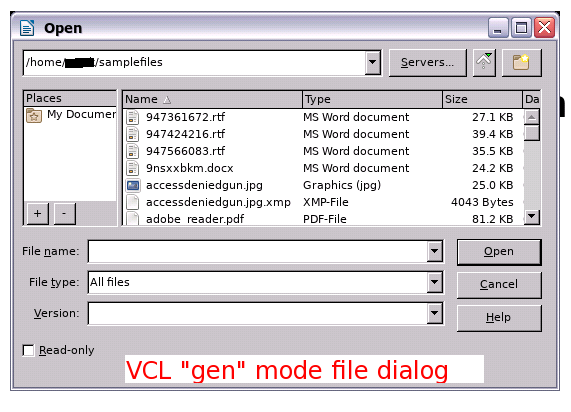
That is a very good question. You can tell by the file dialog. I have attached what it looks like. If you see one that looks like that, you know you are in gen mode. If you get a KDE or Gnome file dialog, you are not in gen mode. By NOT installing the gnome or kde "integrations" in LibreOffice, I think it defaults to gen automatically.
Focus mode (0=custom, 1=click, 2=sloppy, 3=explicit, 4=strict, 5=quiet)
The icewm man page explains this. The xprop output contains several applications. Your libreoffice uses a Passive Input model (see ICCCM 4.1.7), which is not unusual. Can't think of a reason why this wouldn't work.
With the same version and the gen dialog, everything works fine here.
I don't see why you'd need Xephyr for xprop. Better test what fails. Or is the problem the same on Xephyr? Does your Xephyr use 16-bit color?
Focus mode (0=custom, 1=click, 2=sloppy, 3=explicit, 4=strict, 5=quiet)The icewm man page explains this
Those are not "preferences" settings (from the preferences file). So I enabled the ShowFocusModeMenu (which I have never seen before), selected sloppy, and retested. In that mode, there is no problem. LO window focus moves from window B to A no matter what I move the cursor on or click on. Of course, we would never use a mode like this :) Switching it back to click-to-focus and the problem returns- if I click on the "file, edit,view" menu of the other window it raises that window but focus does not move.
With the same version and the gen dialog, everything works fine here.
I have since discovered you can force LibreOffice to gen by using: export SAL_USE_VCLPLUGIN=gen prior to launch
Anyway, I am not sure why you wouldn't see the same thing. Of course, there could be lots of factors. I have since also tested with 24 bit color, the problem remains, so at least we can throw that factor out.
I don't see why you'd need Xephyr for xprop
I am using xephyr to connect to the system that is serving sessions with icewm. That shouldn't complicate anything, but I thought I would mention it. I then log into the machine and run the tests.
Better test what fails. Or is the problem the same on Xephyr? Does your Xephyr use 16-bit color?
Yes and yes. The bug shows whether I am using a "real" Xterminal or doing it through Xephyr. Either way, they are "remote" sessions (the Xserver is not running on the same machine as icewm). I have since also tested with 24 bit color, the problem remains, so at least we can throw that factor out.
I just tested this on the console with X and the problem does NOT occur. So this is only happening with "remote" sessions (we use XDMCP and native X, so no compositing either). That might be the key to reproducing it. You could try doing a session remotely like we do? There is no easy way to do that, unfortunately... your CentOS/icewm machine will need to first allow XDMCP through the display manager and then either:
- configure another machine on the same network, NOT running X at that time, log into it and do "X -query XXXX" where XXXX is the remote (CentOS/icewm) machine.
or
- Use Xephyr on any other machine on the network where you are logged into any X session already and launch "Xephyr :3 -query XXXX" where XXXX is the remote (CentOS/icewm) machine.
I thought this might be difficult to reproduce because our setup is a bit unusual. Sorry about that :(
ShowFocusModeMenu by default is enabled. What disabled it? Sloppy focus works for many users. Because this configuration is so unusual and outdated, your best bet may be to use a version which works, like 2.5.0. Trying to reproduce this looks to be too difficult, at the moment.
ShowFocusModeMenu by default is enabled. What disabled it?
We did. This is a locked-down thin client system. All our settings are in preferences and users are not allowed to change anything. I wasn't aware there was a focus menu or that it would write out yet another per-user config file. Learn something new each day!
Sloppy focus works for many users.
Wouldn't work for my users :)
Because this configuration is so unusual and outdated
It is unusual, but not outdated. I could just as easily call IceWM "outdated" :)
your best bet may be to use a version which works, like 2.5.0.
Either that or just deal with the bug/limitation, it isn't that bad
Trying to reproduce this looks to be too difficult, at the moment.
Indeed it is. Although I thought more people using icewm would be using thin clients (and XDMCP) since it is ideal for that purpose (lockdownable, fast, efficient). That is the hardest part of testing this.
Well, CentOS 8 is past end-of-life and in the vault since last year. The libreoffice you are using is two years old and in the archive. The symptoms described may just as well originate from the client.
Well, CentOS 8 is past end-of-life and in the vault since last year.
We are actually using AlmaLinux 8.5 (just calling it "CentOS 8"), which is current.
The libreoffice you are using is two years old and in the archive. The symptoms described may just as well originate from the client.
Yep, that is true. Not much we can do about that right now, unfortunately :(
Could you test if setting ClientWindowMouseActions=0 makes a difference?
Check the setting with icewm -p | grep ClientWindowMouseActions.
If it does, then show icewm -p | grep -e MouseWin -e Pointer_Button.
Also show ButtonRaiseMask.