

 ibm-functions
document how to use theming
This commit https://github.com/ibm-functions/shell/commit/d94ebc911dc35acfc77f8a5365bbe7c1e68e408e factored out the theme for the shell which is nice but doesn't describe in the readme how to use it: either how to start the shell using an alternate environment or how to build the shell using an alternative configuration.

take a look at https://github.com/ibm-functions/shell/blob/master/app/README.md
it's a start, but admittedly much more work is needed on this front

right - that's a good start; to launch a shell with a different theme requires reading the rest of the code in the commit. This issue is to enhance the readme linked above with more details (there may be a better place to locate this information).
thanks. the name part should be documented in the readme?
though i think there's still a gap in e.g. the macOS application menu. there are two menu items (e.g. Quit xxx) that will take some more finagling to customize. electron is a bit hard-coded, here.
also, the electron-about-window npm we are using needs to be tweaked. i have some pending PRs to that module.
I'm suggesting to document how to start and/or build a shell with an alternate theme. Maybe this is a place to do that https://github.com/ibm-functions/shell/blob/master/docs/dev/README.md?
here's a couple of gaps having tried it out just now:
-
the title bar

-
the menu (although i don't think this is related to the theme)
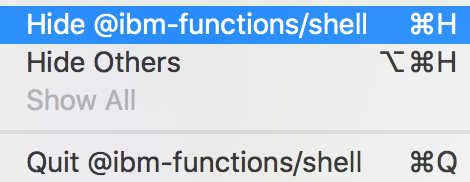
(to change those two menu items, electron requires a productName field in the app/package.json. which makes it impossible to theme, given the current build process, as changing the menu items would require changing a checked-in file. some more finagling to the build process will be necessary; the about window npm is similar, but at least there, we can just update the module easily enough to be more flexible)