

 iblh
iblh
hexo s 依旧报错。
hexo s报错 ,hexo g也报错 1.5.2没错,1.5.5和1.5.6报错。 已经按照 主题以 config.template.yaml 文件取代 config.yaml文件,用以参考配置。 需要手动将 material 文件夹中的 config.template.yaml复制一份并重命名为 config.yaml (并且复制重命名了四份,分别以下名字,还是一样的报错。)
- config.yaml
- _config.yaml
- _config.yml
- config.yaml
INFO Start processing INFO Hexo is running at http://localhost:4000/. Press Ctrl+C to stop. Unhandled rejection TypeError: E:\Blog\i7xy\themes\material\layout\layout.ejs:3 1| 2| <html style="display: none;" <% if(config.language !== null) { %>lang="<%- config.language.substring(0,2) %>"<% } %>>
3| <%- partial('_partial/head') %> (这行报错) 4| 5| <% if(page.layout === 'gallery') { %> 6|
E:\Blog\i7xy\themes\material\layout_partial\head.ejs:22 20| 21| 22| <%- partial('_widget/dnsprefetch') %> (报错) 23| 24| 25|
E:\Blog\i7xy\themes\material\layout_widget\dnsprefetch.ejs:12 10| <% } %> 11|


我也遇到同样的问题,hexo g时的信息Cannot read property 'startsWith' of null,有时报错信息又为Cannot read property 'pagination_dir' of undefined


/themes/material/_config.yml的这里改false看能不能解决
# Enable generate structured-data as JSON+LD for SEO or not.
    # Set as 'false' if it cause some wrong when `hexo g`.
    structured_data: false
SAME HERE ,When I wanted to find a solution, the answer was to read the fuck document.

@Nineburning 前几天装的时候改了试过,配置基本都改了一遍,重启服务,还是一样得报错。你现在改谷歌SEO优化这里,解决问题了吗?(目前我装的是1.5.2版本,没任何错误了, https://i7xy.cn/ )
I set it according to the fuck fuck fuck document, but it didn't work out. Have you solved it now? @channg
@arleyGuoLei 我使用的是1.5.2版本,没有任何错误(戳我查看ninefire.coding.me)。但是1.5.6依旧存在问题,我认为是使用不当造成的错误,没有精力去解决索性就使用1.5.2版本了,反正没太大区别。
修改layout/_widget/dnsprefetch.ejs文件。修改内容如下:
<% } else if(theme.comment.use.startsWith("disqus")) { %>
// to
<% } else if(theme.comment.use && theme.comment.use.startsWith("disqus")) { %>
原因在于没有对配置做基本的检查。事实上里面很多配置只要任意少一些都会直接炸,没有做任何的默认选项。
因为版本可能改动了文件位置,不过你可以全局搜索关键字,修改方式也是前面加检查即可。


还是提一下吧 项目主页的描述: 注意! 在主题的开发迭代过程中,主题的配置文件模板 可能会改动。为了避免使用 git pull 更新主题的用户出现冲突,我们将 主题配置文件模板 命名为 _config.template.yml。配置主题时,你应该拷贝一份 _config.template.yml 并将其重命名为 _config.yml
文档的描述: 为防止造成冲突,主题以 _config.template.yaml 文件取代 _config.yaml 文件,用以参考配置。 需要手动将 material 文件夹中的 _config.template.yaml 复制一份并重命名为 _config.yaml。
两种命名在本地均可正常运行,但在TravisCI部署的话,第一种命名会报错,第二种不会




修改layout/_widget/dnsprefetch.ejs文件。修改内容如下:
<% } else if(theme.comment.use.startsWith("disqus")) { %>
// to
<% } else if(theme.comment.use && theme.comment.use.startsWith("disqus")) { %>
原因在于没有对配置做基本的检查。事实上里面很多配置只要任意少一些都会直接炸,没有做任何的默认选项。
因为版本可能改动了文件位置,不过你可以全局搜索关键字,修改方式也是前面加检查即可。
感谢感谢!!

用
<% } else if(theme.comment.use && theme.comment.use.startsWith("disqus")) { %>
替换layout/_widget/dnsprefetch.ejs 红色框的那一行。
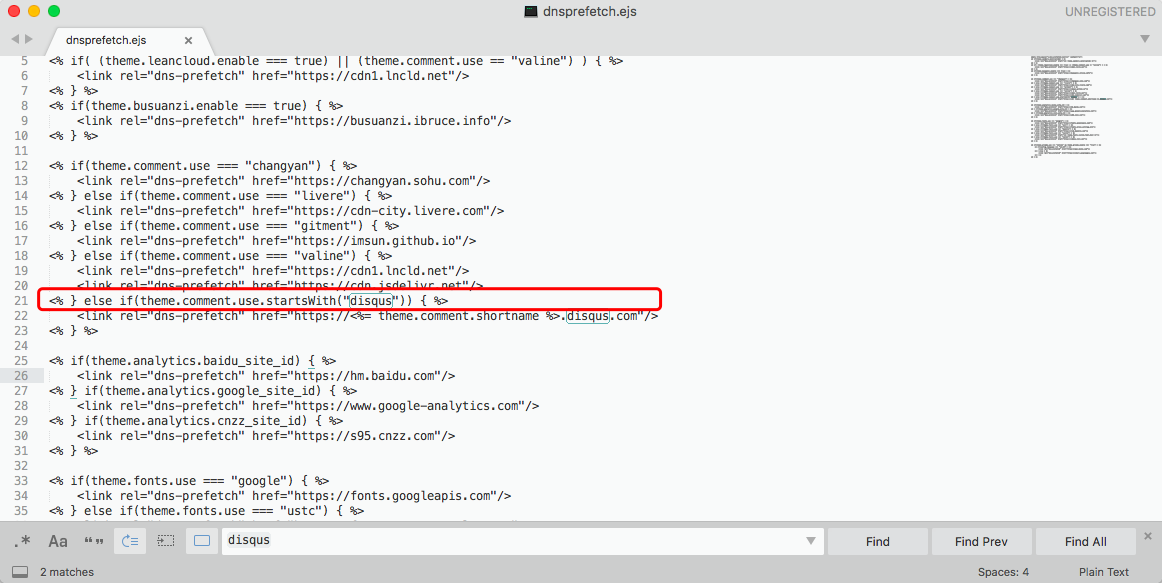 然后执行
然后执行
hexo clean && hexo g && hexo d
即可


