

 iNavFlight
Misbehaving SD Cards blocking/delaying boot
Current Behavior
Apparently some SD Card models block usb init and/or raise cpu load.
Multiple issues have been reported recently:
- https://github.com/iNavFlight/inav/issues/7707
- https://github.com/iNavFlight/inav/issues/7686
- https://github.com/iNavFlight/inav/issues/7722
- https://github.com/iNavFlight/inav/pull/7683#issuecomment-1013857830
Lets centralize the discussion here. Personally i can not reproduce this issue. I primarily own SanDisk and Kingston SD Cards which all init fine. So i am trying to identify and somehow precure a problematic sd card to look further into this issue. If somebody would like to send me a card know to be problematic, that would be highly appreciated.
Steps to Reproduce
- Insert SD Card
- Plug fc into usb
- Try to connect to the configurator
Expected behavior
FC should fully init, including usb, after a reasonable time with misbehaving sd cards being marked as not detected.
Suggested solution(s)
Prevent the SD Card from blocking the FC. There will always be SD Cards failing to init correctly, these should be rejected gracefully.
Additional context
I will restrict testing to the MATEKF765 and the MATEKH743.

Another update on cards tried:
Sandisk 4gb HC4, worked on F765 and H743
Lexar 16gb HC10, worked on F765 did not work on H743
Samsung 265gb UHC3, worked on F765 did not work on H743
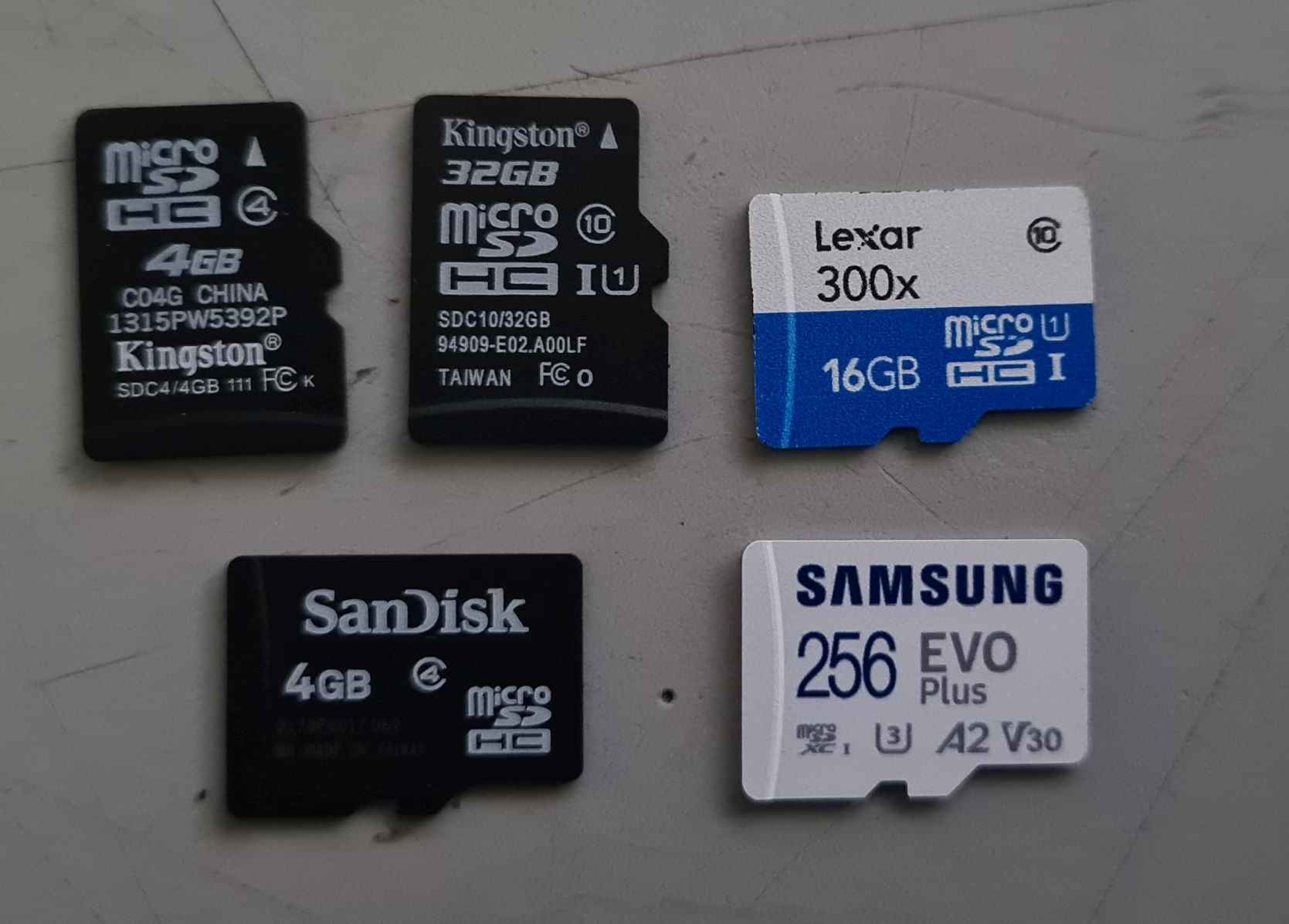

I've found, by loading a formatted microSD (16Gb class 4) into my Matek F405WSE or Matek F722WPX first. Then transferring that card to the Matek F765WSE, will allow it to work instantly, giving no further configurator connection issues.
But, unlike the F405 and F722, which now give MSC access (with 4.0). The F765WSE will not display the the card as an external drive.

Another update on cards tried: Sandisk 4gb HC4, worked on F765 and H743 Lexar 16gb HC10, worked on F765 did not work on H743 Samsung 265gb UHC3, worked on F765 did not work on H743
please elaborate on "did not work": did not connect to the configurator? in what order did test? how long did you let it sit?
"did not work" = would not connect to configurator.
"in what order did test?' = Connect each flight controller without microSD card to configurator to ensure comms, then inserted then formated the card and inserted into controller , then attempted connection to configurator, waited 10 minutes if blue cpu light was not flashing (i.e solid on or solid off) then try connection again.
It seems f765 connected to the configurator with the Samsung 256gb card without issue as the blackbox did not recognise the card was installed (i.e. fatal sd card error).
The F765 would connect to the configurator with the Lexar 16gb (formated), however the cpu load was such that it takes a long time to retrieve data in the configurator (setup page), >15min before I move on to the next test.
If the Lexar card is inserted into the F765 with the freespace.e file installed already (generated from my F405WSE), the configurator responds quickly, however the H743 still does not connect to the configurator with this card even when the freespace.e file is pre-installed.
The H743 would not connect to the configurator with the 32gb kingston HC10 card (even with freespace.e file preinstalled).

i managed to get my hands on a Kingston model with two independent reports of failure. its higher capacity (128gb vs 32gb) but hopefully that will only extragerate the issue. i will report once it arrives and i have done some testing.
Just to clarify again: The goal here is not to make every card work - that won't happen, that's just too much ground to cover. The goal is to prevent the nasty lockups. So in the scope of this issue "did connect but showed fatal error" is a pass.
 I received this Kingston card today. I tried it both, H743 and F765, it worked pretty much instantly with both of them, after i had created a new MBR partition table and formatted it with FAT32.
I've been having issues today, that were resolved by removing the SD card.
The card is a Transcend 4GB class 10 in a Matek H743 Slim running 4.1 RC 1.

I could intermittently get in to the configurator. But On save and reboot I'd get reconnection issues. Sometimes it would just timeout. Other times it say that the firmware versions don't match

Removing the USB and waiting about 20 seconds, would sometimes allow reconnection. Other times would need multiple. USB cycles. Another thing that I noticed was if the arm mode was active, the whole FC would lock up. Also, disabling blackbox on the configuration page did not have any effect on the issue. Only removing the SD card resulted in trouble free iNav.

Very interesting! does this also happen on a fresh flash of the FC? (please save a dump before you try it in case you haven't) Does it happen consistently no matter how you formatted the sd card?
@bkleiner I was recording a “how to install iNav” video at the time. So this was from a full chip erase fresh install. The only part of the diff I took over was the accelerometer calibration. Everything else was added via configurator; which was frustrating and too ages, until I removed the MicroSD card.
Hi,
I have similar issue with H743 board (Lumenier H7 lux) with 4.0.0 firmware installed (quite fresh, I have just calibrated Gyro and configure basic stuff on ports and receiver tabs). I have done this without SD card installed. So inav configurator (4.0.0) works well so far. When I have plugged my SD CARD on the board (Board not connected through USB), and then plugged the board to USB, I'm seing the LED blinking and then fixing to red. And when I want to connect to the configurator, it cannot.
If I remove the SD card and unplug-replug the FC through USB, it works again.
For info, I have formatted my SD CARD priori to insert it in the FC. My SD card is a PNY 8GB SDHC Class 1 (which works previously well on my matek F405 FC).

Arno

Hi again,
I have tested another SD card. In fact the same like the previous except in 16go size. It works fine. Nothing change aside that.
Arno
4.1 rc1 matek h743 V2 wing
These cards do not work, tested on fresh flashed inav and fully configurated inav.
Cards worked in f722 wing and f405 wing without any issues.


I've had similar issues with my H743 WING-V2 flight controller. I have tried several SD cards. I found one that works in H743-WING-V2 and it's the SanDisk Ultra SDXC I. Mine was 64GB but I believe the size does not matter. The format is one of the culprit, but even with the right format iNAV have issues with some cards for some reason.
To format in FAT32 I used AOMEI Partition Assistant program as Windows 10 native formatter did not allow to change the format (the card was exFAT out of the box). I also tried formatting with the "SD Card Formatter" program from the sdcard.org website to not avail (it also did not allow changing the format from exFAT to FAT32). I think the issue sounds like iNAV do not use an updated or a proper library for the SD card driver. Since Betaflight does not create any issues. I think what iNAV Configurator could have is a formatter tool within the blackbox tab or offer to automatically format the sd card to its liking if a "bad card" is detected. It could be a hardware issue as well, like a missing pull-up resistor or interference in the PCB layout.

Also made it work with a 32GB SanDisk Ultra SDXC I. Formatted it in FAT32 using AOMEI Partition Assistant for Windows 10. I did not have to insert it in another FC to make it work. So I guess H743-WING V2 is limited to this SD card brand & model, and formatted in FAT32 only. (maybe it's the SDXC, but I've tried other brand SDXC and didn't work)
@bkleiner I've had an issue with a Matek F765-WSE, using a Sandisk 16Gb Class4 microSD card. This card works fine with an F405 FC.
This F765 hasn't displaying any connection problems to the Configurator.... But when the logging is enabled, it hogs heaps of scheduling time. Even to the point that every function runs slow.... The refresh rate of the OSD is very slow, Dshot reboots the ESC on arming and countless other issues. If I turn off the logging, the issue goes away. And when I changed to another 16Gb Class 10 card, the issue went away. This was tested with 4.1 and current builds from the master.
As a side note. The F765-WSE does not have MSC access... I'm not sure if you have one of these FC for testing?

Completely solved this issue for me. I first got the error after I took out my card, took all the logs off of it and then formatted it. When I put my card back in (same card, same controller) It then would block the configurator from connecting due to high cpu load on the flight controller. Remove the card and it would connect every time. To fix, I just put the card in, connected the usb and let it set for ten minutes (You only have to do this once, it is busy making the freespace file on the card). The card will now work every time unless I format the card then I have to do the ten minute wait again. This was so frustrating to get sorted out. I tried several cards and also my spare f765. This works every time for me. The problem was easily reproduceable by just formatting the card and putting it in the controller. The problem is reliably fixed by the ten minute wait after a SD card format.

Completely solved this issue for me.
@Fotali To say the issue is completely solved, makes it appear there isn't a problem here. With respect, what you've found is a workaround. Waiting 10 minutes for some cards to format in these flight controllers alone, is a problem that doesn't occur with F405 and F722 targets, using the same card.
I'd like to add some more experiences I have encountered with the Matek F765-WSE, while logging at a higher rate, with specific cards. (Actually I haven't found one that doesn't cause some type of problem with this FC). In this case it was logging at 1:1... Card was a SanDisk 16Gb class 10.
I would get intermittent Dshot150 communication breakdown between the FC and ESC. Both control and Telem.
This would stop the motor and also glitch the Blheli32 telemetry for a split second.

Then leave the ESC RPM oddly reading 129! Requiring the throttle to be pulled low, and raised before the motor would restart. No tones heard though.

I first went through Blheli32 settings, thinking it may have been desync... But after much investigation, showing it to occur at any RPM with no throttle change, it points to being logging related.
One example of this.. Was out of all the flights logged that day.. Cross referencing them to DVR files, showed every file in which this occurred was corrupted.. While the flights it didn't occur in, where fine.
Reducing the motor_pwm_rate to 1khz reduced occurrences.
Some more data for the group. I was unable to get a Samsung EVO Select 64GB to work (FC hung on boot), even trying the workaround from @Fotali. However, I was able to get a Samsung EVO Plus 32GB to work as expected. The 64 GB card works as expected with my prior Mateksys F765-WING so I was surprised that it did not work with the Mateksys H743-WINGv2.

I have the same issue with H743-WLITE and Transcend 300S microSD, (both 32 and 64 GB versions). Waiting with the card inserted in the FC did not work.

Copying this information over from #8424
Summary; I too experienced the v5.1.0 flight controller hang on boot when an SDcard is installed in MatekH743-wing v3.
However, I think this is actually a hardware limitation on this particular FC (and perhaps others):
- here we see another FC project changed the max SDCard bus speed to 12.5mhz: https://github.com/ArduPilot/ardupilot/pull/17316
- so, according the SDCard standard: https://www.sdcard.org/developers/sd-standard-overview/bus-speed-default-speed-high-speed-uhs-sd-express/ most of the cards we attempt to use these days ask for bus speeds far higher than 25mhz or even 50mhz.
- i did try inserting an old 256MB card (HC) which seems to attempt bus speed to 25mhz or even 12.5mhz. And this card did work reliably on multiple attempts -- including logging, downloading files, etc.
So, it feels like we need to limit the bus speed for some classes of flight controllers -- regardless of what the card reports.
Seems we do have some infrastructure in place to support this: https://github.com/iNavFlight/inav/blob/master/src/main/drivers/bus_busdev_spi.c#L67
I did attempt to force it to a lower speed, but that didn't help. If anyone knows the details on the SDcard clock speeds, I can experiment.


I've also been having a similar issue with a SPEEDYBEEF405.
I had to set the max clock @ (https://github.com/iNavFlight/inav/blob/master/src/main/drivers/bus_busdev_spi.c#L67) to be "standard" to get my card to be recognized.
After this, my new card acts just like my old card. I'm going to open a new issue for some other black box related problems.

I should also add that when I tried Betaflight, the flight controller booted right up with no modifications.
@b14ckyy Could this clock speed we what is causing the 765-wse to hang on boot with SD cards?

Same issue on Matek H743-mini, only connects on the first boot and then for the whole day it stops working until I remove the SD card. Very strange behavior.

MAtek H743 WLITE
have the same Intenso 4GB not working. Regardless if FAT, FAT32 or no partition. Also leaving it in 10 min and retrying doesnt help Sandisk Ultra 16GB works fine

any movement on this. I really hoped to tune my planes more but getting SD to work is hit and miss even with the same brand of cards
For me, formatting with the official SD association formatter tool helped in some cases: https://www.sdcard.org/downloads/formatter/