

 iNavFlight
Wrong label in Mixer tab when quad with reversed prop spin direction (props out) is plugged in
When setting up a quad with reversed prop spin direction (props out) for the first time, by toggling the slider for that option in the Mixer tab, the label is updated correctly.
However, when you unplug the quad and plug it back in (with the configuration saved), both the slider position and the prop direction icon (frame on the right of the screen) display the correct selected configuration (props out). But the slider label text doesn't reflect the actual configuration, which can be quite confusing. It can lead users to think that the configuration wasn't saved, when it fact, it was.
This screenshot shows the clear mismatch between the slider, icon (which are both correct) and label (which is wrong):
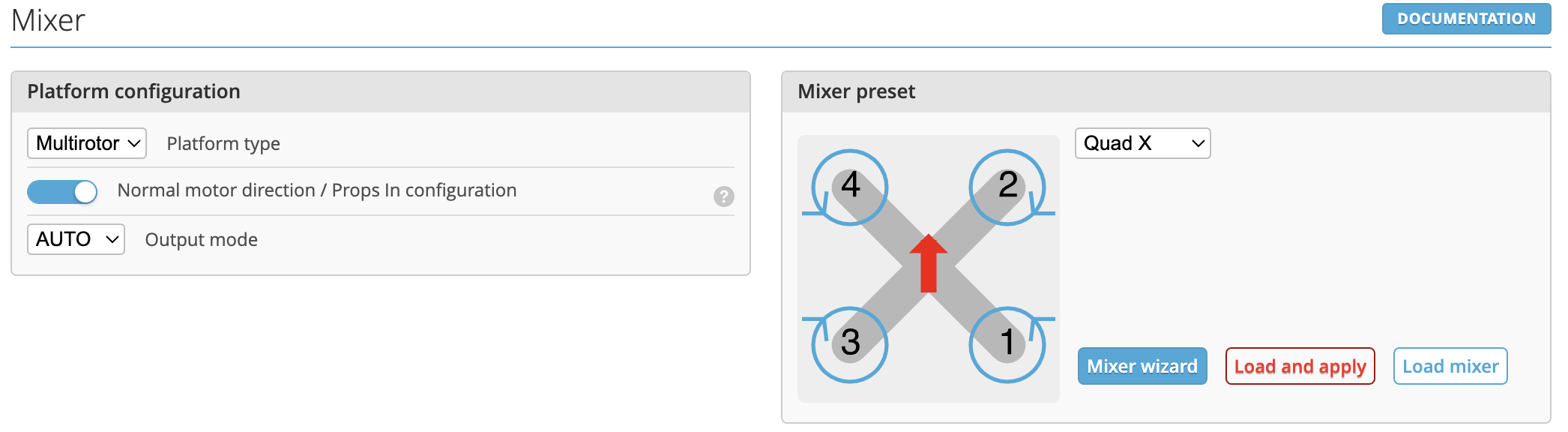
Steps to reproduce:
- Simply plug in any quad with props out configuration into the Configurator, open the Mixer tab and check for the label besides the "prop direction" slider.
