

 iNavFlight
Add "split track" to mission planning tab
When planning missions i found it nearly impossible getting the WP's correctly in place working on pixel basis. I suggest to add a "split track" or "insert half way" function to the mission planning tab similar to Eagle Tree's Vector software.
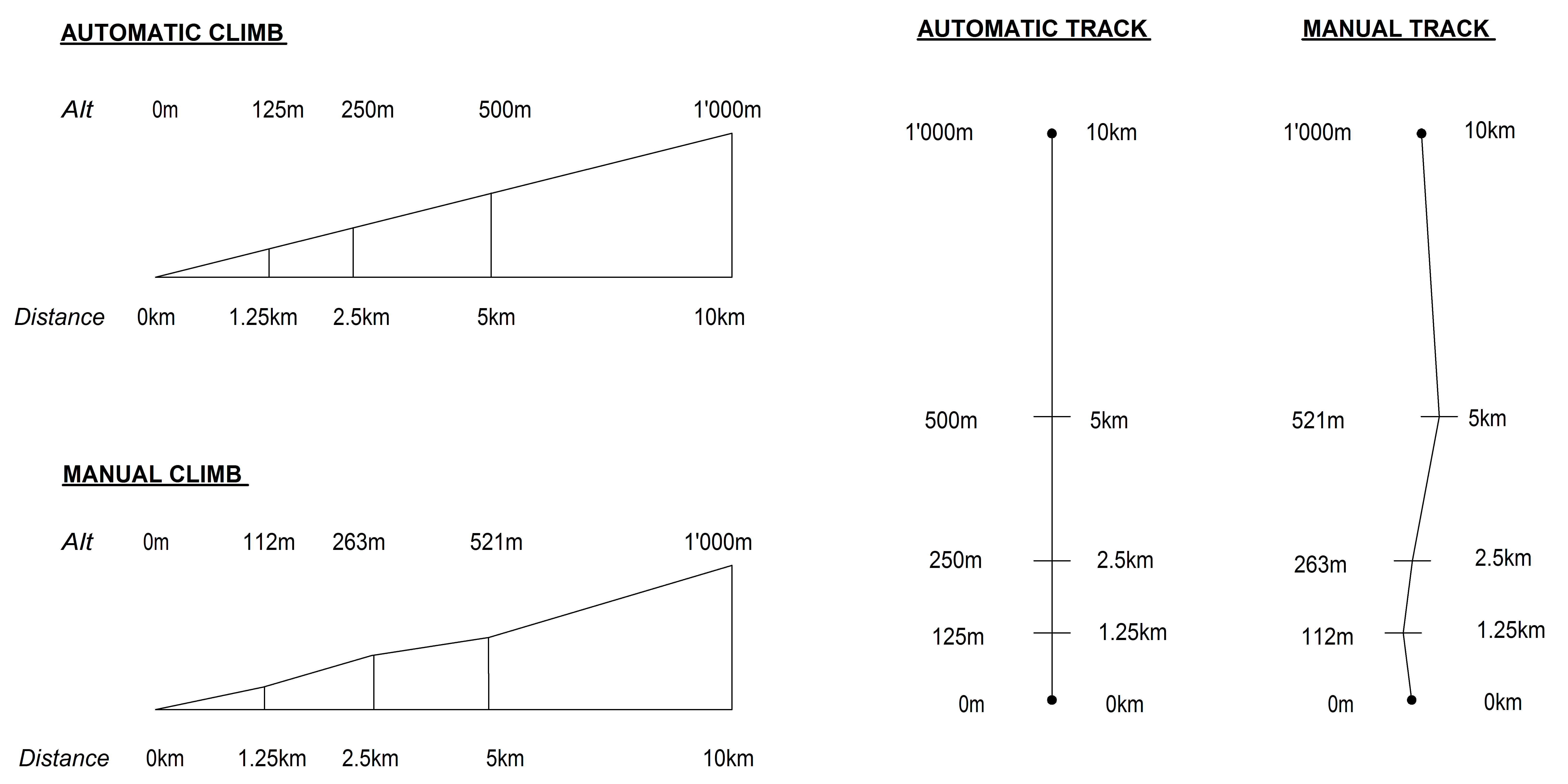
I have not yet found out what the best WP distance is for longer WP missions in order for INAV to do a proper job in climbs and heading. Usually I'm somewhere in the region of 1.5-2km. If I now plan a mission 10km distance and climb to 1'000m I have a very hard time adding those WP's correctly so that the track is perfectly straight and the altitude perfectly on a smooth climb. With this solution you would plan it the following:
set start WP i.e. 0m and set destination WP i.e. 1'000m alt 10km away. This creates the perfect track and rate of climb. When now adding WP's in between, it would be great if I could right-click the track and say "split" or "insert WP". This new WP would be inserted exactly at 50% of the distance and 50% of the alt. I could repeat that as often as i like in each segment in order to get i.e. 10 WP's for the whole distance.
The way it's done today "manually" I never get these numbers and coordinates straight adding to the snake line, pumping WP flight over 10km. I've made a little graph to illustrate the idea for better understanding
 .
.
