

 hypothesis
Client freezes when selecting text in document viewer on emed.folger.edu
Bug report form
Steps to reproduce
- Trying to annotate on: https://emed.folger.edu/view/1644/AShrew in preparation for a demo in 90 minutes.
- Page loads. Client loads. But when I select text, the whole thing freezes up. No buttons appear. Can't click to unselect. Nothing.
- Same behavior in both Chrome and Firefox.
Expected behaviour
Tell us what should happen. Selecting text should cause annotate buttons to appear.
Actual behaviour
Tell us what happens instead. No buttons appear and whole tab is frozen.
Browser/system information
Tell us which browser, browser version, and operating system you were using when you encountered this issue. Chrome Version 64.0.3282.140 Firefox 58.0.2 (64-bit)
Additional details
Feature Request Form
Problem you are trying to address with this feature
Your solution
Add tags - did you add labels?
If this a customer requested feature, make sure to add that label.

Thanks for the bug report @heatherstaines , I was able to reproduce in Chrome 65 using the Hypothesis extension v1.62 on that specific URL.
With Chrome's profiler active while making a text selection, I see some pathological behaviour in the code which handles the selection event and tries to figure out where to show the annotation toolbar. The following is a Bottom Up profile (innermost call at top):
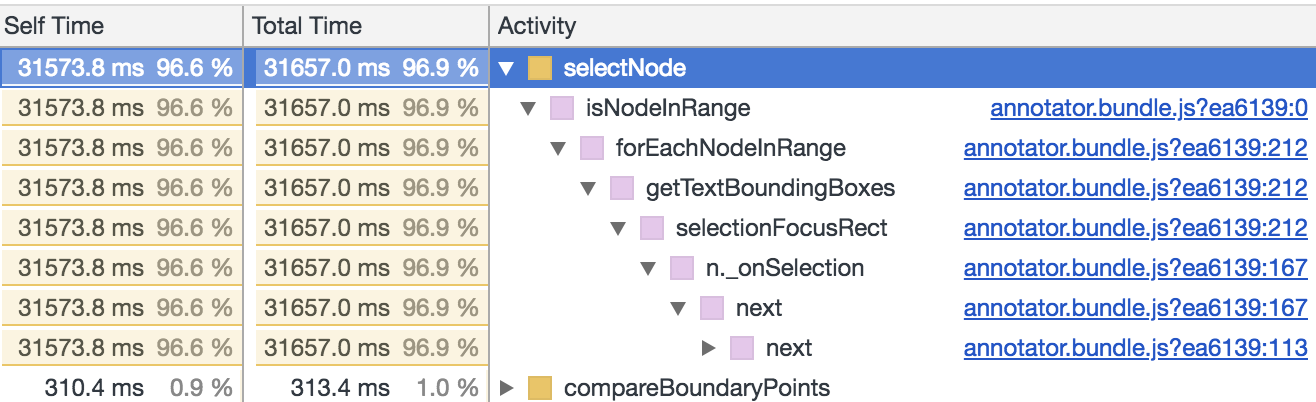
There are a large number of <span> nodes used to finely position the text on this page, which may be related.

Jeremy has let me know that the Folger folks won't need a demo, so I can show them other content. It would be good to find out what's happening on this page though. Thanks.
I can still reproduce this with the current version of the client in Safari.