
openfreemap
 openfreemap copied to clipboard
 hyperknot
Terrain tiles / hillshading
This is a longer term research issue about terrain tiles. Since I've never worked with terrain tiles, and also don't know which open data sources are available, please contribute your knowledge if you have experience in working with them.
Long term aim would be to have a nice looking terrain map styles, for example here is a sample from Google Maps.

Original discussion started by @aschleck here https://github.com/hyperknot/openfreemap/discussions/15
Raw source datasets I'm aware of:
- Copernicus from the EU
- NASADEM from NASA
- ASTER from Japan
- (US only) 3DEP
- (Arctic only) ArcticDEM
3DEP is the most accurate but it's very very very large and hard to process, and only in the US. Most RGB DEM tilesets use NASADEM, but I think Copernicus is slightly better (research indicates it's a toss up https://www.tandfonline.com/doi/full/10.1080/10095020.2023.2296010#d1e321 https://www.usgs.gov/publications/evaluation-copernicus-dem-and-comparison-dem-used-landsat-collection-2-processing). In zxy tiling schemes most of the Arctic gets warped and no one generally cares about elevation at the south pole, so I ignored that. ASTER just seemed bad but maybe that's unfair.
I'm not a GIS expert by any means so would be happy to be corrected. https://www.maptiler.com/terrain// covers a lot of high level stuff if that's helpful.

(copying reply from the discussion)
I assume by terrain RGB you mean DEMs (digital elevation maps). In those layers you have a mapping from pixel to latlng where the value of the pixel encodes the elevation (note that with TIFF images you can do single channel 32-bit float values so it's not 3 channel RGB). My layers are generated from DEMs, though the tiling scheme for the source data I'm using (mostly Copernicus from the EU, some NASADEM) is not the standard zxy scheme so they are different.
I was separately working on generating a global zxy RGB DEM tileset but ran out of energy because I didn't desperately need it and the tooling I was using was being stupid.
There are very clever client side implementations that can generate contours (idk if they're vectorized, maybe) and hill shading rasters from zxy RGB DEMs at render time, however I decided to pregenerate them server side into actual tilesets. In my experience messing with hill shading, the gdal (the program I use to do the shading) implementation just looked visually better than the shader I wrote (my shader looked smoothed and weirdly shiny? gdal looks more real). Since I have implemented my own alternative to MapLibre it's possible that's just a flaw in my own code. Implementing contouring client side in my renderer seemed both too hard and also like an excellent way to crash mobile devices. Also my contour vector layer encodes when a contour is over a glacier (it's pretty!) and it's doable but bonus complexity to calculate that client side.
Not sure if I answered your question. I think it's good to have all three and I personally think they're orthogonal even though you can do everything from one DEM tileset at render time.
Thanks a lot. I prefer to just collect options and information at the moment. You mentioned before that it's about 1.5 TB of data for contours and hillshades, I'm a bit worried it might not be possible to host this much easily.
I'm curious of what's possible by client generated solutions and when is it necessary to use server-generated tiles.
One last thought: my contours are 900gb but MapTiler's dataset is only 215gb. I think I looked into why and I can't recall if mine are denser, more accurate, or if MapTiler's engineers are smarter than me and found some 4x optimization I didn't see. You could compare them to see. So anyway depending on your goals and how much over-zooming you anticipate (for my usecase I expect significant over-zoom) you could reduce the storage size.
https://github.com/onthegomap/maplibre-contour + https://registry.opendata.aws/terrain-tiles/
Thanks a lot @aschleck!
Actually maplibre-contour looks great! I mean you probably immediately recognise the differences between your server rendered version and the maplibre-contour, but it looks quite nice for me.
you can use hillshade vectors rendered from Jörð rgb terrain tiles in a 106GB versatiles container, zoom 0-12, precompressed with brotli.

@yetzt thanks for coming by, I love your work on VersaTiles!
Can you explain me what is a vector in hillshade? In MapTiler what they call Hillshade are basically 8-bit greyscale images, AKA raster tiles, like
https://api.maptiler.com/tiles/hillshade/11/1092/729.webp?key=...
Also, do you have a demo which shows the hillshade vectors?
Thanks, good question. I don't have anything public to show, but i dug out a screenshot. Instead of hillshade raster tiles, it's the shades vectorized; You get "shadow" and "highlight" polygons you can integrate into your map style.
Datawrapper did something similar.
Thanks for the explanation @yetzt. I understand now. The advantage is that it can be super high resolution without having to download the original DEM files, the disadvantage is that you have the vectorised / magazine look, like the one below.
Here is the sample area from datawrapper
So far, as I understand, we can do hillshading the following ways:
- download DEM and calculate hillshade using MapLibre's built in algorithm
- download precalculated hillshade in raster tiles
- use precalculated hillshade vector
For non-full planet region, there are higher quality algorithms, like the ones built into ArcGIS, QGIS or Eduard.
I also found the article introducing the Terrain RGB layer, comparing it with the previous vector based hillshade. In that article the RGB is shown as an improvement over the vector based version.
Interestingly Mapbox seems to have moved back from Terrain RGB to vector hillshade again, as the current styles use vector, albeit with quite a detailed resolution.
the advantage of using vectors for hillshades are better scaling, potentially smaller size, more design freedom and less computational intensity on the client when shading rgb dem tiles.
As far as data sources: the Copernicus DEM is very high quality for the resolution. Although technically it's a surface model rather than a terrain model like NASADEM, my experience is that the surface reported by Copernicus is actually closer to the true terrain than the NASADEM value.
The DEM files are available as tifs on aws, but you'd have to build (and host) the xyz tiles yourself.
The Mapzen / tilezen tiles aren't bad where they use good quality sources (notably parts of the US), but their use of SRTM for most of the world means the quality is poor elsewhere.
Loxcel geomatics has a nice tool for comparing these different sources.
For exactly this usecase, I'm planning to release the next version of the GPXZ dataset as free/open 30m tiles. We convert Copernicus to a terrain model (processing to remove trees and buildings), then layer on lidar data from around the world. But this is a couple months out still!

One more note on DEM evaluation: I'd recommend visualising the DEMs as well as looking at quantitative errors. Especially for use with hillshading which is quite a visual/subjective thing!
SRTM is decently accurate vertically, but it's rather noisy / blurry. Whereas copernicus captures a lot more detail.
To put it another way, applying a gaussian blur to a DEM doesn't impact the mean square error vs ground truth data that much, but you loose fine terrain detail pretty quickly!
Here's a cherry-picked but representative example
@ajnisbet thanks a lot for sharing your knowledge, as well as your planned work on making a 30m GPXZ dataset!
About hillshading, I've seen this image on Eduard's homepage about generalization.
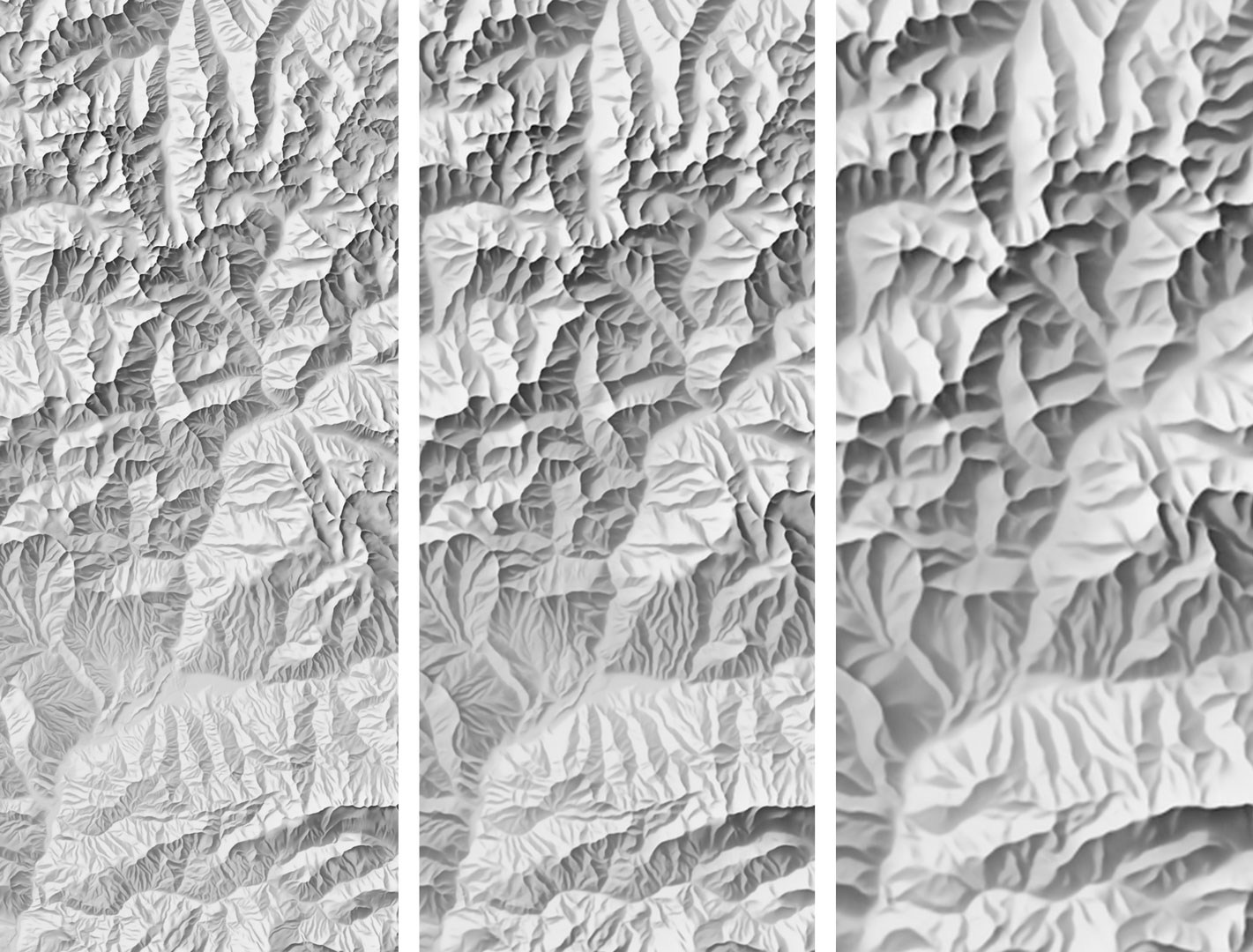
So if I understand correctly, the best would be to start with a high resolution source, like Copernicus 30m and then apply different generalization filters for different zoom levels. Probably for low zooms we want to generalize it quite a lot, and then show the smallest details on higher zoom levels.
FYI, Michael is working on porting his maplibre-contour plugin into maplibre-gl-js core.

@ajnisbet, is the GPXZ dataset still a possibility? That seems likely to be the highest quality source of DEM data if so, but if not then perhaps it would be worth investigating what it would take to convert the Copernicus TIFF data on aws into xyz tiles?
@hyperknot I'd be curious to hear if you've had any further thoughts on hosting DEM tiles? If you did, then do you think you would do so using the same BTRFS method which works so well for the vector tiles?

@stephenemslie what a coincidence, right now, I mean just a few hours ago https://mapterhorn.com/ was launched! It's exactly what I was looking for in this thread.
Since it's 1.43 TB and doesn't need to be updated, I'll be hosting this as Protomaps on Cloudflare. Requiring 2 TB of SSD space from self-hosters would be quite expensive.
That's fantastic news @hyperknot! I'm more than a little surprised and delighted by the coincidence. Thanks for being so ready and willing to host. Thanks also to @mapterhorn for all your work.
Hi everyone, Has anyone here worked on building pre-rendered hillshade tiles from Copernicus GLO 30 data? I've been using a filtered version of the AWS Terrarium-encoded terrain data for some time now, but have noticed some artifacts in the data at higher zoom levels. Having a pipeline to generate hillshade tiles up to zoom 12 from Copernicus data appeals to me, but I'm not sure how heavy a lift this is. Definitely planning on giving it a go...

Hey @diehl, it's not a big lift. Here is my pipeline: https://github.com/aschleck/trailcatalog/blob/main/java/org/trailcatalog/importers/elevation/contour/Hillshader.kt . You can see my tiles at https://trails.lat/ (if you toggle off everything but "Hillshade"). I'm happy to share my 443gb 0-12 pmtiles file with you or whoever is interested if it's helpful.
It's been a while but I know I first experimented with some of the real-time shader DEM hillshading approaches. I liked the gdal offline hillshading better.
@aschleck Thank you for your quick reply with this pointers! Much appreciated...
Hey @hyperknot 👋
I'll be hosting this as Protomaps on Cloudflare
any updates on this ?

Hi,
This is not yet high-priority, as you can just directly use the source Mapterhorn Cloudflare bucket with the Maplibre plugin. But in the future I'm planning on setting it up for sure.
This is not yet high-priority
Got it, looking forward to it.
as you can just directly use the source Mapterhorn Cloudflare bucket with the Maplibre plugin
I don't think you can ? I tried it and requests are blocked by CORS because Mapterhorn does not set permissive access-control-allow-origin headers:
Access to fetch at 'https://download.mapterhorn.com/planet.pmtiles' from origin 'http://localhost:5173' has been blocked by CORS policy: No 'Access-Control-Allow-Origin' header is present on the requested resource.
Thanks, I didn't know it. Can you ask them at https://github.com/mapterhorn/mapterhorn/discussions if it's on purpose or just a missing configuration? If it's on purpose then I'll definitely make it a higher priority item.
From https://github.com/mapterhorn/mapterhorn/discussions/89:
https://download.mapterhorn.com/ will for now not add a wild-card allow origins in the CORS settings.
there is an open task in the NLnet grant to create a central list of mirrors that form a small distribution network if you will
Maybe openfreemap could be part of the mirrors and benefit from a subset of the NLnet grant ?
https://github.com/onthegomap/maplibre-contour + https://registry.opendata.aws/terrain-tiles/
Because I didn't see it above I thought it might be worth mentioning that the Mapzen tiles are available as raster (terrarium encoding) hosted on AWS:
https://s3.amazonaws.com/elevation-tiles-prod/terrarium/{z}/{x}/{y}.png
These work well for both maplibre-contour and hillshading.
I hope someone finds this useful :)

Great news, Mapterhorn also received Cloudflare sponsorship and opened up their CORS settings for public use.
Soon it'll provide plugin-free endpoint in XYZ format, then I'll start working on OpenFreeMap integration.
Oliver made this comparison between the old AWS dataset and Mapterhorn: https://wipfli.github.io/tilezen-mapterhorn-comparision