

 hvdwolf
Install jExifToolGUI with Homebrew (macOS)
When I install manually and drag the program-icon into my application-folder I am told by a start screen of jExifToolGUI that the PATH is not found and it would be better to install jExifToolGUI (?) with Homebrew.
As far as I can tell jExifToolGUI is not available via Homebrew? It would be great if it is.

No, it is not available via Homebrew and I currently do not intend to port it to Homebrew.
The message is not generated by jExifToolGUI, but somehow by homebrew.
And which PATH is not found? For exiftool?
And which version of jExifToolGUI do you have? the with-jre version or the small version?
Where does homebrew install its software?

Here is the message:
(It is complaining that exiftool is not found)
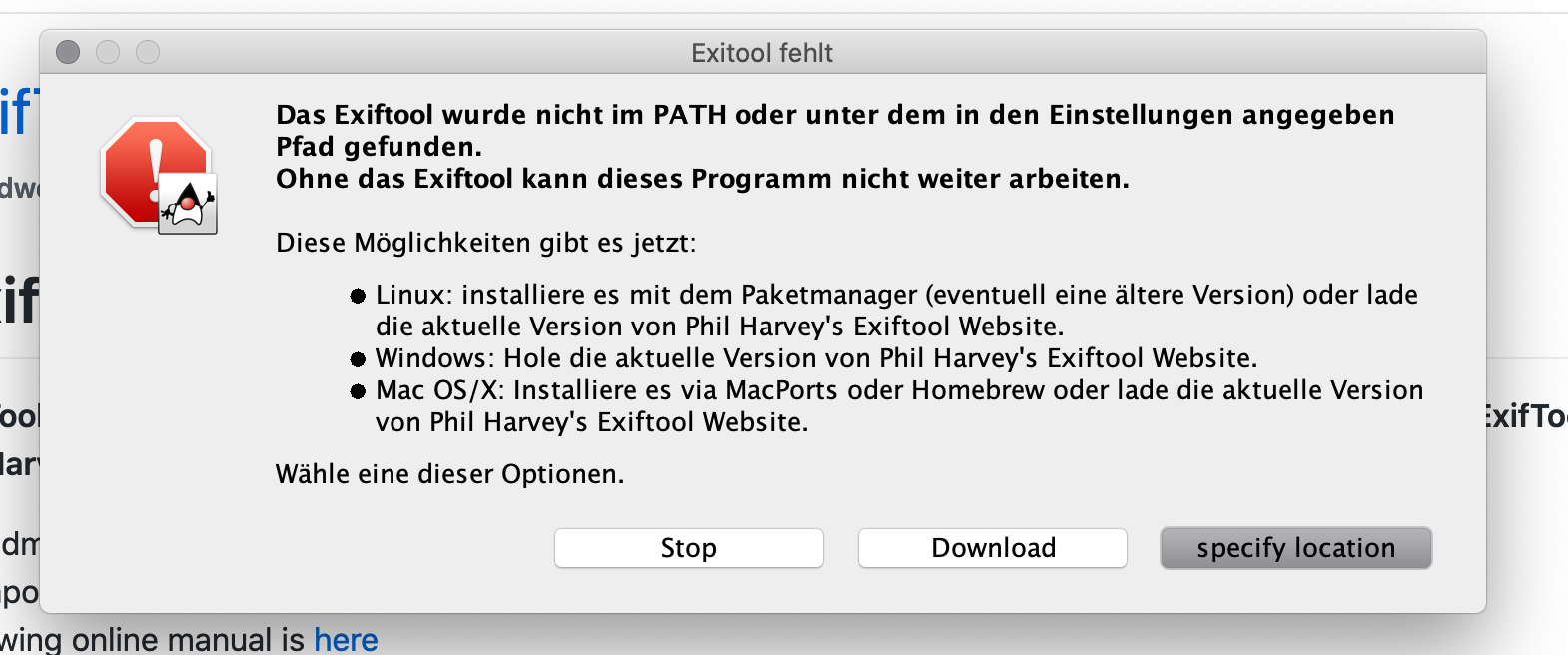
I could fix this by specifying the path of exiftool
The (default) path of exiftool when installed vie homebrew seems to be /usr/local/bin/exiftool (found with which exiftool).
I installed the current version (https://github.com/hvdwolf/jExifToolGUI/releases/tag/1.6.3) with jre (https://github.com/hvdwolf/jExifToolGUI/releases/download/1.6.3/jExifToolGUI-x86_64-macos-1.6.3-with_jre.dmg.zip).

I read a little about homebrew. Homebrew instals everything in its own folders and then symlinks them to /usr/local as your which exiftool already states. This means that jExifToolGUI should(!) find it as which is the same command used by jExifToolGUI to find exiftool.
I just removed my preferences on MacOS (~/Library/Preferences/org.hvdw.jexiftoolgui.plist). I have a "non-homebrew" install but exiftool is also installed in /usr/local/bin.
When I now restart jExifToolGUI, it can't find exiftool and starts searching showing this in the log.
10:14:08.933 [AWT-EventQueue-0] INFO  org.hvdw.jexiftoolgui.Utils - preference exiftool returned: /usr/local/bin/exiftool
10:14:08.936 [AWT-EventQueue-0] DEBUG o.h.j.controllers.CommandRunner - commandrunner [/usr/local/bin/exiftool, -ver]
10:14:09.168 [AWT-EventQueue-0] INFO  org.hvdw.jexiftoolgui.Utils - exiftool_found mentions: true
(The 2nd and 3rd line is to check if we really have a working exiftool). So if your exiftool is in /usr/local/bin, jTG should find it. In other words: I don't understand.
W.r.t. jTG not available under homebrew: I mentioned that I have no intention to port it to homebrew. I now put it on my ToDo list, but as low priority. There are so many things I want to do first, and there is a bundle (2 actually) for MacOS, so there is no priority for me at the moment.
I also ran into this error message even though my exiftool is properly installed on my Mac. I clicked "specify location" and made a mistake in my selection, which caused jTG to quit. Re-opening jTG will cause an instant quit, probably because it tries to run exiftool from the wrong path I selected earlier. Therefore I deleted jTG's .plist preference file and its data folder in the home folder, deleted and redownloaded jTG, but it will still instant quit and the logs show that it was still looking for that wrong path. Now how do I get jTG to prompt me again? How does it still know this wrong path after I deleted the .plist file that mentions it?

This is indeed a bug. If it can't find it or runs into an error, it should request again where you installed it. It normally does, so I need to check why that not works in your case.
You mention that you removed the preferences plist file. Do you mean the ~/Library/Preferences/org.hvdw.jexiftoolgui.plist?
If jExifToolGui starts with a "clean install", it should certainly ask for exiftool. The only time this fails if exiftool is in the PATH, but not correct. Another user had a corrupt exiftool and when I check exiftool, exiftool itself crashed.
Please attach a log. They are in ~/logs (and maybe I should write them under ~/jexiftoolgui_data/logs)
Hello! Here is the message: (It is complaining that exiftool is not found jexiftoolgui_20211123-2359.log )

Is this the latest version 1.10? It is indeed a bug:
23:59:55.918 [AWT-EventQueue-0] INFO  org.hvdw.jexiftoolgui.Utils - exiftool path /Users/malinn/jexiftoolgui_data/jexiftoolgui.db
23:59:57.983 [AWT-EventQueue-0] INFO  org.hvdw.jexiftoolgui.mainScreen - OS name APPLE
23:59:58.005 [AWT-EventQueue-0] ERROR o.h.j.controllers.CommandRunner - IOException error java.io.IOException: Cannot run program "/Users/malinn/jexiftoolgui_data/jexiftoolgui.db": error=13, Permission denied
This is the database, not exiftool. The questions is whether you pointed to the database as being exiftool, or that the program found this on its own. Please explain what you did.
Hello! at first I installed version 1.10 but after the first launch I needed to specify where the exiftool folder is. after that the program stopped running. I tried to uninstall it manually and downloaded version 1.63 from this thread. Nothing has changed. Doesn't start. I'm ready to try yet, but what to do.
Отправлено с iPhone
24 нояб. 2021 г., в 12:18, HvdWolf (Surfer63) @.***> написал(а):
Is this the latest version 1.10? It is indeed a bug:
23:59:55.918 [AWT-EventQueue-0] INFO org.hvdw.jexiftoolgui.Utils - exiftool path /Users/malinn/jexiftoolgui_data/jexiftoolgui.db 23:59:57.983 [AWT-EventQueue-0] INFO org.hvdw.jexiftoolgui.mainScreen - OS name APPLE 23:59:58.005 [AWT-EventQueue-0] ERROR o.h.j.controllers.CommandRunner - IOException error java.io.IOException: Cannot run program "/Users/malinn/jexiftoolgui_data/jexiftoolgui.db": error=13, Permission denied This is the database, not exiftool. The questions is whether you pointed to the database as being exiftool, or that the program found this on its own. Please explain what you did.
— You are receiving this because you commented. Reply to this email directly, view it on GitHub, or unsubscribe. Triage notifications on the go with GitHub Mobile for iOS or Android.
I have indicated it incorrectly. how can i fix it?
Отправлено с iPhone
24 нояб. 2021 г., в 12:46, Yuri Malinnikau @.***> написал(а):
Hello! at first I installed version 1.10 but after the first launch I needed to specify where the exiftool folder is. after that the program stopped running. I tried to uninstall it manually and downloaded version 1.63 from this thread. Nothing has changed. Doesn't start. I'm ready to try yet, but what to do.
Отправлено с iPhone
24 нояб. 2021 г., в 12:18, HvdWolf (Surfer63) @.***> написал(а):
Is this the latest version 1.10? It is indeed a bug:
23:59:55.918 [AWT-EventQueue-0] INFO org.hvdw.jexiftoolgui.Utils - exiftool path /Users/malinn/jexiftoolgui_data/jexiftoolgui.db 23:59:57.983 [AWT-EventQueue-0] INFO org.hvdw.jexiftoolgui.mainScreen - OS name APPLE 23:59:58.005 [AWT-EventQueue-0] ERROR o.h.j.controllers.CommandRunner - IOException error java.io.IOException: Cannot run program "/Users/malinn/jexiftoolgui_data/jexiftoolgui.db": error=13, Permission denied This is the database, not exiftool. The questions is whether you pointed to the database as being exiftool, or that the program found this on its own. Please explain what you did.
— You are receiving this because you commented. Reply to this email directly, view it on GitHub, or unsubscribe. Triage notifications on the go with GitHub Mobile for iOS or Android.
In this case you have to edit ~/Library/Preferences/org.hvdw.jexiftoolgui.plist and make the exiftool line empty, or simply remove the file ~/Library/Preferences/org.hvdw.jexiftoolgui.plist, where ~ is your user home folder.
But it is strange that jExifToolGUI crashes. It should ask for a new PATH to exiftool.
Deleted the file from the library, nothing has changed. The program is not responding.
24 нояб. 2021 г., в 13:17, HvdWolf (Surfer63) @.***> написал(а):
In this case you have to edit ~/Library/Preferences/org.hvdw.jexiftoolgui.plist and make the exiftool line empty, or simply remove the file ~/Library/Preferences/org.hvdw.jexiftoolgui.plist, where ~ is your user home folder.
But it is strange that jExifToolGUI crashes. It should ask for a new PATH to exiftool.
— You are receiving this because you commented. Reply to this email directly, view it on GitHub https://github.com/hvdwolf/jExifToolGUI/issues/77#issuecomment-977732997, or unsubscribe https://github.com/notifications/unsubscribe-auth/AWUJIIX4LHRNWZKBXDVXCNTUNS3T5ANCNFSM4STILRUA. Triage notifications on the go with GitHub Mobile for iOS https://apps.apple.com/app/apple-store/id1477376905?ct=notification-email&mt=8&pt=524675 or Android https://play.google.com/store/apps/details?id=com.github.android&referrer=utm_campaign%3Dnotification-email%26utm_medium%3Demail%26utm_source%3Dgithub.
I removed the file. Then started JTG. Added the jexiftoolguidb as exiftool. Then killed the program and removed the plist file. Then I started JTG again and indeed it somewhere blocks and the log still mentions the jexiftoolguidb as error.
I don't know why, but I will look into it.