

 humhub
How do I get post data?
Hi, I am a beginner of developing humhub. I want to GET/POST a post from my humhub with API. So, I wrote a test with curl, but it does not work. Probably, I must be wrong, but, I don't know how I should do. I wrote like this,
curl -H "Authorization; token
but, it returns
{"name":"Unauthorized","message":"Wrong number of segments", "code":0, "status":401, "type":"yii\web\HttpException"}
How does it have to be? Please teach me the writing format. Thank you.


Thank you, Luke.
I tried basic auth and that is going as desired.
I can send a new post to contentcontainer6 (=a existing space) by REST-API with basic auth: e.g.,
curl -k --request POST -H "Content-Type:application/json" -H "Authorization:Basic $(echo -n '~username~:~password~'|openssl base64)" -d '{"data":{"message":"PostActionTEST from REST-API"}}' "https://www..../api/v1/post/container/6"
But, I don't know how to write with Bearer Token. Please give me a chance to learn.
e.g. to create a group:
curl --user Admin:secretPassword -d '{"name":"Test group"}' -H 'Content-Type: application/json' http://example.com/api/v1/user/group
You can use also Postman, we have a complete collection with all possible requests here: https://github.com/humhub/humhub-modules-rest/tree/master/docs/postman
I have the same issue. On the API configuration page under JWT Key, it says If empty, a random key is generated automatically.
When I leave it empty and click Save, I get a Syntax error : Invalid Argument – yii\base\InvalidArgumentException
I then go back and refresh the page and a JWT token is automatically filled in. I then click Save and it saves successfully. I then use that JWT token with Postman and get the same error as OP. (Wrong number of segments)
The best I can see is that in the file /protected/vendor/firebase/php-jwt/src/JWT.php in the function decode($jwt, $key, array $allowed_algs = array()) it explodes the jwt token on a period '.'.
$tks = \explode('.', $jwt); if (\count($tks) != 3) { throw new UnexpectedValueException('Wrong number of segments'); }
Since the token doesn't have two periods, I assume it will always throw this error. When I paste the JWT token into jwt.io it says it has an invalid signature.
The HTTP Basic Authentication works for me though.

On the API configuration page, the JWT Key is the secret key (not the token you will use).
To get the token key, go to https://jwt.io/:
- Select algorithm HS512
- In PAYLOAD:DATA (replace 1 with the user id that will be used to execute the API actions):
{
 "uid": 1
}
- VERIFY SIGNATURE: replace
your-256-bit-secretby the secret key (in the API configuration) and unchecksecret base64 encoded - Copy the encoded token: this is the token you will use to send actions to the API

Thanks @funkycram They lacked to explain this better in the documentation.

Hey @funkycram did you mean like that
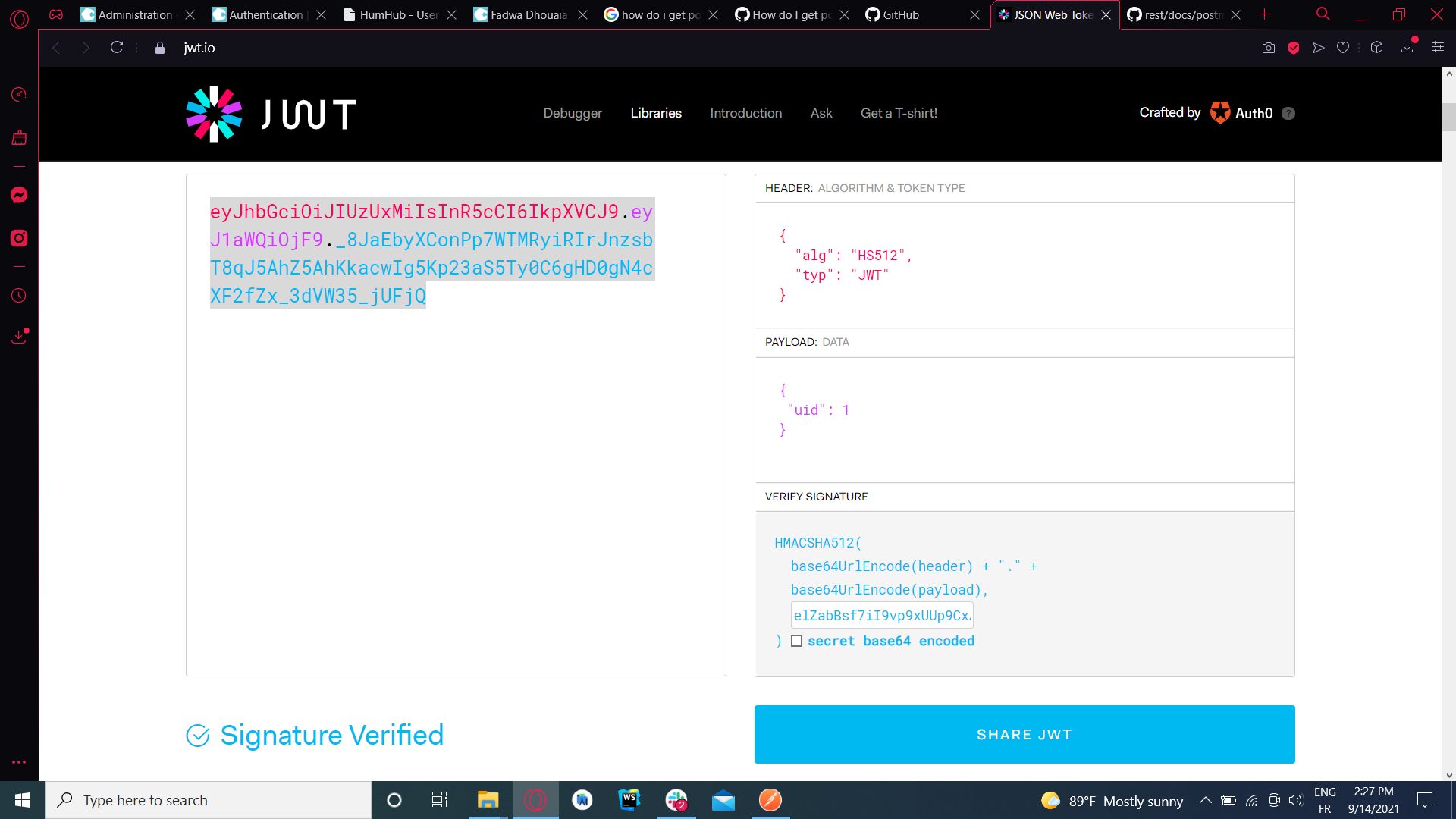
Yes. I really don't know why you have 400 bad request.
Hey guys, specifically @funkycram
I am really struggling here as its giving me a 136 character string from JWT and it can only be 128 long.
Based on whats been said above I have copied the string the module creates and put that as the secret key on JWT.io
I have set "uid":1 on the payload as well and the type is HS512.
Please can someone tell me what I am doing wrong here as I receive this error:
{"name":"Unauthorized","message":"Invalid token!","code":0,"status":"401"}

Sorry @BaconTriple, I don't know what's happening for you, I don't have much experience with this module, I just did it according to the procedure I gave above...
damn... I am really at a loss here because I need this api data, does anyone have a clear step by step with an example they could show me with screenshots. I feel the documentation side of this is lacking quite severely and this could help a lot of other people who stumble across this
Ok so I have managed to get it to work using reqbin.com but the issue is I need to be able to query to current logged in user of a session but this JWT method only allows me to use one UID which means every request is just the user details of that UID. So what is everyone else doing?
Trying to use the API (in another PHP app) and I hardly understand anything to what am I supposed to do with the tokens.
Got a basic PHP curl function that is supposed to work with anything
// Method: POST, PUT, GET etc
// Data: array("param" => "value") ==> index.php?param=value
function CallAPI($method, $url, $data = false)
{
    $curl = curl_init();

    switch ($method)
    {
        case "POST":
            curl_setopt($curl, CURLOPT_POST, 1);

            if ($data)
                curl_setopt($curl, CURLOPT_POSTFIELDS, $data);
            break;
        case "PUT":
            curl_setopt($curl, CURLOPT_PUT, 1);
            break;
        default:
            if ($data)
                $url = sprintf("%s?%s", $url, http_build_query($data));
    }

    // Optional Authentication:
    //curl_setopt($curl, CURLOPT_HTTPAUTH, CURLAUTH_BASIC);
    //curl_setopt($curl, CURLOPT_USERPWD, "user:password");

    curl_setopt($curl, CURLOPT_URL, $url);
    curl_setopt($curl, CURLOPT_RETURNTRANSFER, 1);

    $result = curl_exec($curl);

    curl_close($curl);

    return $result;
}
It works when I call it to auth on the API with my user and password:
$apidata =  array("username"=>"Myuser","password"=>"Mypassword");
$json = CallAPI("POST","https://www.myhumhub.com/api/v1/auth/login",$apidata);
$obj=json_decode($json);
$token=$obj->auth_token;
echo "Auth : ". $obj->message . "<br>Token = ".$token ."<hr>";
Returns
Auth : Success Token = eyJ0eXAiOiJKV1QiLCJhbGciOiJIUzUxMiJ9.eyJpYXQiOjE2NDQ3NjIyMDUsImlzcyI6Imh0dHBzOlwvXC9lc3BlaHViLmJlXC8iLCJuYmYiOjE2NDQ3NjIyMDUsInVpZCI6MSwiZW1haWwiOiJ0b21AZXNwZXJhbnphaC5iZSJ9.J1BqDcBaFWmxKYJo7poWht-IpRD05LZeI0f0k25rcTR3RgbsOiKxXwhEzLRnx_YaiICe4tBEdl12Bm-27L4IUA
After that I am stuck. I can't figure out how to use any function of the API and especially how to pass the token I received.
Example :
            $apidata =  array("auth_token"=>$token); // retrieved previously
            $json = CallAPI("POST","https://www.myhumhub.com/api/v1/user",$apidata);
            echo var_dump(json_decode($json, true));
Gives :
array(4) { ["name"]=> string(12) "Unauthorized" ["message"]=> string(14) "Invalid token!" ["code"]=> int(0) ["status"]=> string(3) "401" }
How to use the token(s) isn't explained anywhere in the humhub API documentation, which is quite disappointing.
I tried to name my token variable differently, but couldn't guess something that work. I googled 2 hours and I am still stuck.
I also tried to use the trick explained above by @funkycram and use that token instead, but it doesn't work either.
Could you please provide an example of how to auth on and use the API with some basic PHP curl code ?
Cheers

@DuvelCorp @luke- The token should be passed separately, for example as 4th param:
function CallAPI($method, $url, $data = false, $token = null)
then add these lines into the function:
    if ($token) {
        $authorization = 'Authorization: Bearer ' . $token;
        curl_setopt($curl, CURLOPT_HTTPHEADER, array('Content-Type: application/json', $authorization));
    }
and instead of your example please use code like this:
$json = CallAPI("GET","http://humhub.yb/api/v1/user", false, $token);
echo '<pre>';
var_dump(json_decode($json, true));
echo '</pre>';
For me it works:
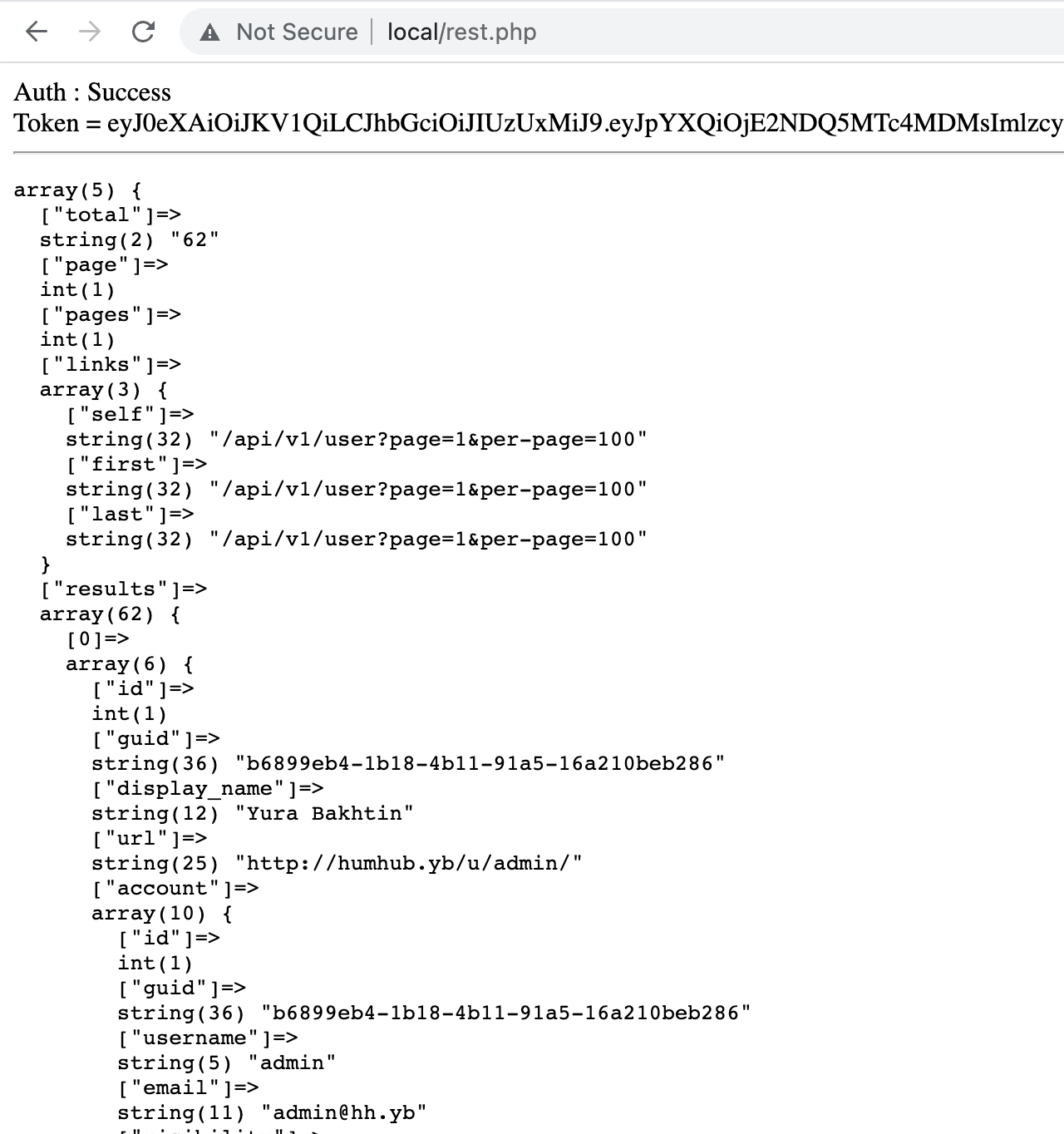
PS: this info is from first result of google search "php curl send bearer token" - https://stackoverflow.com/questions/30426047/correct-way-to-set-bearer-token-with-curl.

@yurabakhtin got additional troubles for the PUT /user
Basically I just want to update one custom profile field that I have created, which is the person ID in my other system. I can see this field in the json returned when I do a GET.
First I have modified my CallAPI function with
        case "PUT":
            curl_setopt($curl, CURLOPT_PUT, 1);
            if ($data){
                curl_setopt($curl, CURLOPT_HTTPHEADER, array('Content-Type: application/json', 'Content-Length: ' . strlen($data)));
                curl_setopt($curl, CURLOPT_POSTFIELDS, $data);
            }
Then I have supposed that in my PUT, I just have to specify the field I want to update, with their value, but that doesn't work. Things I tried:
    $data = array('profile'=>array('fc_id'=>$fcid));
    $payload = json_encode($data);
    $json = CallAPI("PUT","https://www.myhumhub.com/api/v1/user/1",$payload, $HubToken);
--> Returns "NULL"
or
    $payload = '{"profile":{"fc_id": "'.$fcid.'"}}';
    $json = CallAPI("PUT","https://www.myhumhub.com/api/v1/user/1",$payload, $HubToken);
--> Returns the user data, but field is not updated.
At this point I am wondering what my issue is, and if I am supposed to send in my PUT, the whole payload as described here https://www.humhub.com/en/marketplace/rest/docs/html/user.html#operation/updateUser , meaning ALL users data.
That doesn't sounds right to me, as I just want to update one field of the user profile
It took me a couple of tries to get the Bearer auth to work, and it was really entirely my own fault. @funkycram has a perfectly sane and functional example via jwt.io, so thank you for that.
First, read the example carefully. I used "id" in place of "uid" and that surely won't work (duh). Second, I used my text username instead of my integer ID number. I wasn't sure of my uid as it's not entirely obvious (on my install anyway - we use LDAP). I found the uid by clicking the gear icon beside my name in the user admin and hovering over "edit". The ID is in the link (status bar). I could have looked at the DB as well. Could be something to put on the user list table on the user admin page at some point.
I will consider writing a basic markdown "how to" for the docs if someone wants to incorporate that into the main api documentation page. I think that would be worthwhile for users.

Here is a gist that can be used as a guide if anyone wants it:
https://gist.github.com/jelofson/75d6d81cdb7daf9f337a11f10a96d4bb
Thanks @yurabakhtin and @jelofson for theses guide. Perhaps it could be useful for others to share theses tips on https://github.com/humhub/rest/blob/master/docs/README.md or https://github.com/humhub/rest/blob/master/docs/MANUAL.md ?
By all means. Take mine and tweak it or update it as you see fit. If it helps others that would be great. I won't have time to clone the docs and contribute directly, but if you want the content, please feel free. Maybe I will check out the community pages and see if there are any questions related to it as well.
e.g. to create a group:
curl --user Admin:secretPassword -d '{"name":"Test group"}' -H 'Content-Type: application/json' http://example.com/api/v1/user/group
This command requires to have Allow HTTP Basic Authentication ticked in the module settings.
To connect with the JWT token (see how to generate the token here), you can use Authorization: Bearer xxxx.xxx.xxxxx (xxxx.xxx.xxxxx is the token):
curl -d '{"name":"Test group"}' -H 'Content-Type: application/json' -H 'Authorization: Bearer xxxx.xxx.xxxxx' https://example.com/api/v1/user/group
On the API configuration page, the JWT Key is the secret key (not the token you will use).
To get the token key, go to https://jwt.io/:
- Select algorithm HS512
- In PAYLOAD:DATA (replace 1 with the user id that will be used to execute the API actions):
{
 "uid": 1
}
- VERIFY SIGNATURE: replace
your-256-bit-secretby the secret key (in the API configuration) and unchecksecret base64 encoded- Copy the encoded token: this is the token you will use to send actions to the API
Doing this exactly, but still seeing the error:
{
    "name": "Unauthorized",
    "message": "Invalid token!",
    "code": 0,
    "status": "401"
}
How to resolve/diagnose this issue?

On the API configuration page, the JWT Key is the secret key (not the token you will use). To get the token key, go to https://jwt.io/:
- Select algorithm HS512
- In PAYLOAD:DATA (replace 1 with the user id that will be used to execute the API actions):
{
 "uid": 1
}
- VERIFY SIGNATURE: replace
your-256-bit-secretby the secret key (in the API configuration) and unchecksecret base64 encoded- Copy the encoded token: this is the token you will use to send actions to the API
Doing this exactly, but still seeing the error:
{
    "name": "Unauthorized",
    "message": "Invalid token!",
    "code": 0,
    "status": "401"
}
How to resolve/diagnose this issue?
I haved the same problem. And this instruction work perfectly. May be you do something wrong on https://jwt.io/ page. On this page you must see "Signature Verified" string at the botton on left side of the page (below "Encoded" field) before copy token.

There is any existing module to request some data from an external API and show it inside a Hamhub Space?
