

 huggingface
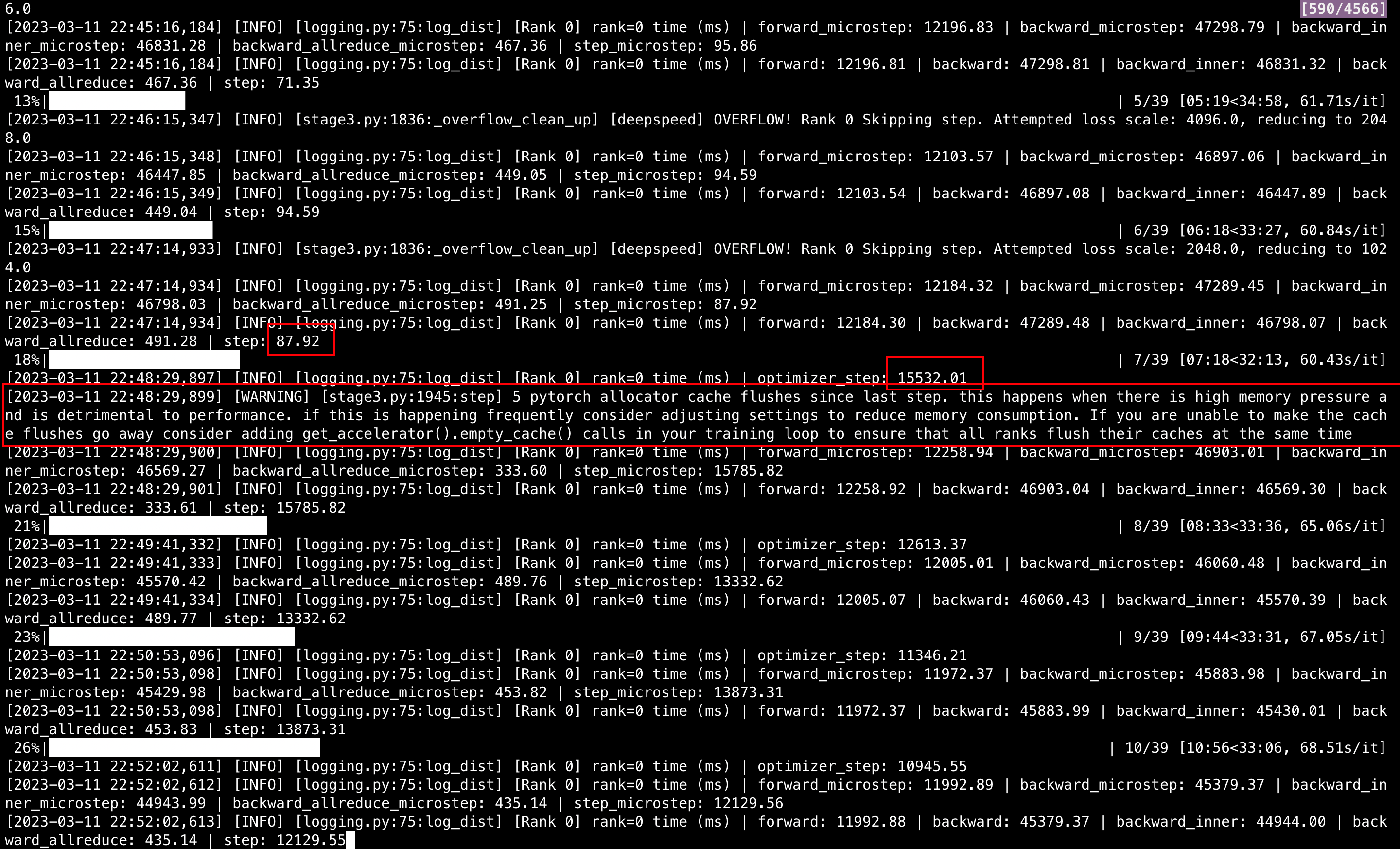
Time spent on engine.step() increased strangely
System Info
I'm using Deepspeed's zero3 with optimizer offload. Time spent on step() increased from ~100ms to 10,000+ ms after a few steps. The CPU memory in occupied ~350G (500G in total).
transformersversion: 4.26.1- Platform: Linux-4.15.0-189-generic-x86_64-with-glibc2.17
- Python version: 3.8.16
- Huggingface_hub version: 0.12.1
- PyTorch version (GPU?): 1.12.1 (True)
- Tensorflow version (GPU?): not installed (NA)
- Flax version (CPU?/GPU?/TPU?): not installed (NA)
- Jax version: not installed
- JaxLib version: not installed
- Using GPU in script?: True
- Using distributed or parallel set-up in script?: True
Who can help?
@sgugger @stas
Information
- [ ] The official example scripts
- [X] My own modified scripts
Tasks
- [ ] An officially supported task in the
examplesfolder (such as GLUE/SQuAD, ...) - [X] My own task or dataset (give details below)
Reproduction
- My code
from transformers.deepspeed import HfDeepSpeedConfig

from transformers import AutoModelForCausalLM, AutoConfig, AutoTokenizer
from transformers.models.codegen.modeling_codegen import CodeGenMLP
import argparse
import torch
import time, datetime
import deepspeed
from deepspeed.accelerator import get_accelerator
from torch.utils.data import Dataset
from transformers.activations import ClippedGELUActivation, LinearActivation
from lion_pytorch import Lion
from datasets import load_dataset
import os, sys
from transformers import Trainer, TrainingArguments, HfArgumentParser
from transformers.integrations import WandbCallback


class MyDataset(Dataset):
    def __init__(self, data, tknz):
        super().__init__()
        self.data = data
        self.tknz = tknz

    def __len__(self):
        return len(self.data)

    def __getitem__(self, idx):
        tknz_text = self.tknz(
            self.data[idx]['text'],
            max_length=args.seq_len,
            padding='max_length',
            truncation=True,
        )
        return {
            'input_ids': tknz_text['input_ids'],
            'attention_mask': tknz_text['attention_mask'],
            'labels': tknz_text['input_ids']
        }


def collate_fn(batch, tknz):
    tknz_batch = tknz.pad(
        batch,
        padding=True,
        max_length=args.seq_len,
        pad_to_multiple_of=8,
        return_tensors='pt'
    )
    return {
        'input_ids': tknz_batch['input_ids'],
        'attention_mask': tknz_batch['attention_mask'],
        'labels': tknz_batch['input_ids']
    }


def train():
    print(f"[{datetime.datetime.today()}] Loading model.")

    model = AutoModelForCausalLM.from_pretrained("Salesforce/codegen-16B-mono", use_cache=False)
    tknz = AutoTokenizer.from_pretrained("Salesforce/codegen-16B-mono")
    tknz.pad_token = tknz.eos_token

    print(f"[{datetime.datetime.today()}] Loading dataset.")
    dataset = load_dataset("NeelNanda/pile-10k")['train'].select(range(args.data_size))
    dataset = MyDataset(dataset, tknz)
    print(f"[{datetime.datetime.today()}] Initializing DeepSpeed Engine.")
    trainer = Trainer(
        model=model,
        args=training_args[0],
        data_collator=lambda batch: collate_fn(batch, tknz),
        train_dataset=dataset,
        tokenizer=tknz,
        callbacks=[WandbCallback()],
    )
    print(f"[{datetime.datetime.today()}] Entering training loop.")
    trainer.train()


if __name__ == "__main__":
    parser = argparse.ArgumentParser()
    parser.add_argument("--local_rank", type=int, default=-1)
    parser.add_argument('--project', type=str, default="my_project")
    parser.add_argument('--name', type=str, default="my_exps")
    parser.add_argument('--data_size', type=int, default=100)
    parser.add_argument('--seq_len', type=int, default=300)
    parser.add_argument("--training_args_file", type=str, default="config/training_args.yml")
    args = parser.parse_args()
    training_args = HfArgumentParser(TrainingArguments).parse_yaml_file(args.training_args_file)
    train()
- My script to run the Python file
port=$(shuf -i25000-30000 -n1)

WANDB_MODE=disabled \
CUDA_VISIBLE_DEVICES=0,1,2,3,4,5,6,7 \
deepspeed --master_port "$port" train_ds_zero3.py \
--seq_len 100
- My config files
- training_args.yml
output_dir: ./output
do_train: true
per_device_train_batch_size: 1
gradient_accumulation_steps: 1
num_train_epochs: 3
log_level: info
fp16: true
gradient_checkpointing: true
remove_unused_columns: false
#deepspeed: ./config/ds_zero3.json
report_to: wandb
run_name: ds_zero3_opt_offload_0311
deepspeed: config/ds_zero3_opt_offload.json
- ds_zero3_opt_offload.json
{
    "fp16": {
        "enabled": "auto",
        "loss_scale": 0,
        "loss_scale_window": 1000,
        "initial_scale_power": 16,
        "hysteresis": 2,
        "min_loss_scale": 1
    },

    "bf16": {
        "enabled": "auto"
    },

    "optimizer": {
        "type": "AdamW",
        "params": {
            "lr": "auto",
            "betas": "auto",
            "eps": "auto",
            "weight_decay": "auto"
        }
    },

    "scheduler": {
        "type": "WarmupLR",
        "params": {
            "warmup_min_lr": "auto",
            "warmup_max_lr": "auto",
            "warmup_num_steps": "auto"
        }
    },

    "zero_optimization": {
        "stage": 3,
        "offload_optimizer": {
            "device": "cpu",
            "pin_memory": true
        },
        "overlap_comm": true,
        "contiguous_gradients": true,
        "sub_group_size": 1e9,
        "reduce_bucket_size": "auto",
        "stage3_prefetch_bucket_size": "auto",
        "stage3_param_persistence_threshold": "auto",
        "stage3_max_live_parameters": 1e9,
        "stage3_max_reuse_distance": 1e9,
        "stage3_gather_16bit_weights_on_model_save": true
    },

    "gradient_accumulation_steps": "auto",
    "gradient_clipping": "auto",
    "steps_per_print": 2000,
    "train_batch_size": "auto",
    "train_micro_batch_size_per_gpu": "auto",
    "wall_clock_breakdown": true
}
- Time spent on step
Expected behavior
The CPU memory is occupied ~350G and I have 500G in total, so the occupation is not that high. I'm confused why the step() get so slow after that certain step.
I hope the step() will be as quick as the first few steps (<100ms).
Thank you for your kindly help.


- The first few steps lead to an OVERFLOW so optimizer didn't run and thus was fast. it then adjusted the scaling factor each step until it reached one that didn't lead to an overflow and thus it did the first optimizer step.
- then you can see from the warning that your setup is misconfigured - you're trying to load too much into your GPU memory and all the optimizations are disabled since there is no gpu memory and it has to do a lot more work to be optimal. As you're already at bs=1 and
gradient_checkpointing=true, the next thing to do is to either add more gpus or use gpus with more memory (I have no idea which gpus you're using) or enableoffload_param(but not sure if you have enough cpu memory remain for offloading params):
You can follow the guidelines here: https://huggingface.co/docs/transformers/main/main_classes/deepspeed#how-to-choose-which-zero-stage-and-offloads-to-use-for-best-performance
but most likely the model you picked is too large for the hardware setup you have chosen.

This issue has been automatically marked as stale because it has not had recent activity. If you think this still needs to be addressed please comment on this thread.
Please note that issues that do not follow the contributing guidelines are likely to be ignored.
![github-actions[bot] avatar](https://avatars.githubusercontent.com/in/15368?v=4 "Published by a pub.dev verified publisher")