

 huggingface
[XLand] Between a ramp and a wall, it seems like the structured grid is not being rendered.
The bug can be reproduced with any of the scripts of XLand. You can see that in the following image, on the side of some ramps, instead of gray terrain, there is just white (which is simply the background color).
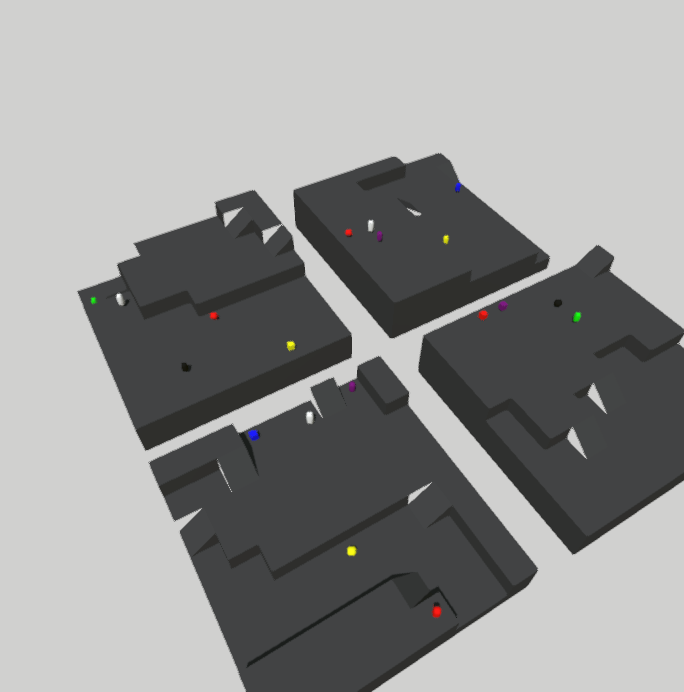
The issue is probably on the grid generation in ProcgenGrid, and more specifically in the generation of the actual map (generate_map function in simenv/src/simenv/assets/procgen/wfc/build_map.py).

Is the rendered mesh the output of this mesh grid, passed into StructuredGrid?
x, z = np.meshgrid(x, z)
The questions is where do we think the bug is. As is, this code is really hard to follow because it doesn't seem like there's a common terminology used for the grid / map / world. There seem to be a ton of different functions called things like gen_map, make_map, build_map (I had mentioned this once in examples I think too). What levels of abstraction should all of these be acting on? How do we verify each level?
What conceptually should be done in src/simenv and what should be in environments/xland?

Hey, procedural generation in a generic way should be inside src/simenv. The way it is now is not so extensible, since I expect a height map to generate the map and then use it to feed the algorithm. In XLand, we only uses a procedurally generated grid from simenv to create the map.
So the issue has nothing to do with xland's code: it is on generation of the grid.
However, notice that the issue is not in the Wave function collapse code, but rather on conversion of the 2D height map generated from the algorithm to a mesh using StructuredGrid. This is done by creating x, z coordinates (equally spaced and with meshgrid) and then assigning them the heights that are the output of the algorithm. The StructuredGrid class transforms these points into a mesh, which leads to the final result.
And I agree that I might not have chosen the best names, but we could certainly change them. Feel free to ping me if you need more clarification :). If you want, I can walk you through the code too!