

 huggingface
notebook_login() from huggingface_hub in VSCode Jupyter notebook
I am running the following in a VSCode notebook remotely:
#!%load_ext autoreload
#!%autoreload 2
%%sh
pip install -q --upgrade pip
pip install -q --upgrade diffusers transformers scipy ftfy huggingface_hub
from huggingface_hub import notebook_login

# Required to get access to stable diffusion model
notebook_login()

import torch
from diffusers import StableDiffusionPipeline

pipeline = StableDiffusionPipeline.from_pretrained(
    "runwayml/stable-diffusion-v1-5", torch_dtype=torch.float16, revision="fp16"
)

pipeline = pipeline.to("cuda")

import os

from IPython.display import Image, display


def generate_images(
    prompt,
    num_images_to_generate,
    num_images_per_prompt=4,
    guidance_scale=8,
    output_dir="images",
    display_images=False,
):

    num_iterations = num_images_to_generate // num_images_per_prompt
    os.makedirs(output_dir, exist_ok=True)

    for i in range(num_iterations):
        images = pipeline(
            prompt, num_images_per_prompt=num_images_per_prompt, guidance_scale=guidance_scale
        )
        for idx, image in enumerate(images.images):
            image_name = f"{output_dir}/image_{(i*num_images_per_prompt)+idx}.png"
            image.save(image_name)
            if display_images:
                display(Image(filename=image_name, width=128, height=128))

# 1000 images take just under an 1 hour on a V100

generate_images("a meal of boeuf bourguignon", 3, guidance_scale=4, display_images=True)
However, three things that I need help with:
-
why no interactive thing happens in
notebook_login()? I also don't see a message after executing thenotebook_login()cell. -
When I have the number of images to be generated as 1000 or even 100 I get cuda out of memory error. However, I am not sure how to change batch size in your code. Could you please help on that?
-
When I changed the number of images to be generated to 4, nothing is generated in the
imagesfolders as you see in the screenshot below.

-
VS Code's Jupyter Notebook implementation doesn't render the login widget nicely. You could log in via the command line (
huggingface-cli loginif I remember right) BUT they've also recently removed the need to log in if you need to access most stable diffusion variants so you should be OK just removing that code anyway :) -
I'm not sure why this is an issue if you're generating them in small batches. I can't recreate the issue - I just replaced the '3' in your code with '100' and it ran fine and made 100 images, but perhaps your GPU was close to running out of RAM anyway and some small memory leak meant it ran out after a few iterations.
-
If num_images_to_generate = 3 and num_images_per_prompt=4 then your code (
num_iterations = num_images_to_generate // num_images_per_prompt) will give num_iterations=0. But when I set num_images_to_generate=4 then it generates four images in my output folder as expected: Are you sure you're looking in the
 imagesfolder on the remote machine where the code is running (as opposed to your local filesystem shown in the explorer view in VS code)?

@johnowhitaker thanks a lot for your response.
I now logged in using cli in terminal and used a python script instead of a notebook. Running it for 1000 error CUDA OUT OF MEMORY error. Running it with 2 creates no photo in images folder. Do you know how I can resolve this issue?
import os

from IPython.display import Image, display

import torch
from diffusers import StableDiffusionPipeline

pipeline = StableDiffusionPipeline.from_pretrained(
    "runwayml/stable-diffusion-v1-5", torch_dtype=torch.float16, revision="fp16"
)

pipeline = pipeline.to("cuda")

def generate_images(
    prompt,
    num_images_to_generate,
    num_images_per_prompt=4,
    guidance_scale=8,
    output_dir="images",
    display_images=False,
):

    num_iterations = num_images_to_generate // num_images_per_prompt
    os.makedirs(output_dir, exist_ok=True)

    for i in range(num_iterations):
        images = pipeline(
            prompt, num_images_per_prompt=num_images_per_prompt, guidance_scale=guidance_scale
        )
        for idx, image in enumerate(images.images):
            image_name = f"{output_dir}/image_{(i*num_images_per_prompt)+idx}.png"
            image.save(image_name)
            if display_images:
                display(Image(filename=image_name, width=128, height=128))


generate_images("a meal of boeuf bourguignon", 2, guidance_scale=4, display_images=True)
 I took the code from here:
https://gitlab.com/juliensimon/huggingface-demos/-/tree/main/food102
I took the code from here:
https://gitlab.com/juliensimon/huggingface-demos/-/tree/main/food102
oh no, this threw CUDA OUT OF MEMORY error. is there a way I could fix it?
import os

from IPython.display import Image, display

import torch
from diffusers import StableDiffusionPipeline

pipeline = StableDiffusionPipeline.from_pretrained(
    "runwayml/stable-diffusion-v1-5", torch_dtype=torch.float16, revision="fp16"
)

pipeline = pipeline.to("cuda")

def generate_images(
    prompt,
    num_images_to_generate,
    num_images_per_prompt=4,
    guidance_scale=8,
    output_dir="images",
    display_images=False,
):

    num_iterations = num_images_to_generate // num_images_per_prompt
    os.makedirs(output_dir, exist_ok=True)

    for i in range(num_iterations):
        images = pipeline(
            prompt, num_images_per_prompt=num_images_per_prompt, guidance_scale=guidance_scale
        )
        for idx, image in enumerate(images.images):
            image_name = f"{output_dir}/image_{(i*num_images_per_prompt)+idx}.png"
            image.save(image_name)
            if display_images:
                display(Image(filename=image_name, width=128, height=128))


generate_images("a meal of boeuf bourguignon", 4, guidance_scale=4, display_images=True)
(food102) mona@ard-omen1:~/research/food102$ python hf_sd_demo.py
Fetching 15 files: 100%|██████████████████████████████████████████████████████████████████████████████████████████████████████████████████| 15/15 [00:00<00:00, 8577.31it/s]
  0%|                                                                                                                                                | 0/50 [00:00<?, ?it/s]
Traceback (most recent call last):
  File "/home/mona/research/food102/hf_sd_demo.py", line 38, in <module>
    generate_images("a meal of boeuf bourguignon", 4, guidance_scale=4, display_images=True)
  File "/home/mona/research/food102/hf_sd_demo.py", line 27, in generate_images
    images = pipeline(
  File "/home/mona/anaconda3/envs/food102/lib/python3.10/site-packages/torch/autograd/grad_mode.py", line 27, in decorate_context
    return func(*args, **kwargs)
  File "/home/mona/anaconda3/envs/food102/lib/python3.10/site-packages/diffusers/pipelines/stable_diffusion/pipeline_stable_diffusion.py", line 529, in __call__
    noise_pred = self.unet(latent_model_input, t, encoder_hidden_states=text_embeddings).sample
  File "/home/mona/anaconda3/envs/food102/lib/python3.10/site-packages/torch/nn/modules/module.py", line 1194, in _call_impl
    return forward_call(*input, **kwargs)
  File "/home/mona/anaconda3/envs/food102/lib/python3.10/site-packages/diffusers/models/unet_2d_condition.py", line 424, in forward
    sample, res_samples = downsample_block(
  File "/home/mona/anaconda3/envs/food102/lib/python3.10/site-packages/torch/nn/modules/module.py", line 1194, in _call_impl
    return forward_call(*input, **kwargs)
  File "/home/mona/anaconda3/envs/food102/lib/python3.10/site-packages/diffusers/models/unet_2d_blocks.py", line 777, in forward
    hidden_states = attn(hidden_states, encoder_hidden_states=encoder_hidden_states).sample
  File "/home/mona/anaconda3/envs/food102/lib/python3.10/site-packages/torch/nn/modules/module.py", line 1194, in _call_impl
    return forward_call(*input, **kwargs)
  File "/home/mona/anaconda3/envs/food102/lib/python3.10/site-packages/diffusers/models/attention.py", line 216, in forward
    hidden_states = block(hidden_states, encoder_hidden_states=encoder_hidden_states, timestep=timestep)
  File "/home/mona/anaconda3/envs/food102/lib/python3.10/site-packages/torch/nn/modules/module.py", line 1194, in _call_impl
    return forward_call(*input, **kwargs)
  File "/home/mona/anaconda3/envs/food102/lib/python3.10/site-packages/diffusers/models/attention.py", line 490, in forward
    hidden_states = self.attn1(norm_hidden_states, attention_mask=attention_mask) + hidden_states
  File "/home/mona/anaconda3/envs/food102/lib/python3.10/site-packages/torch/nn/modules/module.py", line 1194, in _call_impl
    return forward_call(*input, **kwargs)
  File "/home/mona/anaconda3/envs/food102/lib/python3.10/site-packages/diffusers/models/attention.py", line 638, in forward
    hidden_states = self._attention(query, key, value, attention_mask)
  File "/home/mona/anaconda3/envs/food102/lib/python3.10/site-packages/diffusers/models/attention.py", line 655, in _attention
    torch.empty(query.shape[0], query.shape[1], key.shape[1], dtype=query.dtype, device=query.device),
torch.cuda.OutOfMemoryError: CUDA out of memory. Tried to allocate 2.00 GiB (GPU 0; 7.79 GiB total capacity; 2.73 GiB already allocated; 984.06 MiB free; 2.75 GiB reserved in total by PyTorch) If reserved memory is >> allocated memory try setting max_split_size_mb to avoid fragmentation.  See documentation for Memory Management and PYTORCH_CUDA_ALLOC_CONF

If you want to generate 2 images then num_images_per_prompt needs to be 2 or 1 - if it is larger then the code won't generate any images.
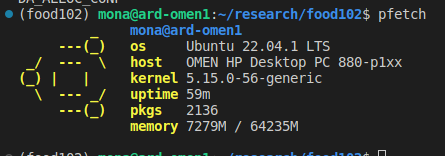
It looks like you only have 8gb ram. So I think set num_images_per_promt to 1 and maybe use pipeline.enable_attention_slicing() to try to reduce RAM usage further and see if you can at least generate a few images
It may also be easier to use something like Google Colab or Kaggle where you can access a GPU with a bit more RAM.