

 html-next
Mobile Safari "scroll to top" + Desktop keyboard shortcut jump to top
While implementing this on a mobile web app, I used the scrollable body demo and it works great. I noticed an issue when trying to scroll to the top by touching on the top bar in iOS. I am using an "infinite load" concept to load more items onto the page. When you scroll to the bottom, it makes an ajax call to the API to get more items. After those items load, the model is updated and the new items show on the page. When you touch the top to scroll up, it staggers and sends you up to random parts of the page. You essentially have to touch the top a few times in order for it to be fully back at the top.
The same can be reproduced on desktop by using the keyboard (on mac, Cmd + Up / Down).
Here is a gif of my experience: https://www.dropbox.com/s/blamakzadktn36g/issue.gif?dl=0
The infinity loader plugin I'm using is https://github.com/hhff/ember-infinity

Can you update to the latest version of vertical-collection, v1.0.0-beta.7, and see if the problem persists? I have a couple of different theories as to what's going on and I think most of them would have been fixed by recent changes.

Thanks for the quick reply I just updated to beta.7 from beta.6 and the same behavior can still seen/reproduced on desktop and mobile.
Ok, it may be related to another Firefox bug we had a while ago where it would stop scrolling because it would detect resizes in components as it scrolled up, and would then shift the scroll position accordingly. If we're scrolling upwards and we recorded that an item was 100px high, but then when it rendered it turned out it was 150px high, we would need to shift the scroll window down 50px to account for the difference.
I currently can't reproduce this behavior in the dummy app here: https://html-next.github.io/vertical-collection/#/examples/scrollable-body
In both safari and chrome I am able to scroll from top to bottom using Cmd + Up/Down after the page has been scrolled through atleast once. Any chance you can post a reproduction steps so we can dig in?
After some further testing, I think I found the problem. It seems that margin-bottom on each of the elements causes the issue that I'm experiencing. I've zipped up a demo with all the dependencies. Simply run ember serve in the main folder and scroll a few times to generate some extra data, then try to Cmd + Up to go back up. Removing the margin-bottom: 20px; in tests/dummy/app/templates/demo.hbs makes it work as normal.
https://www.dropbox.com/s/bn1g5x0qnt03251/ember-infinity-vertical-collection-demo.zip?dl=0
Alright, so I've tracked down the issue. It's occurring because the margin on the bottom of the item is different than the margin on the top. This means that for any item, if it is rendered as the very first item it has a different effective height than if it is rendered as any other item:
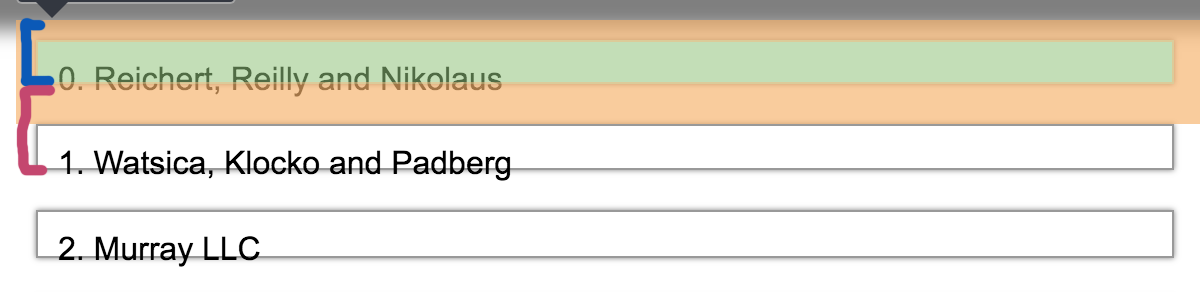
The blue represents the effective height of the first rendered item, which has a 10px margin added to the top, while the pink represents the effective height of the second item, which has a 20px margin added to the top because the first item has a 20px margin-bottom.
Unfortunately we have to measure this way in order to do our calculations correctly (there is no seamless way to measure effective margins of items and their children, we've tried a lot), so when we occlude an item from somewhere in the middle, we think its height is height + 20px, but when its rendered as the very first item, it's height ends up being height + 10px, so we have to shift the scroll container by 10px. This is causing the scrolling to stop.
Going to leave this issue open because the real solution is to figure out a way to prevent setting scrollTop from stopping scrolling. Firefox has this issue all the time, not just with scroll-to-top, so it's a real experience degradation for them.
In the meantime, the best solution for this is to make to make sure that either
margin-top >= margin-bottomon your items- all items are wrapped in a div without margin