
ppsspp
 ppsspp copied to clipboard
 hrydgard
Kurohyou Ryu Ga Gotoku Shinshou (Yakuza) - No clipping of 3d characters behind backgrounds based on depth within screen.
Kurohyo uses 2d backdrops with 3d characters rendered on top of them. PPSSPP does not clip the 3d model when they are "behind" objects in the 2d background. Tested on PPSSPP 1.4 but has not worked on previous versions of the emulator either.
The attached screenshot shows the character floating in space in front of some cupboards instead of being hidden behind them.


Does this work on any backend (such as Vulkan)? Is it the same broken on all 4 backends?
Also - if you try the software renderer (it will be slow), does it render properly there?
Is there a way to get this to happen in the demo?
-[Unknown]

All backends render incorrectly, including OpenGL, D3D9, D3D11, and Vulkan, tested on PPSSPP version 1.5.4.
I tried the software renderer with the OpenGL backend, and it renders correctly with the characters correctly obscured by the foreground geometry in the scene. Screenshot shown below.
I don't have a copy of the demo for this game so I can't say if it works in that or not.

Interesting. I wonder if this game is downloading depth - I seem to recall it was doing that in other places for effects at the start of fights (we currently don't render those effects properly.)
-[Unknown]
Since the background is prerendered, it seems more likely that it's uploading a depth buffer, similar to how Star Ocean uploads a stencil buffer. We don't currently initialize depth buffers with contents of the VRAM where they are created, and we don't detect block transfers to them. Maybe the latter would catch this, that would be convenient.

Is there an easy way to upload depth? I guess it ought to be doable on Vulkan...
-[Unknown]
Yeah, you can output depth from a fragment shader, like we do with our pixel depth rounding hack. So you just need to upload the depth as a texture (depth or single-channel color, whatever) and draw a single quad writing the sampled texture to gl_Depth or whatever the output is called.
This is doable in all backends except D3D9 and GL with versions < 3. For those, I guess you could convert the texture to a dense triangle mesh with the correct depths but not really worth bothering with...
This issue persists in the latest version of PPSSPP - ppsspp-v1.8.0-585.


Thanks for testing, but this will take some tricky work which is not done yet.
Is this pr https://github.com/hrydgard/ppsspp/pull/14833 could possibly help this issue?

Very doubtful. This is probably uploading depth as noted above, which isn't implemented yet in any backend.
-[Unknown]
Is this pr #14833 could possibly help this issue?
I tested it and it doesn't fix the problem. Don't need to enable any options, right?
Just like unknownbrackets says, it's an unrelated problem, which will need some major work on graphics emulation to fix. It's not possible to get it to work right now.
Fix coming up, needs testing: https://github.com/hrydgard/ppsspp/pull/15772
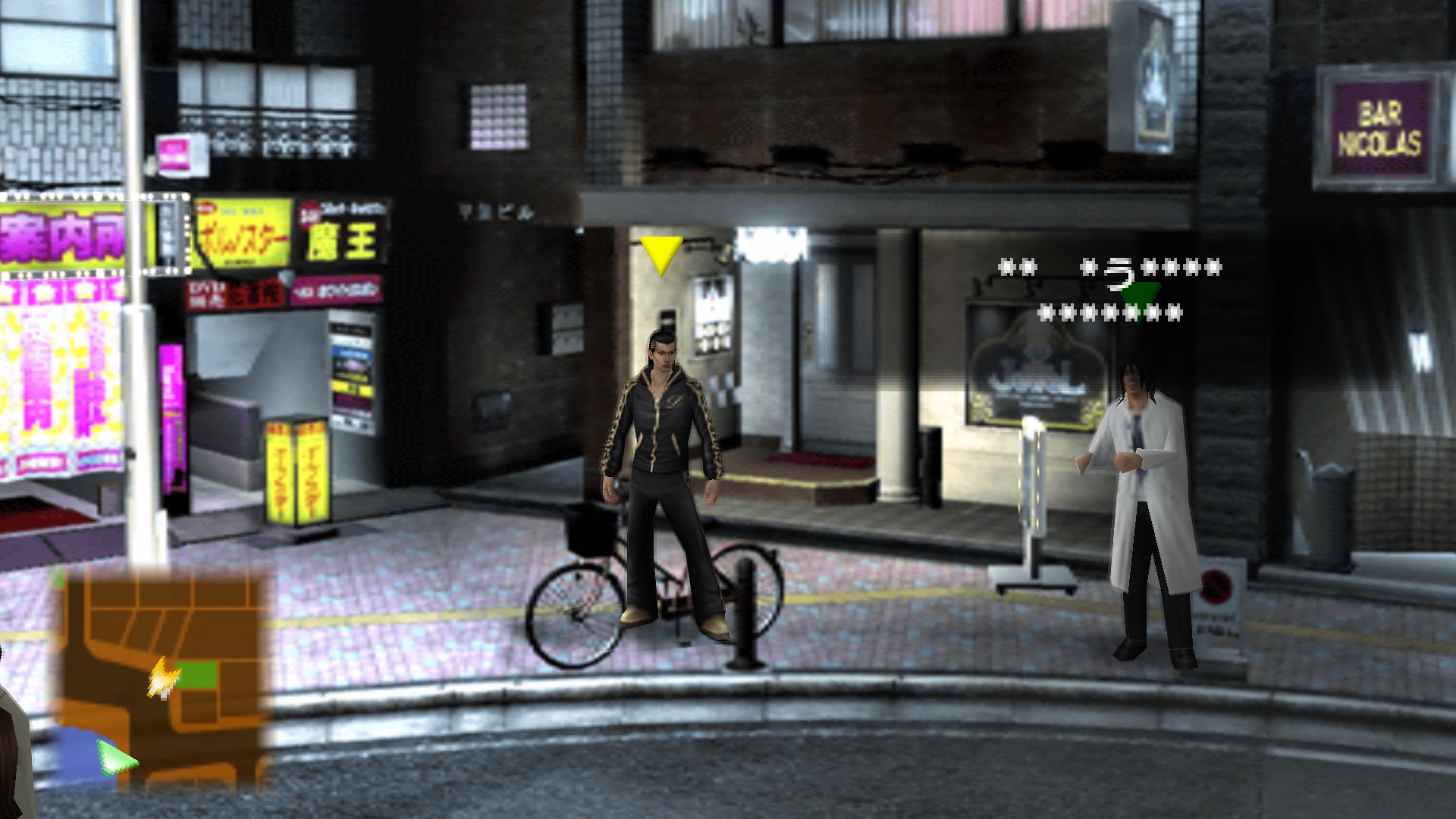
I make savestate. After cutscene go up to bicycle, it happened on Vulkan, D3D9, D3D11, OpenGl. Perhaps this bug occurs exactly after the cutscenes. https://drive.google.com/file/d/15mIcJfkLprfMSZBSL1Zub378Ena9tKRK/view?usp=sharing
This did not happen after every video. This time, there was a video first, then a 3d battle, then videos, and then a transition to a city with a 2d background.
If you go to the pause menu and back, the masks will flash if you stand behind them.
If you do a quick save when an error occurs and then upload, then Depth/Z will work fine.
Seems to be reading data from a directory in SAVEDATA that doesn't exist for me:
80010002=sceIoOpen(ms0:/PSP/SAVEDATA/NPJH50333DAT/DATA08.DNS, 1073758209, 8612): file not found
Could you zip up your NPJH50333DAT directory?
Seems to be reading data from a directory in SAVEDATA that doesn't exist for me:
80010002=sceIoOpen(ms0:/PSP/SAVEDATA/NPJH50333DAT/DATA08.DNS, 1073758209, 8612): file not found
Could you zip up your NPJH50333DAT directory?
https://drive.google.com/file/d/1I7XDGbbWD5v-ZLGw0GQNgX_-pBsWJT2l/view?usp=sharing
Such a bug happens randomly after FMV videos, not after each one. I already play 15 hours.
I changed how the fix works recently, are there still issues after FMV videos?
I changed how the fix works recently, are there still issues after FMV videos?
It flickering. https://drive.google.com/file/d/1pgvRL1IsrQ24dM3Zk8Jomkdi-raX6VVL/view?usp=sharing
I changed how the fix works recently, are there still issues after FMV videos?
It flickering. https://drive.google.com/file/d/1pgvRL1IsrQ24dM3Zk8Jomkdi-raX6VVL/view?usp=sharing
I think the flickering is a fmpeg issue and should be separated to this?
Well the flickering shown in dante's video doesn't look like an ffmpeg issue.
I think this is the flickering issue talk about here Screenrecorder-2022-08-25-22-33-53-652.zip
save state PPSSPP_STATE.zip
ge dump NPJH50333.zip

Its not really flickering on my phone but have a graphics glitch after finishing the cutscene
https://user-images.githubusercontent.com/37603562/186698109-8bc816a4-9b8e-44ba-ba72-d29140ab3be9.mp4