
ppsspp
 ppsspp copied to clipboard
 hrydgard
Ridge Racer: Headlight and sun glares not rendering, lighting issues
EDIT: Glares solved now, just the dark car lightning left to fix
There are reports that it does work on some old versions on AMD only, which is very strange.
Ridge Racer lens flare UCES00002_0002.zip
It does work in the software renderer, although for whatever reason it's kinda glitching a bit from frame to frame (something is not deterministic, or we get some accidental feedback effect?)
https://user-images.githubusercontent.com/130929/191835425-f284d189-2966-4c2a-ba43-8929614bf575.mp4
In the hardware renderer, no flares:

It seems to be doing some actually not that complicated trickery. There's a strange draw that gathers a whole bunch of pixels (768 vertices making up 128 little rectangles) into a 1x1 render target at 0x041fff00 and adds them up using stencil (step 1301):

Stencil does end up as 255 but alpha stays at 0, so something is not going quite right there with our stencil operation substitution.

We're using dualsrc blend and writing alpha into Src1:
    fragColor0 = vec4(v.xyz, 0.0039220000617206096649169921875);
    fragColor1 = vec4(0.0, 0.0, 0.0, v.w);
~~But the alpha part of the blend equation doesn't read from it, only the color? That seems wrong.~~
Wait, no, it's the 0.00392 we want (increment by 1/255, if the pixel is not discarded, alpha test is happening). ~~But it's ONE instead of SRC_ALPHA in Alpha Src in the equation, that does seem wrong.~~ Wait I'm confusing myself, we do want ONE * 0.00392.. Hm. No it does actually seem to accumulate OK?? Hm.
Then it textures from the 1x1, rendering the highlight as a simple mesh, step 1302 (and oh, it seems it goes wrong here - the framebuffer/texture matching misses it, and creates an empty 1x1 texture instead):

It does do CLUT-from-framebuffer later in the frame but that's just for the speedometer, the lights are simpler.

Ok, that wasn't so hard, fix coming up.
https://user-images.githubusercontent.com/130929/191841577-da751dd1-6c69-4b8b-9028-77337b3e20a6.mp4
Some interesting things about this frame dump:
The correct rendering on the PSP has better shading:

Compared to the current rendering in Vulkan (I'm not sure about the top left, it's only happening in headless):

Also as you can see from the PSP frame dump, somehow the CLUT was not captured. It knows it's a target, but somehow it's not getting rendered properly (even on a PSP), probably some issue with the dump machinery... well, forcing it to use the CLUT from the framedump gives this:

Software also gets the lighting wrong, outside the weird flickering:

The texture filtering looks more accurate, which is nice, but the lighting is just as wrong (some in the background as well.) Of course, there's also the weird flickering... gotta see what's going on there.
-[Unknown]

Filtering prims to 1-1345 is fine, but 1-1346 reproduces it so it must be caused somehow by that draw.
The draw in question is a bloom, simple 58x32 draw from 8888 to the screen, using dither, alpha blend, and color test. Color test is simply != zero, and blend is fixed one + one (so the color test is pointless, maybe I should optimize it out...) Dither seems inoffensive as well.
The bloom temporary is created at 1334/1438, so my guess is that's where things are going wrong. It copies in strips 128 wide from 5551 481x272 -> 8888 241x137. It then self-renders that down from 241x136 -> 121x68, also it rectangle strips. And then further from 120x68 -> 60x34, again self-render. From here, it does a no-texture reverse subtract blend, to get the bright parts. The another self-render, this time blending at offsets with a fixed + fixed blend of about 51% + 51%, to blur it.
If I flush each of those using the GE debugger, there's no weird flickering, so it's definitely some hazard/threading issue... forcing 1339 and 1342 to use 1 thread makes the issue go away. What's weird is, both ought to have naturally decided on 1 thread since they're clearly render-to-self.
Aha, it's because it just flushed in this scenario, due to the pending overlap.
-[Unknown]
I mixed up the headlight flickering with something else in the game. But the headlights do come on when you're in tunnels too, the speedometer changes color to indicated your headlights are on which is a nice touch.


Speaking of headlight glares, in one of the Android builds, the headlight glare only renders on one headlight as if the other one is broken and smashed. I dunno how to explain it and I got no screenshots of it.

That's weird, huh. Will try.
Regarding the dark car lighting issue, it's using specular lighting, but not seeing much of it (step 1000 is right in the middle of rendering the car "surface"). Might simply be something wrong with our lighting equations, although they have been through quite a lot of testing... Software transform doesn't make any difference (of course, if it had, it should have worked in the software renderer). It does apply an environment map right afterwards, but it's quite dark and does not seem to be enough to explain the lighting difference, even if blended wrongly somehow.
Hm, the first vertex I get at step 1000 has a garbage normal... (Setting a breakpoint in Lighter::Light).
Later, NormalizedOr001 in if (doSpecular) seems to go spectacularly wrong when stepping... I think that function needs another look.
Anyway, I'm starting to doubt it's actually specular now, because fixing NormalizedOr001 and lowering the power coefficient from 16.0 to 1.0 gets me this:

Which looks very different. But if it was drawing something into the environment map, it should have worked on software if it works on hardware...
 Managed to dig up an old screenshot of the singular headlight bug. It occurred on Android. I didn't experience this on other platforms and as the image suggests, this is pre-CLUT fix so the speedometers are still broken.
Edit: Still occurs after CLUT patch.

That's quite curious, does it happen with any car and track (at night), or some specific combination?
That's quite curious, does it happen with any car and track (at night), or some specific combination?
It doesn't need a specific combination. It just has to be either night or in a tunnel where the headlight is enabled.
Just a note: filtering the framedump to 1 - 1000 on a PSP produces this:

Compare to:

The important thing here is that the lighting is already correct for the parts drawn so far, which does indicate that it's not the tex matrix later at 1080/1438.
Also, if I force the specular coefficient (rewriting any 0x5B418000 command to 0x5B42C600) higher to 99 on the PSP, it is indeed darker:

Interestingly, there's still some specular, even at such a high power, but it's much darker. Conversely, if I force PPSSPP's specular down to 0.3f, I get this (not sure what's wrong with the normalized value, it seems to work for me...):

Even this is wrong, I wonder if it could somehow be that the "toViewer" value is actually wrong? The PSP lighting looks better than this (or than your screenshot), at least as far as how it's shaded compared to the headlights.
If I set the coefficient that low on the PSP, it's a ton brighter:

-[Unknown]
Oh, interesting. But if you look at the little air intakes or whatever, looks like the correct light is coming from a different direction? There's a shine to it that's just not there with hacked specular:

So maybe it's more than just the coef that's off.
As for the toViewer thing, I figured that one out back in the day using the light demo from the homebrew PSPSDK, IIRC, it makes it match.
The normalize thing seems to have been a false positive, it doesn't affect the results.
I've managed to get a reliable repro, of the glitched sun sprite problem. I can only get it to happen on Android so far. Bayonet car (3rd, class 1) on Sunset Drive, on Pocophone F1, Ridge Racer 1 EUR.
Unfortunately, can't replicate it on PC, strangely enough... I can see an additional texture being invalidated and decoded every frame when looking at the sun though.
There is a second CLUT effect going on with the sun, similar to the highlights. I've caught it in a capture now.
It again textures from the framebuffer and accumulates the results into a single pixel at 041fc000. Then it textures from 041fc000, drawing to the first 256 pixels of the top line of an 8888 render target at 0418c650, creating an alpha gradient from 0-255, which is presumably intended for use as a CLUT next. RGB are black or nearly so across the whole gradient.
This is then loaded as a dynamic CLUT, and used with this strangely tall source texture, which contains a quarter of some flare shape at the bottom right:

Weirdly, the output of that depal operation is 100% black though. Not sure what's going wrong... Oh looks like a bad scissor? Hm... The U/V range calculation there is wrong, the UVs coming in are already in texel coordinates.
The reason it seems to fail differently on PC and Android is probably that because we're not filling the texture properly, we texture from DONT_CARE-initialized data.
Hm, I discovered that the lens flare actually works occasionally on Sunset Drive, and the depal seems to miss the bottom/right column/row of the texture.
Fixed that in 0c4935f336dee11e23b990079d3569b13eef723d .
I think we can keep it closed, but the lighting issue on the vehicle itself is still not resolved, right?
-[Unknown]
The corrupted sun glare is still not fixed but somehow, its now more subtle than usual. Its now a very translucent vertical bar which you could see better if you switch to the back camera. Its a tad bit more subtle in the bumper camera, almost undetectable. Upgraded to the latest PPSSPP version and it took 2 laps in Sunset Drive until I finally noticed it. I'm not sure if its related to my settings cause I have everything maxed out. Auto 1:1, TexMMPX, Auto Max Quality, and 16x filtering.
Well at least it's better, but sure, wanna fix it all. Got a screenshot of what you're seeing?
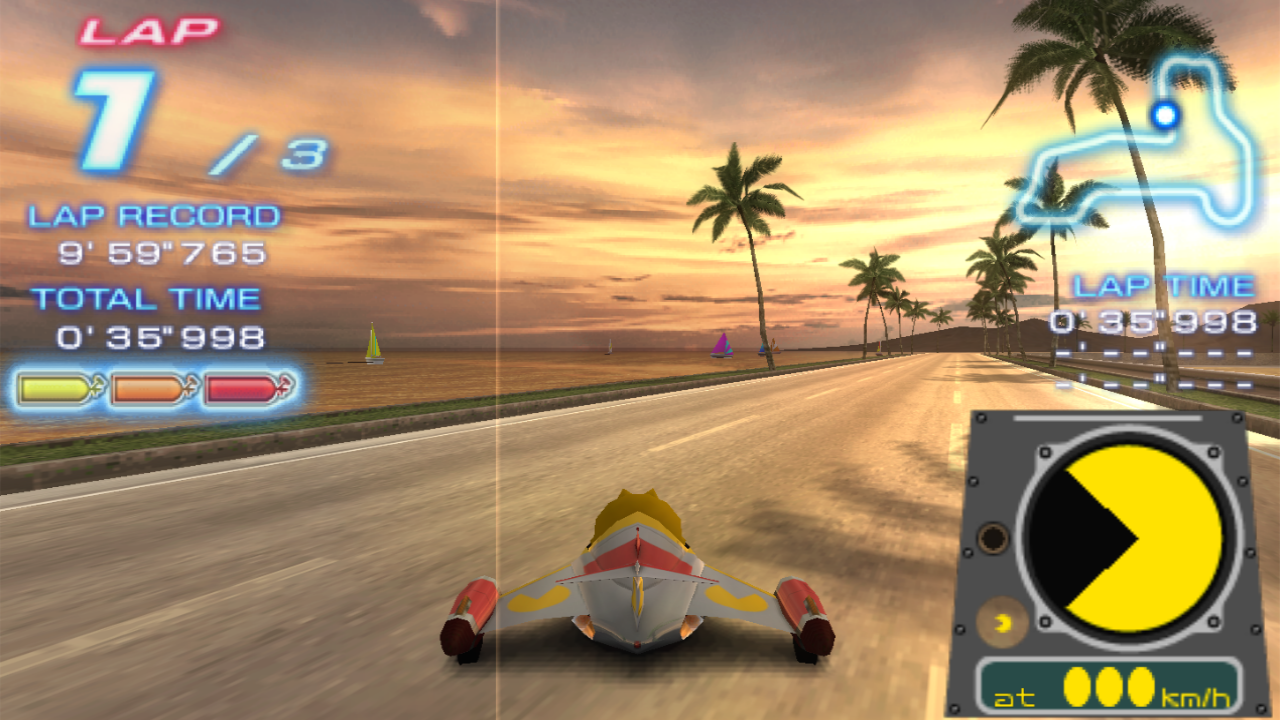 The glare is now a vertical bar as I said. But at least it doesn't obstruct your view anymore.
Edit: Weird, the sun glare somehow works in Phantom Mile. I replaced the skybox texture with a night sky texture and when I get to the last turn in Phantom Mile, I see the sun glare is not corrupted.
OK. I think we're just still a pixel off or so on the detected render area, which we use to limit the area we do "depal" (lookup in palette texture). I'll try to fix it up tomorrow.
Sun glare vertical bar is still there btw. Headlight glare also still doesn't properly render on Android. HOWEVER, the Angelus from RR1 has it's lights render fine. Probably cause it only has 1 headlight so only one glare gets rendered for it. As for the other cars, they still have fucked up headlight rendering.
I have the same issue when using the Vulkan backend.
I tried v1.15.3, v1.14.4 and the latest dev build v1.15.3-26-g55c1c48d6 All have the same problem.
CPU: Ryzen 6900hx GPU: Radeon 680m OS: Windows 11 Graphics driver: Adrenalin 23.4.3

On Android hardware on a build from yesterday. Just leaving this screenshot with the screwed up headlight glare in here
Unrelated but after updating my PPSSPP client, the audio is high pitched now. Weird. Edit: Yep, it's a HZ problem. Having a HZ higher than 60 causes the audio to speed up.
I can't reproduce the vertical bar in sun glares.
The missing second headlight does reproduce on devices without support for dual source blending. Very unclear how that affects things, but I can get it to repro even on PC if I forcibly disable the feature!
Anyway, I'm leaving fixing the second headlight to the next version, now that I've figured out the reason why compatibility differs.
I can still reproduce the vertical line in sun glares using the latest version 1.16.6. Even though I have a different GPU.
Here's my settings file: ppsspp.zip
CPU: Ryzen 6900HX GPU: Radeon RX 6600M OS: Windows 11 23H2 Graphics driver: Adrenalin 23.12.1
ok, then we still need to look at that one too.. I do have a radeon now so once I get around to it, will test on that.
@antoniodesousa I seem to visually detect the use of texture upscaling in your screenshot - do you get the line if you disable it?
Hi @hrydgard , I just tested it without the texture upscaling but it made no difference. The issue only happens with the Vulkan backend. And most likely only to AMD GPUs. I use the Vulkan backend because:
- It has by far the best performance compared to the other backends
- It supports MSAA antialiasing, which greatly improves the overall picture quality
- It supports TextMMPX, which greatly reduces the black lines between the tiles when upscaling the native resolution (most notably Ridge Racer and Outrun 2006) while maintaining the overall picture quality. To me, it actually looks even better than the original