
ppsspp
 ppsspp copied to clipboard
 hrydgard
Spider-man 3 crashing
Game or games this happens in
ULUS-10317 Spider-man 3
What area of the game / PPSSPP
When you beat u enemies in crime spree, ppsspp will crash with the following screen:

What should happen
It shouldn't crash
Logs
50:42:531 user_main E[SCEKERNEL]: HLE/sceKernelThread.cpp:2672 sceKernelWaitThreadEnd - bad thread 363 50:42:563 user_main E[SCEKERNEL]: HLE/sceKernelThread.cpp:2672 sceKernelWaitThreadEnd - bad thread 360 50:43:515 user_main E[SCEKERNEL]: HLE/sceKernelThread.cpp:2672 sceKernelWaitThreadEnd - bad thread 373 50:43:531 user_main E[SCEKERNEL]: HLE/sceKernelThread.cpp:2672 sceKernelWaitThreadEnd - bad thread 370 50:45:036 user_main E[SCEKERNEL]: HLE/sceKernelThread.cpp:2672 sceKernelWaitThreadEnd - bad thread 383 50:45:050 user_main E[SCEKERNEL]: HLE/sceKernelThread.cpp:2672 sceKernelWaitThreadEnd - bad thread 380 56:15:250 user_main E[MEMMAP]: Core/MemFault.cpp:184 Bad execution access detected, halting: 00000000 (last known pc 00000000, host: 0x7f0c00000000) Segmentation fault (core dumped)
Platform
Linux / BSD
Mobile phone model or graphics card
Geforce GT630
PPSSPP version affected
V1.13.1-247-g3edaeae81
Last working version
No response
Graphics backend (3D API)
OpenGL / GLES
Checklist
- [X] Test in the latest git build in case it's already fixed.
- [X] Search for other reports of the same issue.
- [X] Try resetting settings or older versions and include if the issue is related.
- [X] Try without any cheats and without loading any save states.
- [X] Include logs or screenshots of issue.

It's possible this is related to #10196, although I think that was arm32 only or something.
It's likely that there's a problem with your disc. Please rip a clean one and double check the CRC. Looking at reports for this game, there are several different CRCs which is usually a sign that there are people using bad or hacked copies of the disc, which may not run properly.
https://report.ppsspp.org/game/ULUS10317_1.02
-[Unknown]

I doubt it's something to do with the dump, as it's listed on the report as working by some (798e7d3f)
But build this and it does not crash: https://github.com/hrydgard/ppsspp/commit/dab36b4e91e8bc8697affb30a9ffaa8077e5cf8c . will try later to see where it starts o break (If my weekend ends up the way I plan it.
EDIT: tried the Redump dump and it crashes the same place as the one I uses
@unknownbrackets I tested a bit more. Seems between commits 6fb5d82fe (no crash) and 1f71a69be (crashes) the problem starts to manifest.
Down to 20 commits. This one plays correctly: c3ecd41e2cf3c510e4ddc7a62a2c02ea2fe9e2a5
tested this with v1.14-2-g23ca9f629, andthis still happen with the USA disc. And yes the Disc is the same this one: http://redump.org/disc/30102/ so shouldn't be a problem
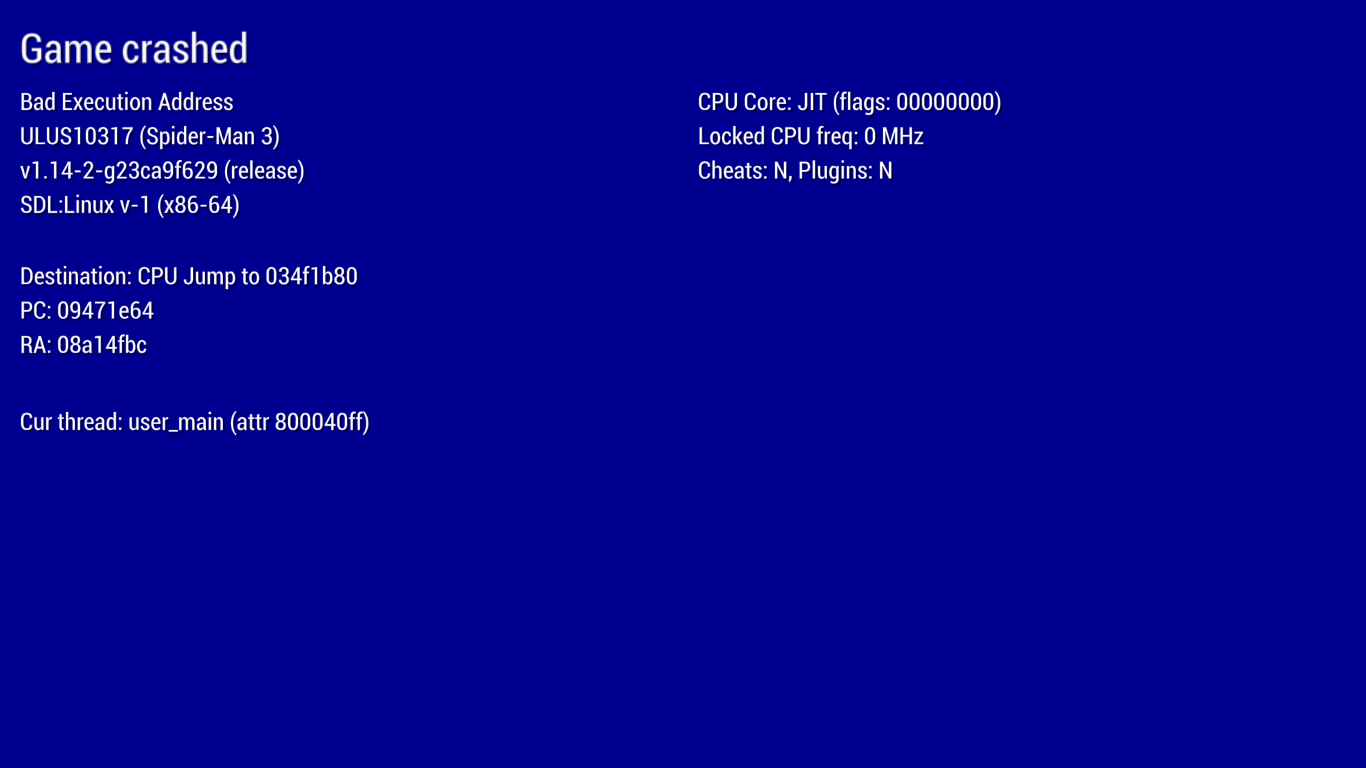
OK tested the Euro release and it also crashes as soon as spidey's hit.
This happens to be left on the terminal:
28:48:574 user_main    E[MEMMAP]: Core/MemFault.cpp:219 Bad memory access detected! 00000000 (0x7fda00000000) Stopping emulation. Info:
088129bc_z_un_08812968
movss xmm7, dword [rbx+rax]

double free or corruption (out)
Aborted (core dumped)
Disc I used is the same as this one: http://redump.org/disc/15633/
@unknownbrackets
I tested it with Retroarch and the same thing happens there:
[libretro ERROR] [MEMMAP] Bad memory access detected! 00000020 (0x7ff200000020) Stopping emulation. Info:
0881e650_z_un_0881e4a0
movss [rbx+r10+0x20], xmm14
if I use a locally build core. While using one that comes from Retroarch gives:
[libretro ERROR] [MEMMAP] Bad execution access detected, halting: 0000000a (last known pc 0000000a, host: 0x7f8f0000000a)
Sorry I think I didn't see the previous reply back in August.
It sounds like if c3ecd41e2cf3c510e4ddc7a62a2c02ea2fe9e2a5 worked fine, this would be caused by #15372. Does the previous commit work fine for both US and EU, or are they separate issues?
In PPSSPP proper, if you go to Settings -> Tools -> Developer tools -> JIT debug tools, and check the "ALU" box, does the problem go away? This will make emulation a bit slower but may help narrow it down.
If not, does changing Settings -> Tools -> Developer tools -> CPU core to "IR interpreter" instead of "Dynarec (JIT)" prevent the crash? This will be even slower, but again would help confirm.
Especially if disabling ALU helps, what specific CPU do you have? The output of cat /proc/cpuinfo would be most helpful.
That change just makes it use BMI2 in some cases, but maybe we're somehow misdetecting your CPU's support for BMI2 and emitting bad instructions for it.
-[Unknown]
This still crashing on armv7 phone.
Interpreter

Dynarec JIT

IR Interpreter crashing me out the emulator without bluescreen.

Looks like it was resolved recently, We build https://github.com/hrydgard/ppsspp/commit/b4c61acbf39e09779179e3a264f354712e82e54f and we didn't experience any crashes in the 20 minutes we played
Hm, I've thought this one was resolved before, so I'll await more reports :)
