

 hpjansson
Sixel rendering with >256 colors
First of all, spoiler: this image is rendered in Konsole with sixels, as you can see it has 2906 colors:
Script that can do it (you need to install libsixel-bin for it to work): sixel_colors.py
This script uses a technique known as tiling: dividing a single image into multiple stripes, each containing its own palette. This allows us to significantly increase the number of colors displayed. Older hardware terminals didn't allow this because they had a fixed palette of on-screen colors, but modern terminal emulators render the interface in truecolor mode and aren't constrained by this limitation! Therefore, we can output as many sixel images, each with its own palette, as we want.
We could go even further and use the transparency capabilities of sixel to sequentially output multiple images with different transparency masks and palettes to the same location. This would theoretically allow for full truecolor, but I haven't gotten around to implementing it yet.
You can also try cutting into little squares or rectangles instead of horizontal stripes, which is also a way to get TrueColor.
PS: chafa is great, thanks!

Nice! In theory this would be doable in Chafa by internally creating multiple ChafaSixelCanvas for a single input image and gluing the output from each of them together vertically.
There are four potential issues with it. None of them are disqualifying, but it means it would have to be an additional mode of operation and not the default. From most serious to least:
- The terminal can be in different modes that tell it how individual sixel images should be placed, and where the cursor should be after printing. To make matters worse, terminals interpret these settings differently (see #192). We'd have to manipulate the modes before doing this, and it will still fail on some terminals.
- Some terminals rescale each image to a virtual cell size, typically 10x20 per cell, which is the DEC standard. This means they can't interpolate the pixels on the seams between strips, so you would probably get visible glitches there (e.g. Windows Terminal).
- If you have an image with a solid color background, the quantizer may decide to give it a slightly different shade in each strip, so you'd get visible horizontal bands. In general, I imagine this could be a problem with images that combine flat, cartoony elements with a high color count.
- Performance. Quantizing is the slowest part of the operation, and it would have to run multiple times. Sixel data would be bigger and less compressible.
I've done some work on quality in the past, see the following issues if you're curious:
https://github.com/hpjansson/chafa/issues/174#issuecomment-2489241676 #238
The big question is how much better can you make it look side by side?
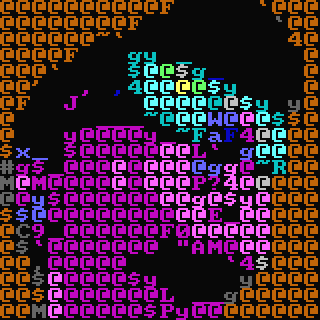
Hi @hpjansson, thanks for the quick response! I'd like to share how my experiments align with your concerns, which might be useful for the research:
Regarding cursor placement: You are absolutely right. This was my biggest hurdle. The only reliable method I found for Konsole was to use absolute ANSI cursor positioning (CSI row;col H) before rendering each independent strip. This confirms your point that mode manipulation is critical and terminal-specific. By using absolute positioning before each strip, we effectively sidestep the ambiguity of where the terminal leaves the cursor after rendering a sixel image. It doesn't matter where it ends up, because we explicitly move it to the correct starting point for the next strip anyway.
Regarding virtual cell sizes and seams: I also ran into this! Initially, I had visible gaps between my 6-pixel strips. The breakthrough came when I decided to query the terminal for its cell size (CSI 16 t) and dynamically set my strip height to match the reported pixel height. Also, we don't necessarily have to match the height of the strips (or any other tiles) exactly to the cell height. It might be more logical to use a value that's a multiple of 6 and is clearly greater than the cell height. Using ANSI positioning may overwrite some part of the previous strip, but we can take this into account and prepare the strips (or other tiles) accordingly.
Regarding Windows Terminal: You mentioned it might have issues with seams. It's worth noting that the Windows Terminal team here on github is generally very responsive to community feedback, especially regarding VT compatibility. If a minimal, reproducible test case demonstrating the interpolation problem at the seams were created, there's a good chance they would be open to addressing it. Improving this could benefit the entire ecosystem of sixel-generating tools, not just Chafa. I'd create the ticket myself, but I don't have access to a Windows machine.
Thanks again for your great work on chafa and for considering this!
- Some terminals rescale each image to a virtual cell size, typically 10x20 per cell, which is the DEC standard. This means they can't interpolate the pixels on the seams between strips, so you would probably get visible glitches there (e.g. Windows Terminal).
Windows Terminal already stores and renders the images in strips (one per cell row), so if that can result in visible glitches then they would already exist with regular images. Assuming I've understood this proposal correctly, I can't see how it would make any difference at all to the way the image appears in Windows Terminal.
If you have an image with a solid color background, the quantizer may decide to give it a slightly different shade in each strip
Isn't the whole point of this mode that you shouldn't need a quantizer?

In my example, quantization is still used, but not for the whole image — it’s applied to each stripe separately. Thanks to this, I increase the number of colors by an order of magnitude. But the idea can be taken further by dividing the stripes into smaller tiles, and then quantization wouldn’t be needed at all. This should be possible because we position the cursor using the usual escape sequences provided for this purpose, rather than relying on where the terminal will place it after displaying the image.
Windows Terminal already stores and renders the images in strips (one per cell row), so if that can result in visible glitches then they would already exist with regular images. Assuming I've understood this proposal correctly, I can't see how it would make any difference at all to the way the image appears in Windows Terminal.
Oh, I didn't know WT already does this. The artifacts are indeed present. I made some test images to verify/illustrate. You may have to open these in a separate tab or image program to avoid browser scaling.
Original:
WT output with 4pt font:
WT output with 9pt font:
WT output with 18pt font:
Detail of above images at 4x zoom (no interpolation):
There are two things going on, most likely. First, the overall affine is discontinuous (gives you that crumpled look on the vertical axis at 4pt - and looking closely at the 18pt one, it looks like the edge pixels are repeated between rows - maybe the matrix goes [0..1] instead of [0..1>. Second, there is no interpolation between rows (obviously, as it hits the abyss in between).
You can't really expect things to look right when you scale the image in separate slices unless you manage the affine/sampling interval uniformly and either make the input slices slightly taller or do inter-slice lookups for the edge pixels.
Isn't the whole point of this mode that you shouldn't need a quantizer?
I think @unxed is proposing two things. One is the row slices (256 colors per row), the other is to keep adding transparent images atop each other with a new palette each time until all colors present in the image are represented (direct color).
Anyway, my point with the row interpolation stuff is that it's possible for WT (and other terminals) to implement this free of artifacts when the image arrives in one piece, but there is no way to do it correctly when row slicing happens on the client side.
I think @unxed is proposing two things. One is the row slices (256 colors per row), the other is to keep adding transparent images atop each other with a new palette each time until all colors present in the image are represented (direct color).
There is also a third option: split rows to several blocks, each having < 256 pixels, so 256 color palette would be enough to match all colors exactly. Unfortunately, I couldn't quickly create a demo application for this algorithm, because I couldn't get img2sixel to create a full palette in such small files; for some reason, it makes them very short, 4~14 colors. So better implementation is needed.
My first attempt was writing my own sixel esc seqs encoder, , but I still haven't managed to get it to work. Maybe I'll come back to it someday, but I'm not sure.
Perhaps the python sixel library does it better. If not, we'll still have to tinker with our own implementation. Perhaps we will implement sixels in far2l, and most likely in the process I will understand this protocol better. We might also try out the block tiling technique there. Creating a demo based on existing and working code would no longer be such a difficult task. And creating a demo based on existing and working code is a much less difficult task.
Or you can try it yourself based on the sixel support code that is already in chafa. The most important thing is the ability to take PNGs with a palette and convert them into sixels with exactly the same palette. With this capability, outputting full-color images with sixels in the manner described above will become entirely possible.
Given the artifacts I mentioned above, I think the only option that could reliably improve quality would be the one where you're overlaying multiple images with transparency. It also has the benefit that you could pick any palette size you want between 2 and the direct color equivalent. The downside is that it'll only work on terminals that support transparency correctly and are able to handle overlaid images efficiently.