

 hovancik
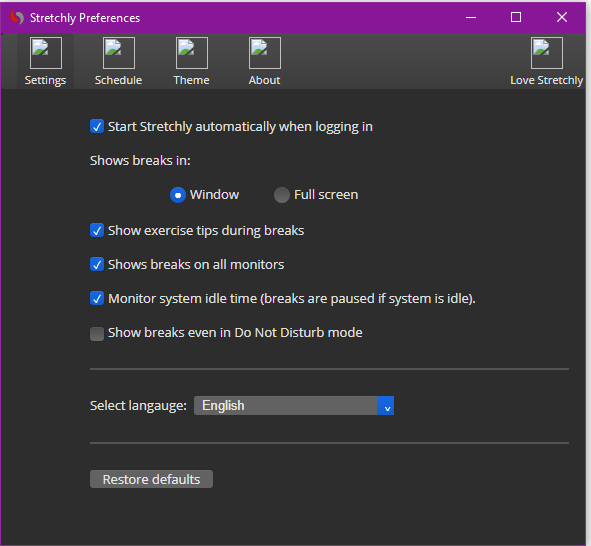
Icons missing, show as broken image icons
Prerequisites
- [X ] I'm using latest version: v1.1.0
- [X ] I've checked Known issues
- [X ] I've checked Open issues
Description
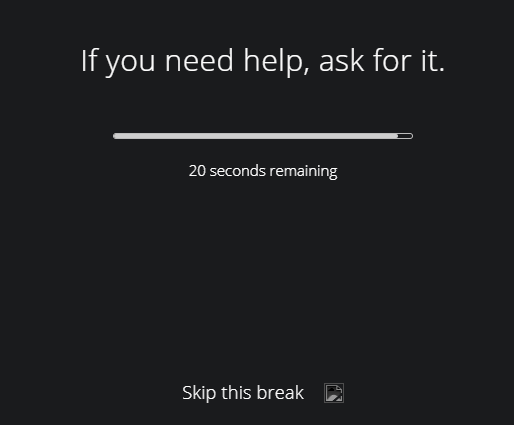
In the preferences and at the end of the Skip this break text on a break pop up, the icons/image are missing.
Operating system: Windows 1909
Steps to Reproduce
- Right click Stretchly and go to preferences - notice missing icons across top of preferences nav and also on some pages like the about page.
- Right click Strechly and skip to next break (micro or otherwise) and notice that the click icon from the end of the skip break link/line of text is a broken image icon.
Expected behavior: Icons should be presently.
Actual behavior: Icons are missing and a broke image icon is should in it's place.
Reproduces how often: 100% of the time
Additional Information
Any additional information, configuration or data that might be necessary to reproduce the issue.
Originally this was fine, until the new version of stretchly with the new icons upgraded.
Since then the icons have been missing. I've upgrades, resinstalled but no success from this.


Hi,
I used the offline installer initially. I've since used chocolately but the same issue persists.
I've used chocolately to uninstall and reinstall too.
Thanks Mike
On Tue, 22 Sep 2020, 07:15 Jan Hovancik, [email protected] wrote:
Hi @mikedixson https://github.com/mikedixson ,
what installer did you use?
— You are receiving this because you were mentioned. Reply to this email directly, view it on GitHub https://github.com/hovancik/stretchly/issues/701#issuecomment-696528999, or unsubscribe https://github.com/notifications/unsubscribe-auth/AAZXRV76GSSEGNTZYUGHIY3SHA6JBANCNFSM4RUSVZMQ .
Hi @mikedixson , I'm just trying to install in virtual machine with choco install stretchly and everything went fine. Do you install as admin? Or maybe some antivirus is blocking the files?
I'm not using Windows OS so not sure, TBH.
Yeah I'm admin. Could be antivirus possibly. I'll do an uninstall and clean everything out and see how that goes and maybe try a VM with and without Windows defender enabled to see if it works
On Sat, 26 Sep 2020, 18:41 Jan Hovancik, [email protected] wrote:
Hi @mikedixson https://github.com/mikedixson , I'm just trying to install in virtual machine with choco install stretchly and everything went fine. Do you install as admin? Or maybe some antivirus is blocking the files?
I'm not using Windows OS so not sure, TBH.
— You are receiving this because you were mentioned. Reply to this email directly, view it on GitHub https://github.com/hovancik/stretchly/issues/701#issuecomment-699525862, or unsubscribe https://github.com/notifications/unsubscribe-auth/AAZXRVYWDPRZGTC3DEIAORTSHYRTDANCNFSM4RUSVZMQ .
Hi Jan,
Yes I'm afraid so :-(
On Thu, 15 Apr 2021 at 16:27, Jan Hovancik @.***> wrote:
Is this still an issue?
— You are receiving this because you were mentioned. Reply to this email directly, view it on GitHub https://github.com/hovancik/stretchly/issues/701#issuecomment-820519086, or unsubscribe https://github.com/notifications/unsubscribe-auth/AAZXRV6BIK6YJVE27RJD6GTTI4AWDANCNFSM4RUSVZMQ .
Hi, maybe you can try getting the chromium debugger by hitting Ctrl+Shift+I and checking what the error is?
Hi, is this still issue in new versions? I'll close this but let me know if the issue persists.