
anny-dock
 anny-dock copied to clipboard
 horberlan
A modern, animated dock for Hyprland built with Rust and Bevy Engine

anny-dock





A modern, animated dock for Hyprland built with Rust and Bevy Engine. Currently exclusive to Hyprland, with plans to support other window managers in the future.
Note: This is my first Rust project! While I'm committed to writing clean and efficient code, I'm also learning along the way. Feedback and suggestions are greatly appreciated as I explore Rust's capabilities and best practices.
Appearance • Installation • Usage • Configuration • Contributing
Appearance
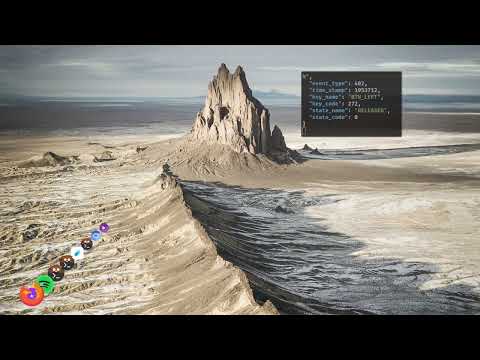
Requirements
- Hyprland
- Rust 1.75+
Installation
You can install the anny-dock manually by cloning this repo and building from source:
# Clone the repository
git clone https://github.com/horberlan/anny-dock.git

# Enter the directory
cd anny-dock

# Build the project
cargo build --release

# Run anny-dock
cargo run --release
or downloading it and installing it directly (from Crates)
cargo install anny-dock
Besides, you may opt for moving the target path to your local binaries for turning the anny-dock an executable in your system $PATH:
cp target/release/anny-dock /usr/local/bin
Usage
Basic Controls
- Scroll: Navigate through icons
- Left Click: Launch/Focus application
- Right Click: Pin/Unpin application
- T: Toggle application titles
- Q/Esc: Close application
- 1..8: Launch/Focus visible applications
- Arrow Keys (←/→): Scroll the dock left and right
- Drag & Drop: Reorder icons
Configuration
anny-dock's configuration can be customized through a TOML file located at ~/.config/anny-dock/config.toml. The configuration system includes:
[config]
visible_items = 8        # Number of items visible in the list
margin_x = 85.0          # Horizontal margin from screen edge
margin_y = 50.0          # Vertical margin from screen edge
spacing = 40.0           # Space between icons
z_spacing = 2.0          # Depth spacing for 3D effect
base_scale = 1.2         # Base icon scale
scale_factor = 0.9       # Scale factor for animations
scroll_speed = 15.0      # Scroll sensitivity
tilt_y = 0.25            # Inclination factor (0.0 = horizontal, 0.5 = strong diagonal)
icon_size = 56.0         # Base size of icons
Configuration File Location
- Default location:
~/.config/anny-dock/config.toml - The file will be created automatically on first run if it doesn't exist
- All values are optional - missing values will use defaults
- Changes take effect immediately after saving
Configuration Organization
- All configuration options are now centralized in the
Configstruct - Configuration values are loaded from a dedicated module
- Default values are more clearly defined and easier to modify
- Configuration is now more modular and easier to extend
Dock Inclination (tilt_y)
- The
tilt_yfield controls the inclination of the dock towards the center of the screen. - Example:
tilt_y: 0.25makes the dock point to a spot 25% of the screen height above the center. - Adjust this value to customize the dock's angle to your visual preference.
Architecture
anny-dock is built using a modern ECS architecture with Bevy:
Core Systems
- Animation System
- Hover System
- Scroll System (diagonal, inclination configurable)
- Icon Management
- Hyprland Integration
- Event Handling
Components
HoverTarget: Manages hover states and animationsClientIcon: Handles icon rendering and scalingScrollState: Controls scroll behaviorDockConfig: Manages dock configuration
Roadmap
Current
- [x] Hyprland support
- [x] Basic animation system
- [x] Icon management
- [x] Favorite applications
- [x] Scroll using keyboard arrows
Planned
- [ ] Add it to the Arch User Repository
- [ ] Configuration file
- [ ] Migrate to hyprland layer
- [ ] Include custom themes
- [ ] Multi-monitor support
- [ ] Make it window manager agnostic
Development
Prerequisites
- Rust 1.75+
- Bevy dependencies
- Hyprland
Building from Source
# Debug build
cargo build

# Release build
cargo build --release
Contributing
We welcome contributions! Please see our Contributing Guidelines for details.
As this is my first Rust project, I'm particularly open to:
- Code reviews and best practices suggestions
- Rust idioms and patterns recommendations
- Performance optimization tips
- Architecture improvement ideas
Development Process
- Fork the repository
- Create your feature branch
- Commit your changes
- Push to the branch
- Create a Pull Request
License
This project is licensed under the MIT License - see the LICENSE file for details.
Acknowledgments
- Bevy Engine for the UI
- Hyprland for the window manager integration
- bevy_svg for SVG rendering
- xdg-utils for desktop integration
 horberlan