

 home-assistant
Addon installation broken
Describe the issue you are experiencing
The latest version (installed from scratch) does not allow the installation of addon

What is the used version of the Supervisor?
supervisor-2021.12.1
What type of installation are you running?
Home Assistant OS
Which operating system are you running on?
Home Assistant Operating System
What is the version of your installed operating system?
Home Assistant OS 7.0
What version of Home Assistant Core is installed?
core-2021.12.0
Steps to reproduce the issue
- I select the addon I want to install
- I click on install
- the installation does not start and the warning appears ...
Anything in the Supervisor logs that might be useful for us?
21-10-12 18:09:41 ERROR (SyncWorker_0) [supervisor.docker.interface] Can't install homeassistant/aarch64-addon-configurator:5.3.3: 500 Server Error for http+docker://localhost/v1.41/images/create?tag=5.3.3&fromImage=homeassistant%2Faarch64-addon-configurator: Internal Server Error ("Get "https://registry-1.docker.io/v2/": x509: certificate has expired or is not yet valid: current time 2021-10-12T16:09:41Z is before 2021-11-30T00:00:00Z")
Additional information
Sistem log


It seems your device date/time is not valid. The OS makes sure that on bootup it synchronizes the time with NTP services. Does the problem persist when making sure Internet connectivity is present on boot?

Is this all related to bug #3289 I reported on November 4th? I asked for an explanation but didn't get an answer. Maybe you missed it because you closed the bug? I also made several attempts to activate the Raspberry WiFi connection during boot, and use the mobile phone in Tethering during installation (copying a configuration file found on the internet, appropriately modified with user and password), but without success. After all, not everyone has the availability of an ethernet connection. In my opinion, you should allow the user to configure the internet connection after booting and entering user data, like any other operating system. Keep in mind that not everyone is a computer expert.
However, only now I was able to install again: now the boot is performed, but the kernel does not synchronize with the time (90 seconds pass).
Yesterday I opened two more reports: #3356 in the supervisor #10887 in the frontend Is everything connected?
HasOS "runs" on a Raspberry Pi 4 (version with 4GByte) connected to a FritzBox 7530 router via an ethernet cable which in turn is connected to the optical fiber modem.
I hope you don't leave me with the system unusable for another two months like last time.
Sorry for the outburst and my bad English.
@agners can you please tell me if the bugs I have reported relate to time synchronization? Is there anything I can do? My system is shut down since early November. I have tried several times to open all ports of the modem during installation, including UDP 123, but without success. This sync problem seems widespread, and it's not good advertisement for a new user...
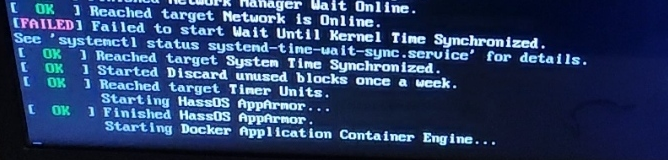
Here I read: "Reached target System Time Sinchronized" but the system did not synchronize.
@agners can you please tell me if the bugs I have reported relate to time synchronization?
Yeah, I'd say https://github.com/home-assistant/frontend/issues/10887 is related (its not just two hours, the month seems wrong too).
It seems that your FritzBox 7530 or provider doesn't allow NTP. Since you did open ports I'd guess its your provider which blocks the NTP service. This is a bit unusual, but my best explanation at that time.
Can you access the OS shell using a keyboard connected to the system and by typing login?
From the OS shell, can you try the following command:
systemctl status systemd-timesyncd
@agners
I also made several attempts to activate the Raspberry WiFi connection during boot, and use the mobile phone in Tethering during installation (copying a configuration file found on the internet, appropriately modified with user and password), but without success.
Below is the file, (saved without extension) and copied to a USB key formatted FAT32 called CONFIG, connected to the Raspberry and then booted
[connection] id=my-network uuid=72111c67-4a5d-4d5c-925e-f8ee26efb3c3 type=802-11-wireless
[802-11-wireless] mode=infrastructure ssid= ******* nome rete ******* #Uncomment below if your SSID is not broadcasted #hidden=true
[802-11-wireless-security] auth-alg=open key-mgmt=wpa-psk psk= ******* Password *******
[ipv4] method=auto
[ipv6] addr-gen-mode=stable-privacy method=auto
What am I doing wrong?
After all, not everyone has the availability of an ethernet connection. In my opinion, you should allow the user to configure the internet connection after booting and entering user data, like any other operating system.
What do you think?
My provider does not apply any filters, but I found that it uses NAT 2. It seems to me that it is blocking time synchronization. I am waiting for them to give me clarification. Could this be the cause?
Oh, I ordered a usb keyboard, it will arrive tomorrow...
Thank you
@agners here is the output of the command you asked me for
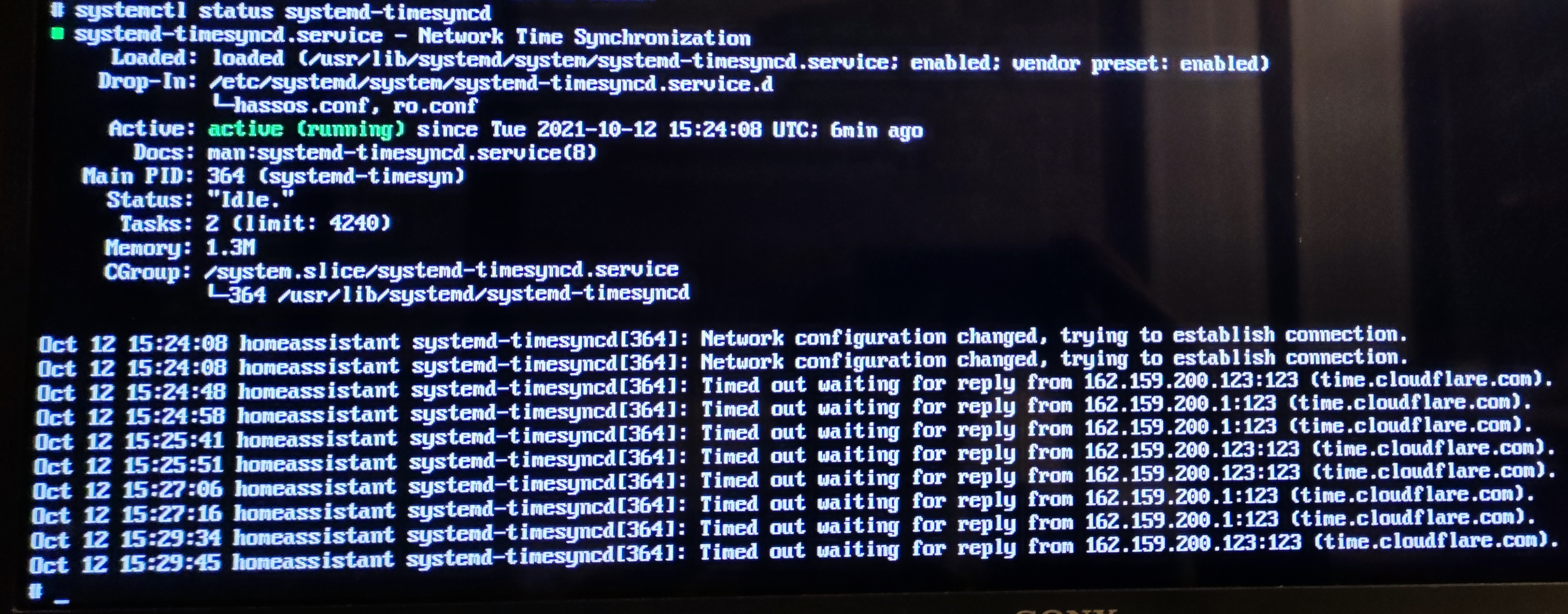
I don't know exactly what this means, but my provider has assured me that they do not block time synchronization in any way. Some idea? Thanks in advance
There hasn't been any activity on this issue recently. Due to the high number of incoming GitHub notifications, we have to clean some of the old issues, as many of them have already been resolved with the latest updates. Please make sure to update to the latest version and check if that solves the issue. Let us know if that works for you by adding a comment 👍 This issue has now been marked as stale and will be closed if no further activity occurs. Thank you for your contributions.
![github-actions[bot] avatar](https://avatars.githubusercontent.com/in/15368?v=4 "Published by a pub.dev verified publisher")
@agners @pvizeli I confirm that the problem concerns NTP synchronization: the provider (Open Fiber), by far the largest in Italy, blocks some sites for synchronization. From the tests carried out:
< Working > time.windows.com time.google.com - time1.google.com - time2.google.com - time3.google.com - time4.google.com ntp1.inrim.it - ntp2.inrim.it - time.inrim.it
< Not working > time.cloudflare.com pool.ntp.org 0.europe.pool.ntp.org - 1.europe.pool.ntp.org - 2.europe.pool.ntp.org - 3.europe.pool.ntp.org 0.it.pool.ntp.org - 1.it.pool.ntp.org - 2.it.pool.ntp.org - 3.it.pool.ntp.org 0.android.pool.ntp.org - 1.android.pool.ntp.org - 2.android.pool.ntp.org - 3.android.pool.ntp.org time.nist.gov - ... time.apple.com - ... time.facebook.com - ... stratum1.net - ...
After a lot of time lost (and system unusable) I found rather hidden on the Home Assistant site the trick to solve it however not for everyone: by editing the file timesyncd.conf.
Could you please insert in the file present in HAOS, also under "FallbackNTP" the various NTP sites that are not blocked (or better still all), so that other users do not run into the problem?
Sorry for my bad English.
Since HA OS sets NTP=, FallbackNTP won't have any effect. From the documentation:
[...] Any per-interface NTP servers obtained from systemd-networkd.service(8) take precedence over this setting, as do any servers set via NTP= above. This setting is hence only relevant if no other NTP server information is known. [...]
I am not opposed to add Google's time servers to the list NTP=.
Also, tell your provider to not block NTP :D
Already tried with no results!
I am not opposed to add Google's time servers to the list
NTP=.
It would solve all problems and avoid them to others
Hello,
I have the same issue: HA supervisor is unable to update. HA supervisor version is: supervisor-2022.01.1 HA supervisor latest update is: supervisor-2022.03.4
The error I get is
Update of Supervisor failed: Can't install ghcr.io/home-assistant/armv7-hassio-supervisor:2022.03.4: 404 Client Error for http+docker://localhost/v1.41/images/ghcr.io/home-assistant/armv7-hassio-supervisor:2022.03.4/json: Not Found ("no such image: ghcr.io/home-assistant/armv7-hassio-supervisor:2022.03.4: No such image: ghcr.io/home-assistant/armv7-hassio-supervisor:2022.03.4")
How to solve this ? I am running HA on a Raspberry Pi connected to internet through LAN. I didn't performed update on networks settings and the HA update is working fine. Also the system date and time is good.


I have an installation on Raspberry pi os + docker. Do you have an equivalent for this command?
[Edit]: I did the command and it was executed successfully but error on updating the supervisor is not solve.

Same issue when executing the command ha supervisor update
22-03-17 10:55:20 ERROR (SyncWorker_0) [supervisor.docker.interface] Can't install ghcr.io/home-assistant/armv7-hassio-supervisor:2022.03.4: 404 Client Error for http+docker://localhost/v1.41/images/ghcr.io/home-assistant/armv7-hassio-supervisor:2022.03.4/json: Not Found ("no such image: ghcr.io/home-assistant/armv7-hassio-supervisor:2022.03.4: No such image: ghcr.io/home-assistant/armv7-hassio-supervisor:2022.03.4") 22-03-17 10:55:20 ERROR (MainThread) [supervisor.supervisor] Update of Supervisor failed: Can't install ghcr.io/home-assistant/armv7-hassio-supervisor:2022.03.4: 404 Client Error for http+docker://localhost/v1.41/images/ghcr.io/home-assistant/armv7-hassio-supervisor:2022.03.4/json: Not Found ("no such image: ghcr.io/home-assistant/armv7-hassio-supervisor:2022.03.4: No such image: ghcr.io/home-assistant/armv7-hassio-supervisor:2022.03.4")
Hello again,
I tried to update manually through docker using the command: docker pull ghcr.io/home-assistant/armv7-hassio-supervisor:2022.03.4
and I get an other error message: failed to register layer: error creating overlay mount to /var/lib/docker/overlay2/xxxxxxxx/merged: too many levels of symbolic links
I don't know if this is related to the message I get when trying to update through the UI
I had the exact same problem with the success of new installations not completing on new disks. The log (browser) had a completely wrong date and time. At first I suspected DNS and therefore took out the pi-hole as DNS server. But that did not help. Then I read that for NTP also the UDP protocol is needed and that was then the error: in my Fritzbox new devices may only 'surf and mail'. After I deleted this restriction for the new Raspberry, everything worked!

@agners @pvizeli With the update to HaOS 8.0 everything went wrong: on reboot the system froze again due to NTP synchronization failure
I am not opposed to add Google's time servers to the list
NTP=.
Please, this would solve all the problems
With HAOS 8.1 you can now pass a custom NTP server via DHCP (option 42). I am not sure if Fritz!Box supports this configuration, but maybe enabling NTP support on Fritz!Box enables that option automatically?
https://en.avm.de/service/knowledge-base/dok/FRITZ-Box-7530/336_Configuring-time-synchronization-NTP-for-FRITZ-Box-and-network-devices/
Make sure to restart your Home Assistant OS installation after setting the configuration.
It works thanks 🎉 even if it is not a method within the reach of users not familiar with technology. I also don't think all modems offer this service. Do I have to close the report?
There hasn't been any activity on this issue recently. Due to the high number of incoming GitHub notifications, we have to clean some of the old issues, as many of them have already been resolved with the latest updates. Please make sure to update to the latest version and check if that solves the issue. Let us know if that works for you by adding a comment 👍 This issue has now been marked as stale and will be closed if no further activity occurs. Thank you for your contributions.
As written above: I also don't think all modems offer this service. should i still close the report?
There hasn't been any activity on this issue recently. Due to the high number of incoming GitHub notifications, we have to clean some of the old issues, as many of them have already been resolved with the latest updates. Please make sure to update to the latest version and check if that solves the issue. Let us know if that works for you by adding a comment 👍 This issue has now been marked as stale and will be closed if no further activity occurs. Thank you for your contributions.
There hasn't been any activity on this issue recently. Due to the high number of incoming GitHub notifications, we have to clean some of the old issues, as many of them have already been resolved with the latest updates. Please make sure to update to the latest version and check if that solves the issue. Let us know if that works for you by adding a comment 👍 This issue has now been marked as stale and will be closed if no further activity occurs. Thank you for your contributions.
There hasn't been any activity on this issue recently. Due to the high number of incoming GitHub notifications, we have to clean some of the old issues, as many of them have already been resolved with the latest updates. Please make sure to update to the latest version and check if that solves the issue. Let us know if that works for you by adding a comment 👍 This issue has now been marked as stale and will be closed if no further activity occurs. Thank you for your contributions.
As written above I do not believe that all modems offer this service. Should I still terminate the report?
There hasn't been any activity on this issue recently. Due to the high number of incoming GitHub notifications, we have to clean some of the old issues, as many of them have already been resolved with the latest updates. Please make sure to update to the latest version and check if that solves the issue. Let us know if that works for you by adding a comment 👍 This issue has now been marked as stale and will be closed if no further activity occurs. Thank you for your contributions.
Closed since there is a solution that works for original issue as reported
