

 home-assistant
An integer value in a helper is converted to a float
Checklist
- [X] I have updated to the latest available Home Assistant version.
- [X] I have cleared the cache of my browser.
- [X] I have tried a different browser to see if it is related to my browser.
Describe the issue you are experiencing
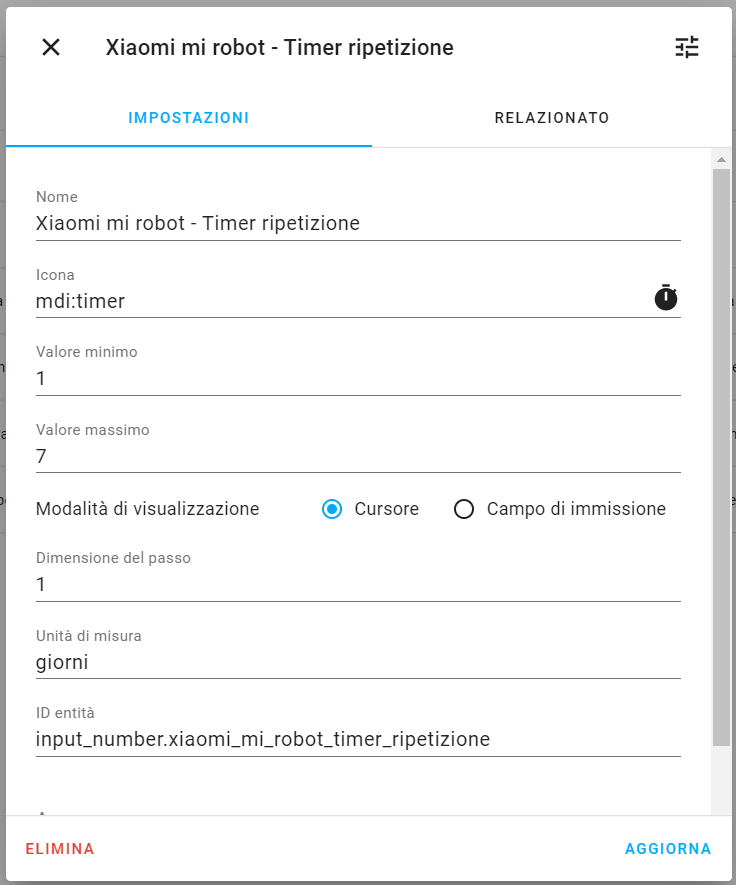
I created an input_number helper with values from 1 to 7 whose unit of measure is days...
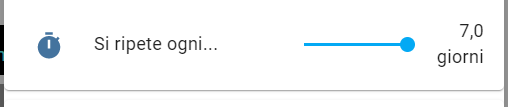
...but in the card the value is converted to float
Describe the behavior you expected
IMO the values created in the helpers should reflect the values in the cards: so only if there are float values in the helper, they will be displayed as such in the card
Steps to reproduce the issue
...
What version of Home Assistant Core has the issue?
core-2021.5.5
What was the last working version of Home Assistant Core?
No response
In which browser are you experiencing the issue with?
Chrome and Firefox: the latest versions
Which operating system are you using to run this browser?
Windows 10, Android 11, Android Companion App
State of relevant entities
No response
Problem-relevant frontend configuration
No response
Javascript errors shown in your browser console/inspector
No response
Additional information
No response

If you check the backend state of the helper (e.g. via the HA dev tools) you will see, that the actual backend value is a float, so the frontend is displaying the correct value in the card.

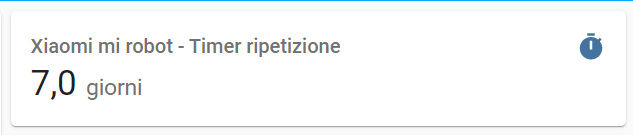
Hi spacegaier, correct, let me explain better. What I mean is that for a few weeks a value of a helper has been displayed to me as a float, and it is not the best of life to see 7.0 days: it seems that all integer values are rendered as floats. By heart, the "bug" came out of the introduction of the number format choice # 8811

There hasn't been any activity on this issue recently. Due to the high number of incoming GitHub notifications, we have to clean some of the old issues, as many of them have already been resolved with the latest updates. Please make sure to update to the latest Home Assistant version and check if that solves the issue. Let us know if that works for you by adding a comment 👍 This issue has now been marked as stale and will be closed if no further activity occurs. Thank you for your contributions.
![github-actions[bot] avatar](https://avatars.githubusercontent.com/in/15368?v=4 "Published by a pub.dev verified publisher")
@matthiasdebaat what do you think? it doesn't seem very nice to see entities with labels like "7.0 days"
If I understand you correctly, you want a 7 instead of 7,0? Can an input_number work with decimals? In that case I agree that it would be nicer to remove the decimal.

If I understand you correctly, you want a
7instead of7,0?
That's just what I mean
Can an
input_numberwork with decimals?
I don't think so, but I'm just a user here. maybe @spacegaier can answer.
I can only suggest truncating the decimals if they have a zero value, or more elegantly adding a checkbox to allow the user to force the value to integer. In both cases, no complexity would be introduced to the code, but the UI would be much more elegant.
P.s. I have been following the project for just over a year, and it is nice to see how much it is maturing with each new monthly release, and the great effort to make it more and more accessible to everyone. Congratulations, keep it up
... , or more elegantly adding a checkbox to allow the user to force the value to integer.
I like this, we could add this to the Lovelace card. Wondering if this is a Advanced option.
input_number entities can have float values if the step is set to less than 1.
As @spacegaier said, the actual value of an input_number is always stored as a float, so the frontend number formatting preserves that and intentionally keeps the trailing zero.
For an immediate fix you could create a template sensor that rounds the value of the input_number to an integer and display that in Lovelace.
I like the idea of having more advanced settings for Lovelace cards that enable greater control over how things are displayed, but that seems like an architecture decision, see https://github.com/home-assistant/architecture/discussions/571

@joshmcrty thank you for the tip. Sorry for the late reply: my microSD card has broken and no longer boots 😭 . I am awaiting the delivery of an SSD to be used in conjunction with a new microSD.
input_numberentities can have float values if thestepis set to less than1.
@spacegaier @joshmcrty @matthiasdebaat I thought ... wouldn't it be easier to automatically format the value of an input-number at the card level if its step is an integer?
There hasn't been any activity on this issue recently. Due to the high number of incoming GitHub notifications, we have to clean some of the old issues, as many of them have already been resolved with the latest updates. Please make sure to update to the latest Home Assistant version and check if that solves the issue. Let us know if that works for you by adding a comment 👍 This issue has now been marked as stale and will be closed if no further activity occurs. Thank you for your contributions.
IMHO:
There is no need for any Advanced options.
The input_number integration has a "step" option.
Frontend should display as many digits after point as the "step" accuracy:
step: 1000,100,10,1 -> display 0 digits after point
step: 0.1 -> display 1 digit after point
step: 0.01 -> display 2 digits after point
and so on

If you look at the screenshot the step is set to 1 (not 0.1), but the card shows 7.0 days.
There hasn't been any activity on this issue recently. Due to the high number of incoming GitHub notifications, we have to clean some of the old issues, as many of them have already been resolved with the latest updates. Please make sure to update to the latest Home Assistant version and check if that solves the issue. Let us know if that works for you by adding a comment 👍 This issue has now been marked as stale and will be closed if no further activity occurs. Thank you for your contributions.
There hasn't been any activity on this issue recently. Due to the high number of incoming GitHub notifications, we have to clean some of the old issues, as many of them have already been resolved with the latest updates. Please make sure to update to the latest Home Assistant version and check if that solves the issue. Let us know if that works for you by adding a comment 👍 This issue has now been marked as stale and will be closed if no further activity occurs. Thank you for your contributions.
On Home Assistant 2022.10.1
in more info the data is formatted correctly
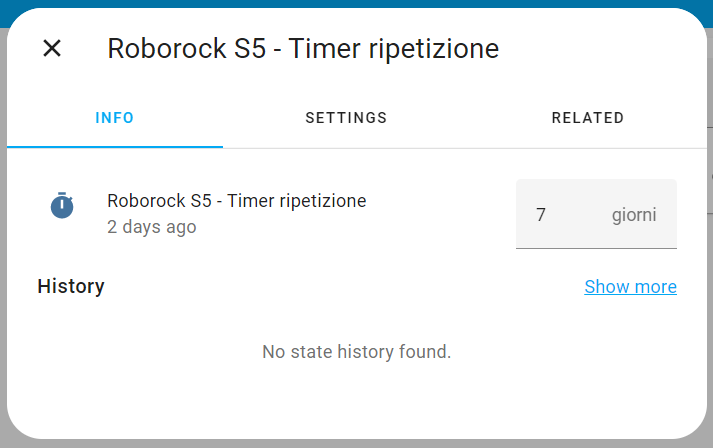
but in cards no
