

 home-assistant
ICON State Color for colored light tracks color when light is white
Checklist
- [X] I have updated to the latest available Home Assistant version.
- [X] I have cleared the cache of my browser.
- [X] I have tried a different browser to see if it is related to my browser.
Describe the issue you are experiencing
Release 2022.12.1 Using a colored light (Philips Hue for example) with Entities Card. Using HA Default Theme When the colored light is off, the icon color is Blue. When the colored light is on and set to White color, the icon state color continues to track the light's rgb color which is White. => Result: Since the background is white, the icon state color is also white and thus the icon can not be seen.
Using a theme (I use "Slate" theme) that uses black background. Light icon state color is white when colored light is OFF. When colored light is on and set to White color, the icon state color continues to track the light's rgb color which is White. =>Result: The icon can be seen (white icon against black background), but the icon is the same color as the light icon in the off state. This means there is no difference in icon state color between off and on. Makes it difficult to know the light is actually on.
Prior to 2022.12
When the colored light was on and set to White, the icon color did not track the light's color,
instead it used a color variable (I don't recall which one, maybe it was paper-item-icon-active-color).
Because a color variable was used when the light was set to White, themes could also use this variable to set the icon to a theme related color.
Describe the behavior you expected
Same behavior prior to 2022.12, that is:
When a colored light is on and set to White, the icon color should not track the light's color,
but instead use a color variable (for example: rgb-state-light-color).
Otherwise when the colored light is on and set to a non-White color, the icon color should track the light's color.
Steps to reproduce the issue
- Set Theme to default
- Setup Entities card using a light entity that supports colors
- Goto that Entities card and turn the light on, and set its color wheel to white (center of the color wheel)
- Note that the icon is no longer visible.
What version of Home Assistant Core has the issue?
2022.12
What was the last working version of Home Assistant Core?
2022.11
In which browser are you experiencing the issue with?
Google Chrome
Which operating system are you using to run this browser?
Windows 10
State of relevant entities
No response
Problem-relevant frontend configuration
No response
Javascript errors shown in your browser console/inspector
No response
Additional information
No response

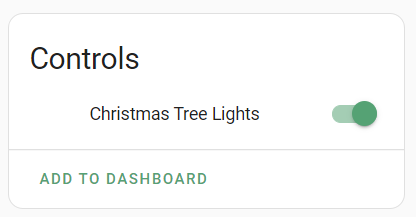
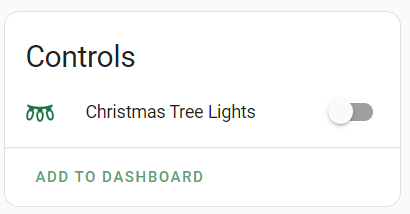
Adding screenshots to illustrate the problem. I'm using the default light theme with modified accent colors. When the light is on the icon is invisible. In this case, it's the Twinkly integration which defaults the RGB values to 255,255,255. I don't ever control the RGB colors in HA.
Lights on:
Lights off:

Hello. I just tested on a old HA version (2022.7) and I have the same behavior without theme.


I just tested on a old HA version (2022.7) and I have the same behavior. I don't know why you didn't have the issue in 2022.11
Well, for me personally, I cannot confirm previous behavior. The only RGB lights I have are my Twinkly Christmas tree lights, and those only get used in November or December, and I don't remember as far back as 2021. 😃
Hello. I just tested on a old HA version (2022.7) and I have the same behavior without theme.
I'm working off of memory as something I did not notice before 2022.12, so yes it is possible this has been the behavior for a few releases, but I do know this has worked properly before.
I'm not an expert, but was curious...... I found sometime back when there was a hui-entity-button card, this card contained the following:
 private _computeColor(stateObj: HassEntity | LightEntity): string {
    if (!stateObj.attributes.hs_color) {
      return "";
    }
    const [hue, sat] = stateObj.attributes.hs_color;
    if (sat <= 10) {
      return "";
    }
    return `hsl(${hue}, 100%, ${100 - sat / 2}%)`;
  }
I may be incorrect, but I believe a saturation of <=10 indicates that the color of the light is white (or nearly so).
This card was later made into the hui-button card, and the computeColor continuing checking for hue/saturation until this commit where it stopped checking for hue/saturation. As of today for the hui-button card, computeColor still no longer considers whether a colored light is set to white or not.
  private _computeColor(stateObj: HassEntity): string | undefined {
    if (stateObj.attributes.rgb_color) {
      return `rgb(${stateObj.attributes.rgb_color.join(",")})`;
    }
    if (stateObj.attributes.hvac_action) {
      const hvacAction = stateObj.attributes.hvac_action;
      if (["heating", "cooling", "drying"].includes(hvacAction)) {
        return `rgb(${CLIMATE_HVAC_ACTION_COLORS[hvacAction]})`;
      }
      return undefined;
    }
    const iconColor = stateColorCss(stateObj);
    if (iconColor) {
      return `rgb(${iconColor})`;
    }
    return undefined;
  }
As for the hui-entity-card, perhaps it (and other cards) could consider using this hue/saturation check algorithm that use to be in computeColor.
As an FYI... For Entities Card, when using Card Mod, it appears that I can achieve the desired results using:
type: entities
entities:
  - entity: light.bonus_room_light
    card_mod:
      style:
        hui-generic-entity-row $ state-badge $: |
          ha-state-icon {
            {% if is_state(config.entity,'on') and state_attr(config.entity, 'hs_color' )[1] <= 10 %}
              color: rgb(var(--rgb-state-light-color)) !important;
              filter: none !important;
            {% endif %}
          }
There hasn't been any activity on this issue recently. Due to the high number of incoming GitHub notifications, we have to clean some of the old issues, as many of them have already been resolved with the latest updates. Please make sure to update to the latest Home Assistant version and check if that solves the issue. Let us know if that works for you by adding a comment 👍 This issue has now been marked as stale and will be closed if no further activity occurs. Thank you for your contributions.
![github-actions[bot] avatar](https://avatars.githubusercontent.com/in/15368?v=4 "Published by a pub.dev verified publisher")
Update as of 2023.3.6 Using Slate theme, the colored LED light icon still shows as White when ON instead of the standard amber color.
There hasn't been any activity on this issue recently. Due to the high number of incoming GitHub notifications, we have to clean some of the old issues, as many of them have already been resolved with the latest updates. Please make sure to update to the latest Home Assistant version and check if that solves the issue. Let us know if that works for you by adding a comment 👍 This issue has now been marked as stale and will be closed if no further activity occurs. Thank you for your contributions.