

 home-assistant
Device automation trigger value for some Z-Wave devices cannot be changed via UI
Checklist
- [X] I have updated to the latest available Home Assistant version.
- [X] I have cleared the cache of my browser.
- [X] I have tried a different browser to see if it is related to my browser.
Describe the issue you are experiencing
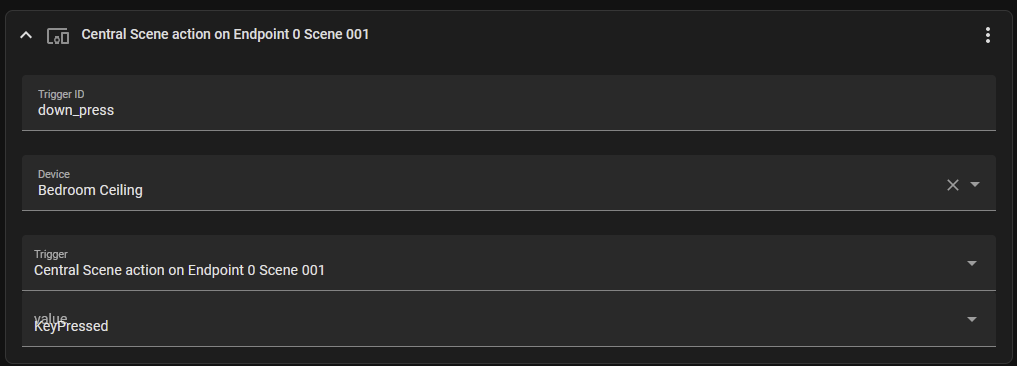
Within the automation trigger options is an option to trigger based on device, which gives the option to select a trigger and value if a Z-Wave device is chosen. On some Z-Wave devices, the value select box is visually bugged (as seen in screenshot). It also fails to save the selection sometimes, and defaults to either a random value, or the previously selected value.
This bug also affects node-red-contrib-home-assistant-websocket, which makes me suspect it is a core issue.
Describe the behavior you expected
The value should be selected properly
Steps to reproduce the issue
- Select a Z-Wave device as the trigger.
- Select any trigger and value, then save.
- Exit and re-enter the automation screen, and try to change the value. ...
What version of Home Assistant Core has the issue?
2022.10.5
What was the last working version of Home Assistant Core?
No response
In which browser are you experiencing the issue with?
No response
Which operating system are you using to run this browser?
No response
State of relevant entities
No response
Problem-relevant frontend configuration
No response
Javascript errors shown in your browser console/inspector
No response
Additional information
No response

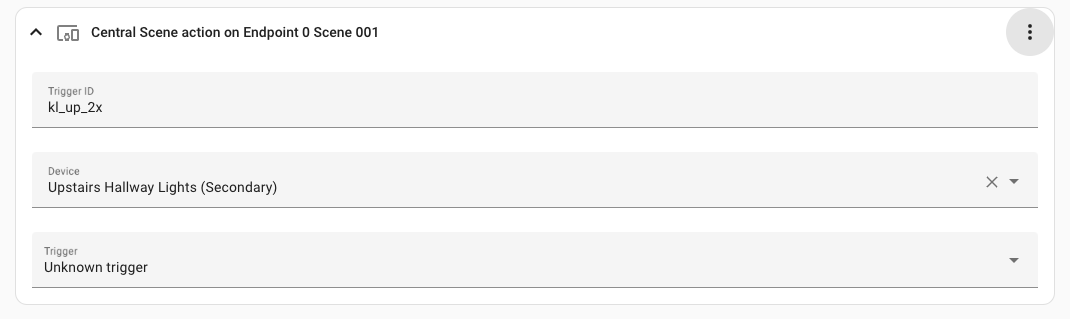
This has gotten worse in 2022.11.x, Now the UI won't even detect central scenes on new devices:
domain: zwave_js
type: event.value_notification.central_scene
property: scene
property_key: "001"
endpoint: 0
command_class: 91
subtype: Endpoint 0 Scene 001
value: 3
id: kl_up_2x
now shows as:

FYI, probably related: https://github.com/home-assistant/frontend/issues/14307
Also probably related: https://github.com/home-assistant/frontend/issues/14279
I'm also seeing this part of the issue : "the value select box is visually bugged (as seen in screenshot)".

I think this might be something different than #14307 and #14279, I believe I have a pending fix for those but it did not seem to fix this issue.

I notice that everytime I load one of these "bugged" triggers, I get this exception in the browser, might be related.
foundation.ts?cd83:187 Uncaught (in promise) TypeError: Cannot read properties of undefined (reading 'toString') at MDCSelectFoundation.setDisabled (foundation.ts?cd83:187:1) at HaSelect.firstUpdated (mwc-select-base.ts?c358:679:1)
I wonder if the visual bugging of the select box might have something to do with this:
https://github.com/material-components/material-components-web-react/issues/717
This is still a problem on 2023.2.+ Central Scene Commands are now not detected by HA.
@chrisjenx - Can you elaborate a bit on what is still a problem?
The initial issue was that selected values could not be changed/saved. Is that still the case? I cannot reproduce this issue in 2023.2, so I'm wondering if this issue is fixed. It seems to work fine for me.
What you keep mentioning about missing central scene events I think should really have a separate/new issue opened instead of bringing it up here, it really feels unrelated to me. And for what it's worth I don't see that problem, so I think devs would need a complete bug report from you to help understand what is going on with your system. I suspect it is an issue for core repository, not frontend, since core is what creates the list of options for the frontend to display.
@karwosts hi, the issue seems to be fixed in 2023.2, but the UI is still broken (overlapping text for value select box). Not sure if you want to keep this issue opened.
It might be simpler if this was closed, and a ticket was opened just for addressing the overlapping text. As is there's a lot of different claims in this thread and it's a little confusing what is being requested.
But it's not really up to me, so you can do what you wish with it.