
frontend
 frontend copied to clipboard
 home-assistant
Energy dashboard allows to add duplicated entities
Checklist
- [X] I have updated to the latest available Home Assistant version.
- [X] I have cleared the cache of my browser.
- [X] I have tried a different browser to see if it is related to my browser.
Describe the issue you are experiencing
Hello,
Energy dashboard allows the user to add duplicated entities in the ocnfiguration which causes issues in the dashbard view:
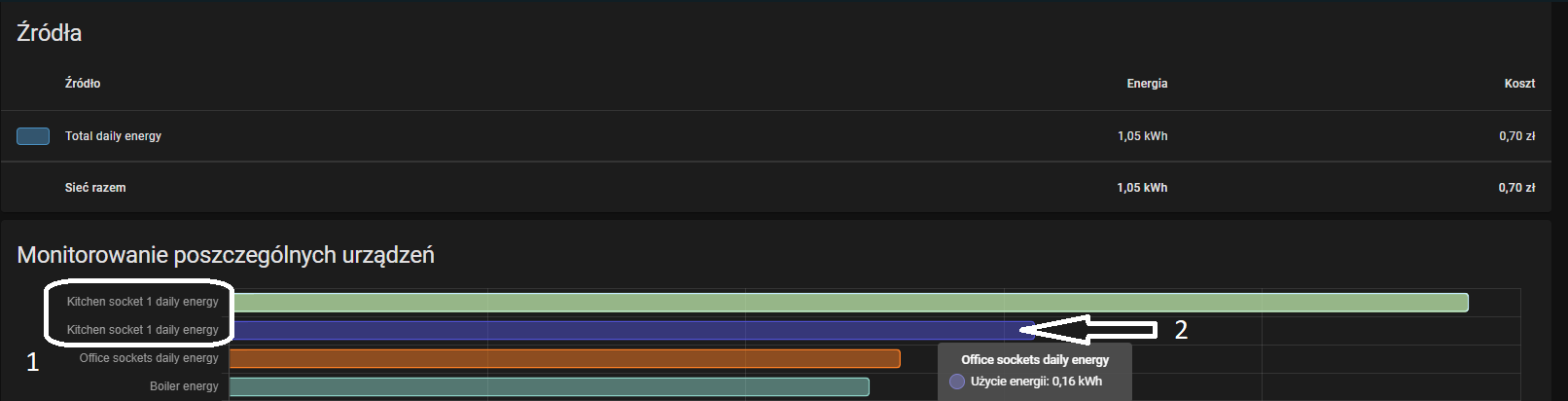
First (1) mark on the print screen shows the duplicated entity (as configured by the user) but when the user hower the mouse on the second bar as the second (2) mark shows the user gets date from different source (third row - Office socets daily energy) which is incorrect.
Describe the behavior you expected
There are three approaches:
- (safest from the HA perspective) Don't allow user to add duplicated entities in the dashboard configuration (adding duplicated entities can cause different issue like some double counting of the total power usage, etc). What if user have already added duplicated entity? Does HA should remove them?
- (more flexible from the user perspective) Allow user to add duplicated entities but show message box with information that such entity is already on the dashboard and ask user whether he want to add it regardless (can cause additional issues described in the first point).
- Allow user to add duplicated entities and fix issue with the dashboard (can cause additional issues described in the first point).
Steps to reproduce the issue
- Open Energy Dashboard in edit mode (/config/energy)
- Add an entity that reports energy usage
- Add the same entity to the Energy Dashboard for the second time
- Open Energy Dashboard (/energy)
- Hover mouse over second bar
What version of Home Assistant Core has the issue?
2022.6.6
What was the last working version of Home Assistant Core?
No response
In which browser are you experiencing the issue with?
Chrome 102.0.5005.125
Which operating system are you using to run this browser?
Windows 10
State of relevant entities
ID: sensor.kitchen_socket_1_daily_energy
Name: Kitchen socket 1 daily energy

State:
301

Attributes:
state_class: total_increasing
unit_of_measurement: Wh
device_class: energy
friendly_name: Kitchen socket 1 daily energy
area: Kitchen


ID: sensor.kitchen_socket_1_power
Name: Kitchen socket 1 power
State:
52.0

Attributes:
state_class: measurement
unit_of_measurement: W
device_class: power
friendly_name: Kitchen socket 1 power
area: Kitchen
Problem-relevant frontend configuration
No response
Javascript errors shown in your browser console/inspector
No response
Additional information
No response

There hasn't been any activity on this issue recently. Due to the high number of incoming GitHub notifications, we have to clean some of the old issues, as many of them have already been resolved with the latest updates. Please make sure to update to the latest Home Assistant version and check if that solves the issue. Let us know if that works for you by adding a comment 👍 This issue has now been marked as stale and will be closed if no further activity occurs. Thank you for your contributions.
![github-actions[bot] avatar](https://avatars.githubusercontent.com/in/15368?v=4 "Published by a pub.dev verified publisher")